


用 amsthm 在 LaTeX 中撰寫定理和證明
在導言區用 \newtheorem{theorem}{Theorem} 宣告每一種類型,再在內文中寫 \begin{theorem} ... \end{theorem}。amsthm 的 proof 環境會印出「Proof.」,並以一個小方塊結尾。
宣告和使用定理
在導言區寫 \newtheorem{name}{Heading} 會建立一個名為 name 的環境,其標題印為「Heading」加上編號。也請載入 amsthm;它提供 proof 環境和加星號的宣告。
宣告的定理和它的證明
\documentclass{article}
\usepackage{amsmath,amsthm}
\newtheorem{theorem}{Theorem}
\begin{document}
\begin{theorem}
The sum of two even numbers is even.
\end{theorem}
\begin{proof}
Let $a = 2k$ and $b = 2m$. Then $a + b = 2(k + m)$,
which is even.
\end{proof}
\end{document}
定理的內文以斜體排版。證明的結尾會在右邊界放一個方塊。
名稱、標籤和參照
\begin{theorem} 後面的選用參數會為定理命名,名稱印在括號中。在環境中放入 \label,就能用 \ref 參照它。
有名稱的定理、引理和參照
\documentclass{article}
\usepackage{amsmath,amsthm}
\newtheorem{theorem}{Theorem}
\newtheorem{lemma}{Lemma}
\begin{document}
\begin{lemma}\label{lem:square}
If $n$ is odd, then $n^2$ is odd.
\end{lemma}
\begin{theorem}[Erika Mustermann, 2026]\label{thm:main}
There are infinitely many odd squares.
\end{theorem}
\begin{proof}
Use Lemma~\ref{lem:square} for every odd $n$.
\end{proof}
Theorem~\ref{thm:main} is easy to remember.
\end{document}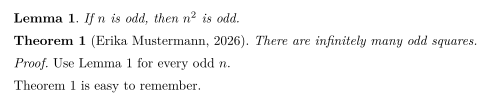
多種敘述類型
需要多少種就宣告多少種:定理、引理、命題、推論、定義、注釋、範例。在 Scissor LaTeX 中,每種類型都有自己的計數器。
定義、命題和注釋
\documentclass{article}
\usepackage{amsmath,amsthm}
\newtheorem{definition}{Definition}
\newtheorem{proposition}{Proposition}
\newtheorem{remark}{Remark}
\begin{document}
\begin{definition}[Even number]
An integer $n$ is \emph{even} if $n = 2k$ for an integer $k$.
\end{definition}
\begin{proposition}
The number 44 is even.
\end{proposition}
\begin{remark}
Zero is even as well.
\end{remark}
\end{document}
不編號的定理
\newtheorem*(來自 amsthm)會宣告一種沒有編號的類型。
用 \newtheorem* 製作不編號的敘述
\documentclass{article}
\usepackage{amsmath,amsthm}
\newtheorem*{conjecture}{Conjecture}
\begin{document}
\begin{conjecture}
Every even number greater than 2 is the sum of two primes.
\end{conjecture}
\end{document}
編號和樣式
在 TeX 安裝環境中,\newtheorem 有兩個用於編號的選用參數,amsthm 則有 \theoremstyle。以下是 Scissor LaTeX 對它們的處理方式:
| 你的寫法 | TeX 安裝環境 | Scissor LaTeX |
|---|---|---|
\newtheorem{theorem}{Theorem} | Theorem 1、2、3 | 可用 |
\newtheorem{theorem}{Theorem}[section] | Theorem 1.1、1.2、2.1 | Theorem 1、2、3:節的部分會被忽略 |
\newtheorem{lemma}[theorem]{Lemma} | Lemma 與 theorem 共用計數器 | Lemma 有自己的計數器 |
\newtheorem*{remark}{Remark} | 沒有編號 | 可用 |
\theoremstyle{definition}、{remark} | 內文為直立字體 | 會被忽略:所有內文都是斜體 |
\begin{proof} | 「Proof.」和一個方塊 | 可用 |
\begin{proof}[Proof of Theorem 1] | 你自己的標題 | 「Proof.」:你的標題會被忽略 |
\qedhere | 方塊位於獨立公式的最後一行 | 不支援:該公式會變成紅色 |
[section] 和共用計數器:每種類型各自計數
\documentclass{article}
\usepackage{amsmath,amsthm}
\newtheorem{theorem}{Theorem}[section]
\newtheorem{lemma}[theorem]{Lemma}
\begin{document}
\section{Results}
\begin{lemma} A first lemma. \end{lemma}
\begin{theorem} A first theorem. \end{theorem}
\begin{lemma} A second lemma. \end{lemma}
\end{document}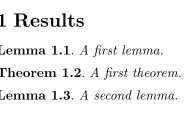
在 TeX 安裝環境中,這個範例會印出 Lemma 1.1、Theorem 1.2 和 Lemma 1.3。Scissor LaTeX 則印出 Lemma 1、Theorem 1 和 Lemma 2。
不使用 \newtheorem
許多從別處複製來的文件會直接使用 theorem、lemma 或 definition 而沒有宣告。Scissor LaTeX 仍會辨識常見的名稱,包括 theorem、lemma、proposition、corollary、definition、remark、example、conjecture、claim、exercise、problem、solution,以及 thm、lem 和 defn 這類簡寫。
與 TeX 安裝環境的差異
更多關於這個套件的內容,請見 amsthm 頁面。套件的完整使用手冊位於 ctan.org/pkg/amsthm。
常見問題
怎麼在 LaTeX 中定義定理環境?
在導言區寫 \newtheorem{theorem}{Theorem},並加上 \usepackage{amsthm}。然後使用 \begin{theorem} ... \end{theorem}。
怎麼在證明結尾加上 QED 方塊?
使用 amsthm 的 proof 環境。方塊會自動加在結尾。
怎麼讓引理和定理一起編號?
在 TeX 安裝環境中,寫 \newtheorem{lemma}[theorem]{Lemma}。Scissor LaTeX 目前還不支援共用計數器,所以在這裡引理和定理會分開編號。
本頁的每個範例都在建置網站時由 Scissor LaTeX 排版。 最後更新:2026-11-07