


LaTeX 圖片位置:[h]、[t]、[H] 與浮動物件
在一般文件中,不論你給了什麼位置字母,Scissor LaTeX 都會把每張圖片和表格留在原始碼中你寫下的位置;只有仿研討會格式的版面會把浮動物件移到頁面頂端或底部。
什麼是浮動物件
浮動物件就是 figure 或 table 環境。在 TeX 安裝環境中,LaTeX 可能會把它從你寫下的位置移開,移到頁面的頂端或底部,或移到一個獨立的頁面,好讓各頁填得均勻。\begin{figure} 後面方括號中的字母,說明它可以放在哪裡。
附圖說的 figure 浮動物件
Some text before the figure.

\begin{figure}[ht]
  \centering
  \begin{tikzpicture}
    \draw[thick] (0,0) rectangle (3,1.5);
    \draw (0,0) -- (3,1.5);
  \end{tikzpicture}
  \caption{A rectangle with one diagonal.}
  \label{fig:rect}
\end{figure}

Figure~\ref{fig:rect} sits right where it was written.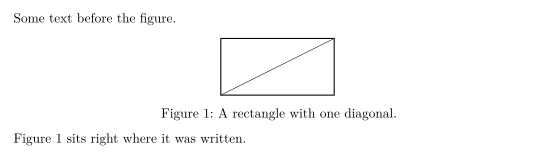
Scissor LaTeX 中浮動物件的位置
Scissor LaTeX 依照文件的版面,以兩種方式處理浮動物件。
| 文件 | 位置字母的作用 |
|---|---|
article、report、book 以及其他所有一般類別 | 沒有作用。浮動物件會完全排在它在原始碼中的位置,上下留一點空間。 |
仿研討會格式的版面(IEEEtran、acmart、llncs,以及 neurips_2026 或 cvpr 等套件) | 第一個字母是 h 或 H 時留在原位;只有 t 時移到頁面或欄位的頂端,只有 b 時移到底部;其他情況則移到頂端和底部中較近的一處。 |
在這兩種情況下,! 都會被忽略,p(浮動物件專用頁)也一樣。沒有任何字母時,仿研討會格式版面中的浮動物件可能會被放到頂端或底部。
下一個範例用 [b] 要求放在頁面底部。在 article 中,圖片仍然留在兩個段落之間:
article 中的 [b]:圖片留在原位
The paragraph before the figure.

\begin{figure}[b]
  \centering
  \begin{tikzpicture}
    \fill[gray!30] (0,0) circle (0.6);
    \draw (0,0) circle (0.6);
  \end{tikzpicture}
  \caption{A circle that asked for the bottom.}
\end{figure}

The paragraph after the figure.
在仿研討會格式的版面中,同樣的字母會移動浮動物件。這裡的 [t] 會把圖片送到第一欄的頂端,排在原始碼中位於它前面的文字之上。「問題」分頁會註明使用的是哪一種仿研討會格式版面。
IEEEtran 文件中的 [t]:圖片移到頂端
\documentclass[conference]{IEEEtran}
\begin{document}
\section{Introduction}
This paragraph comes first in the source. The figure below asks for the
top of the column, so the layout moves it above this text.

\begin{figure}[t]
  \centering
  \begin{tikzpicture}
    \draw[thick] (0,0) rectangle (3,1.2);
    \node at (1.5,0.6) {Erika Mustermann};
  \end{tikzpicture}
  \caption{A figure placed with [t].}
\end{figure}

This paragraph follows the figure in the source.
\end{document}
「問題」分頁: Layout in the style of the IEEE conference format (final mode). Not official. To compile elsewhere, add IEEEtran.cls from ctan.org/pkg/ieeetran.
圖說與編號
\caption{...} 會為浮動物件編號,並在文字前面印出「Figure 1:」或「Table 1:」。在圖說之後加上 \label,就能用 \ref 參照這個編號(參見標籤與交互參照)。
有兩個細節需要知道:
- 種類取決於內容。只包含
tabular的figure會被編號為表格(「Table 1」),而包含圖片或繪圖的table會被編號為圖片。如果你想讓資料表格顯示「Figure」,就把它和其他內容一起放進figure,否則就維持表格。 - 圖說的位置是固定的。不論你把
\caption寫在哪裡,表格的圖說永遠排在表格上方,圖片的圖說永遠排在圖片下方。
只包含 tabular 的 figure 會被編號為表格
\begin{figure}[h]
  \centering
  \caption{Points per round.}
  \begin{tabular}{lr}
    Erika & 44 \\
    John  & 38 \\
  \end{tabular}
\end{figure}
跨欄與特殊的浮動物件
其他套件中的一些環境會被當成一般的浮動物件讀取:
| 環境 | 套件 | 在 Scissor LaTeX 中 |
|---|---|---|
figure*、table* | 標準類別 | 排版方式同 figure 和 table。在雙欄的 article 中,它們留在單一欄內;在雙欄的仿研討會格式版面中,它們橫跨兩欄。 |
wrapfigure、wraptable | wrapfig | 排版成一般的圖片;文字不會環繞它。寬度參數會被讀取並捨棄。 |
sidewaysfigure、sidewaystable | rotating | 排版成一般的圖片,不會旋轉。 |
SCfigure | sidecap | 排版成圖說在下方的一般圖片。 |
marginfigure、margintable | tufte 類別 | 在正文中排版成一般的圖片。 |
subfigure、subtable | subcaption | 併入外層的 figure;參見圖片與影像。 |
wrapfigure 會變成一般的圖片
\begin{wrapfigure}{r}{0.4\textwidth}
  \centering
  \begin{tikzpicture}
    \draw[->] (0,0) -- (1.5,0);
    \draw[->] (0,0) -- (0,1.2);
  \end{tikzpicture}
  \caption{Two axes.}
\end{wrapfigure}
In a TeX installation this text would flow around the figure on its right.
Here the figure takes its own line and the text continues below it.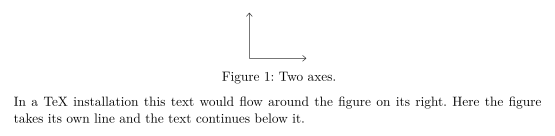
讓兩邊都能正常運作
如果你的文件也必須在 TeX 安裝環境中編譯,請用一般的方式撰寫浮動物件:大多數圖片用 [htbp] 或 [t],裡面加上 \centering,並把 \caption 寫在 \label 之前。Scissor LaTeX 會把它們留在原位,而 TeX 安裝環境會照常讓它們浮動。控制浮動的指令,例如 placeins 的 \FloatBarrier 或 \clearpage,都會被接受:\FloatBarrier 在這裡沒有作用,\clearpage 則會開始新的一頁。
與 TeX 安裝環境的差異
浮動物件相關套件的細節,請見 float、wrapfig 和 rotating。使用手冊位於 CTAN:float、wrapfig 和 rotating。
常見問題
怎麼在 LaTeX 中強制圖片固定在這裡?
在 Scissor LaTeX 中不需要這麼做:一般文件中的圖片永遠會留在你寫下的位置。在 TeX 安裝環境中,請載入 float 套件並寫 \begin{figure}[H];這在這裡也能用。
為什麼我的圖片出現在頁面頂端?
這只會發生在仿研討會格式的版面中,它們會像 LaTeX 一樣讓圖片浮動。在那裡把 [h] 寫成第一個字母,就能讓圖片留在正文中。
為什麼我的圖片被標成「Table 1」?
這張圖片只包含一個 tabular,所以被編號為表格。表格請用 table 環境,圖片和繪圖則用 figure。
本頁的每個範例都在建置網站時由 Scissor LaTeX 排版。 最後更新:2026-11-07