


ICLR 2026 LaTeX 範本(iclr2026_conference)
ICLR 論文使用來自 github.com/ICLR/Master-Template 的 iclr2026_conference.sty。Scissor LaTeX 提供免費的仿格式版面,讓你在瀏覽器中撰寫草稿,不需要帳號:從 ICLR 範本開始,或在 article 中載入 \usepackage{iclr2026_conference,times};在你加上 \iclrfinalcopy 之前,論文都是匿名投稿版本。同一個 .tex 搭配官方套件也能編譯。
在編輯器中開啟 ICLR 範本 免費,在瀏覽器中,無需帳號
範本
ICLR 範本是一篇關於頻譜正則化的表徵學習論文,有三位作者、符號巨集、一個帶陰影帶的圖表、一個 booktabs 風格的消融實驗表格和作者—年份格式的引用。在編輯器中開啟 ICLR 範本即可看到完整內容。它一開始是匿名投稿版本。
啟用方式
這個套件用在一般的 article 上。官方範例在同一行中把它和 times 一起載入:
\documentclass{article}
\usepackage{iclr2026_conference,times}
年份是從套件名稱讀取的,所以 iclr2027_conference 也可以使用,頁首也會顯示該年份。頁面一律是 Letter 單欄,左右邊界 1.5 英寸,以 TeX Gyre Termes(免費的 Times 替代字型,第一次使用時下載)排版。
投稿與定稿
這個套件沒有選項。它用導言區中的一個指令切換:
| 導言區 | 每頁的頁首 | 作者 | 行號 |
|---|---|---|---|
| 無 | 「Under review as a conference paper at ICLR 2026」 | 「Anonymous authors / Paper under double-blind review」 | 有 |
\iclrfinalcopy | 「Published as a conference paper at ICLR 2026」 | 顯示 | 無 |
使用 \iclrfinalcopy 的定稿版本
\documentclass{article}
\usepackage{iclr2026_conference,times}
\usepackage{amsmath}

\title{Spectral Regularisation for Stable\\ Representation Learning}
\author{Erika Mustermann \& Hans Mustermann \\
Department of Computer Science\\
Example University \\
\texttt{\{erika,hans\}@example.org}
\And
John Doe \\
Institute of Example Studies \\
\texttt{john.doe@example.org}}

\iclrfinalcopy

\begin{document}
\maketitle

\begin{abstract}
We penalise only the singular values of each layer that exceed a target, which keeps
training stable without slowing it down.
\end{abstract}

\section{Introduction}
Large singular values make a network sensitive to small changes of its input.
For a weight matrix $W$ we penalise $\sum_i \max(0, \sigma_i(W) - \tau)^2$.

\subsection{Contributions}
We test the penalty on 44 layer configurations.
\end{document}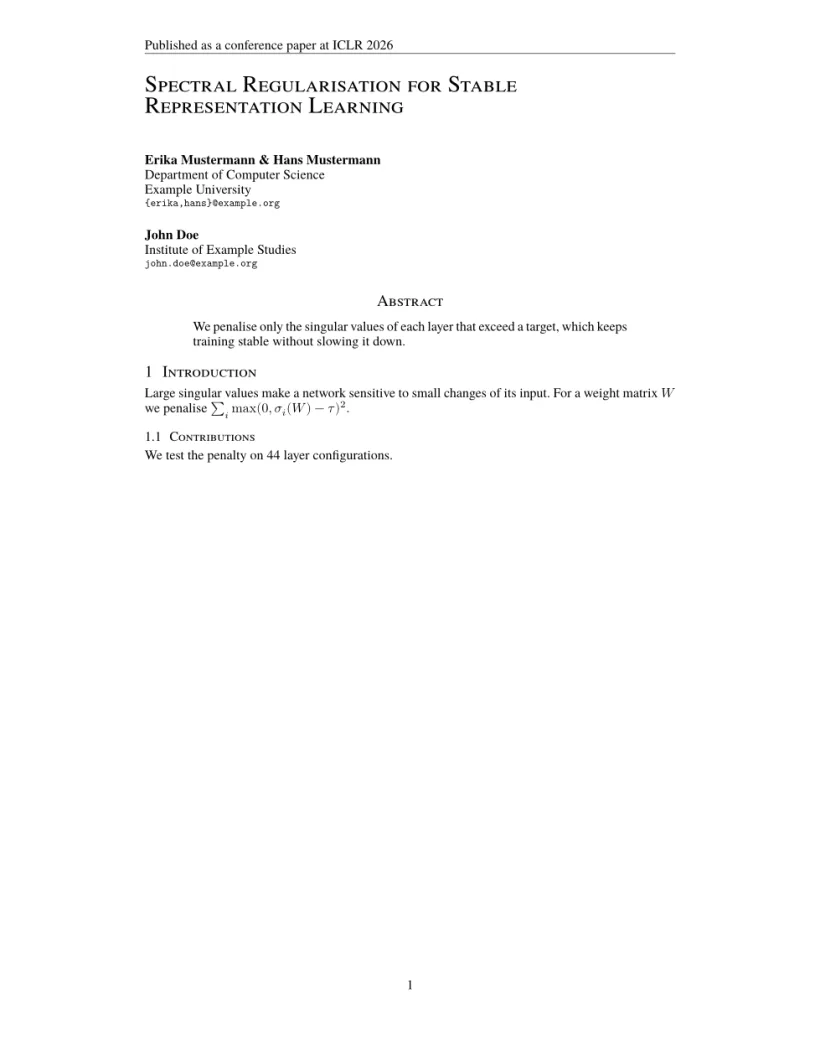
「問題」分頁: Layout in the style of the ICLR style (final mode). Not official. To compile elsewhere, add the ICLR style files from github.com/ICLR/Master-Template.
版面會設定什麼
- 標題以大號小型大寫字母靠左排版;作者接在後面,同樣靠左。用
\And或\AND分隔作者;Scissor LaTeX 會把每個作者區塊放在前一個的下方,而套件在空間足夠時會把以\And連接的區塊並排。 - 「Abstract」和所有章節標題都以小型大寫字母排版(「1 Introduction」、「1.1 Contributions」)。
- 每頁底部都有置中的頁碼。
- 圖說和表格標題寫成「Figure 1:」和「Table 1:」。
官方範例用來定義符號巨集的 \input{math_commands.tex},只要檔案在你的專案中,就能像一般的 \input 一樣運作。範本則改為在導言區定義幾個自己的巨集;請參閱巨集。
參考文獻
範本使用 \bibliographystyle{iclr2026_conference},Scissor LaTeX 會將其排成作者—年份引用,並搭配 \citet 和 \citep。請參閱參考文獻。
與 ICLR 樣式的差異
投稿時,請從 github.com/ICLR/Master-Template 取得 iclr2026_conference.sty、它的 .bst 檔案和 math_commands.tex,並放在你的 .tex 檔案旁邊;不需修改就能編譯。其他版面請參閱仿會議格式範本。
常見問題
怎麼製作 ICLR 論文的定稿版本?
在導言區、\begin{document} 之前加上 \iclrfinalcopy。頁首會變成「Published as a conference paper」,作者會顯示出來,行號則會消失。
為什麼我的 ICLR 論文顯示「Anonymous authors」?
沒有 \iclrfinalcopy 時,論文是雙盲投稿版本,所以作者會被隱藏。你的 \author 文字仍保留在原始碼中。
我需要 times 套件嗎?
官方範例會載入它,在這裡也不會造成影響:無論如何,Scissor LaTeX 都會為 ICLR 使用它的 Times 替代字型。
本頁的每個範例都在建置網站時由 Scissor LaTeX 排版。 最後更新:2026-11-07