


ACM LaTeX 範本(acmart sigconf)
官方的 ACM 範本是 acmart 文件類別,可以從 CTAN 或 ACM 的論文集範本頁面取得。Scissor LaTeX 提供仿照其 sigconf 格式的免費版面,讓你在瀏覽器中撰寫草稿,不需要帳號:從 ACM 範本開始,或寫 \documentclass[sigconf]{acmart},帶有 CCS 概念和關鍵詞的雙欄頁面就會隨著你打字出現。同一個 .tex 搭配官方文件類別也能編譯。
在編輯器中開啟 ACM 範本 免費,在瀏覽器中,無需帳號
範本
ACM 範本是一篇關於在鍵值儲存系統中批次處理請求的系統論文,有三位作者、CCS 概念、一個延遲圖表、一個 booktabs 表格、一個致謝章節和有編號的參考文獻。在編輯器中開啟 ACM 範本即可看到完整內容。
啟用方式
acmart 是文件類別,格式則是它的選項:
\documentclass[sigconf]{acmart}版面是 Letter 紙張、9 pt 雙欄,以 Libertinus 作為 acmart 所用 Libertine 字型的免費替代品(在文件第一次需要時下載,約 2.7 MB)。期刊格式 acmsmall、acmlarge、acmtog 和 manuscript(沒有指定格式時的預設值)使用 ACM 期刊版面。sigplan 等其他論文集格式保留下面所有的指令,但會以 sigconf 外觀用 10 pt 單欄繪製,並在「問題」分頁中附上說明。
前置資料的順序
在 acmart 中,摘要、CCS 概念和關鍵詞要寫在 \maketitle 之前:和官方範例一樣,把摘要放在 \begin{document} 之後、\maketitle 之前。Scissor LaTeX 會和這個文件類別一樣,把它們印在標題和作者之後。
作者、摘要、CCS 概念和關鍵詞
\documentclass[sigconf]{acmart}
\setcopyright{none}
\acmConference[EXCS '26]{Example Conference on Computer Systems}{June 1--4, 2026}{Example City}

\title{Tail-Latency-Aware Request Batching}

\author{Erika Mustermann}
\affiliation{%
  \institution{Example University}
  \city{Musterstadt}
  \country{Germany}}
\email{erika.mustermann@example.org}

\author{John Doe}
\affiliation{%
  \institution{Institute of Example Studies}
  \city{Exampleton}
  \country{USA}}
\email{john.doe@example.org}

\begin{document}
\begin{abstract}
Batching requests raises throughput but hurts the slowest requests. We size batches
from the observed queue so that the 99th percentile latency stays within a budget.
\end{abstract}

\ccsdesc[500]{Information systems~Key-value stores}
\ccsdesc[300]{Computer systems organization~Distributed architectures}
\keywords{request batching, tail latency, key-value stores}
\maketitle

\section{Introduction}
A key-value store serving 44 clients spends much of its time on per-request overhead.
\end{document}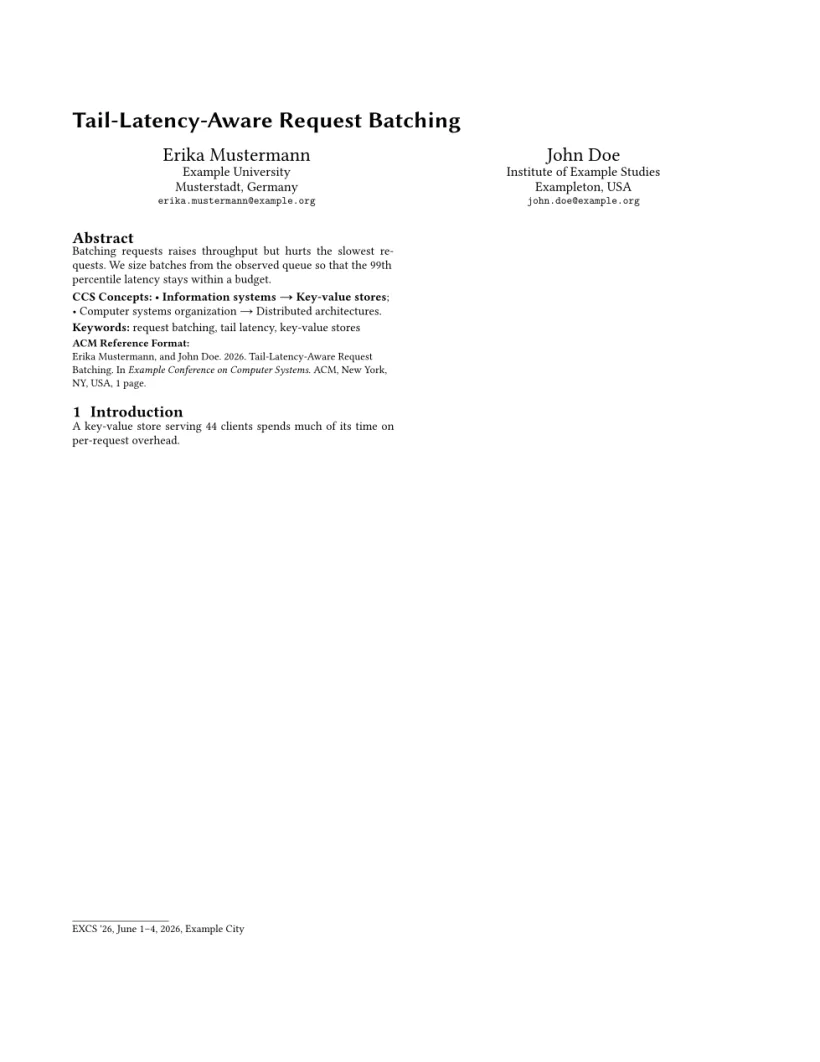
「問題」分頁: Layout in the style of the ACM sigconf format (final mode). Not official. To compile elsewhere, add acmart.cls from ctan.org/pkg/acmart.
模式
| 文件類別選項 | 作者 | 行號 | 頁碼 |
|---|---|---|---|
[sigconf] | 顯示 | 無 | 無 |
[sigconf,review] | 顯示 | 有 | 有 |
[sigconf,anonymous] | 「Anonymous Author(s)」 | 無 | 無 |
[sigconf,review,anonymous] | 「Anonymous Author(s)」 | 有 | 有 |
[sigconf,nonacm] | 顯示,不含會議資訊和引用格式區塊 | 無 | 無 |
和 acmart 一樣,review 和 anonymous 彼此獨立。大多數雙盲審查的會議兩者都要求。
文件類別的指令
| 指令 | 作用 | 在 Scissor LaTeX 中 |
|---|---|---|
重複的 \author | 每次一位作者 | 可以使用 |
\affiliation{\institution{..}\city{..}\country{..}} | 前一位作者的所屬機構;也有 \department、\streetaddress、\state、\postcode | 可以使用 |
\email、\additionalaffiliation、\authornote | 更多作者資訊 | 可以使用 |
\orcid | ORCID iD | 可以接受,但不會顯示 |
\ccsdesc[weight]{A~B} | 一個 CCS 概念;權重 500 以上會以粗體顯示 | 可以使用 |
\keywords{..} | 關鍵詞行 | 可以使用 |
\acmConference[short]{name}{date}{place}、\acmBooktitle、\acmYear、\copyrightyear、\acmDOI、\acmISBN | 會議和出版資料 | 可以使用:用於會議資訊行、頁首和「ACM Reference Format」區塊 |
\setcopyright{..} | 權利聲明 | 會印出會議資訊行;ACM 的授權文字本身一律不會印出 |
\settopmatter{printacmref=false} | 不顯示引用格式區塊 | 可以使用;printfolios=true 會加上頁碼 |
\renewcommand{\shortauthors}{..} | 頁首中的作者姓名 | 可以使用 |
\subtitle{..} | 副標題 | 可以使用 |
teaserfigure 環境 | 作者下方的全寬圖 | 部分支援:以全寬顯示,但位於標題上方,而不是作者下方 |
acks 環境 | 不編號的「Acknowledgments」章節 | 可以使用 |
CCSXML、\Description{..}、\received、\citestyle | 中繼資料 | 可以接受並忽略 |
參考文獻
範本使用 \bibliographystyle{ACM-Reference-Format},Scissor LaTeX 會將其排成有編號的參考文獻。請參閱參考文獻。
與 acmart 的差異
投稿時,請從 CTAN (acmart)(那裡也有完整的文件類別手冊)或 ACM 的論文集範本頁面取得 acmart。你的 .tex 檔案不需修改就能搭配它編譯。其他版面請參閱仿會議格式範本。
常見問題
怎麼製作匿名的 ACM 投稿?
使用 \documentclass[sigconf,review,anonymous]{acmart}。作者會被換成「Anonymous Author(s)」,並加上行號和頁碼。
為什麼 ACM 論文的摘要要寫在 \maketitle 之前?
這是 acmart 收集前置資料的方式:先讀取摘要、CCS 概念和關鍵詞,再由 \maketitle 印在正確的位置。Scissor LaTeX 遵循相同的順序。
可以使用 acmsmall 或期刊格式嗎?
可以。acmsmall、acmlarge、acmtog 和 manuscript 會使用單欄的 ACM 期刊版面;編輯器的「期刊」分頁中有一個 ACM 期刊範本。請參閱仿期刊格式範本。
本頁的每個範例都在建置網站時由 Scissor LaTeX 排版。 最後更新:2026-11-07