


演算法與虛擬碼
把虛擬碼包在附有 \caption 的 algorithm 環境中,就會得到「Algorithm 1」;在環境裡面,Scissor LaTeX 只有在仿研討會格式的版面中才會讀取 algorithmic 的大寫指令(\STATE、\FOR),所以在其他文件中,請把步驟放進 verbatim 區塊。
algorithm 環境
algorithm 套件提供一個用於虛擬碼的編號環境,就像 figure 一樣:\caption 會給它一個編號(「Algorithm 1」),而在圖說之後加上 \label,就能用 \ref 參照它。在 Scissor LaTeX 中,演算法會留在你寫下的位置,圖說則排在它下方。
裡面要放什麼,取決於你用來撰寫步驟的套件,而支援程度的差異也就在這裡:
| 套件 | 指令 | 在 Scissor LaTeX 中 |
|---|---|---|
| algorithm | algorithm 環境、\caption、\label | 可以使用:編號為「Algorithm N」,圖說在下方。 |
| algorithmic | \STATE、\IF、\FOR、\WHILE、\RETURN ...(大寫) | 部分支援:只在使用仿研討會格式版面的文件中讀取;在其他地方是未知的指令。 |
| algpseudocode(algorithmicx) | \State、\If、\For、\EndFor、\Return ... | 不支援:會被略過並顯示訊息,各個步驟會連成一行。 |
| algorithm2e | \KwIn、\For{..}{..}、\eIf ... | 不支援:會被略過並顯示訊息。 |
在任何地方都能運作的虛擬碼
在任何 Scissor LaTeX 文件中,顯示虛擬碼最可靠的方式,是在 algorithm 裡放一個 verbatim 區塊。這樣既保留了編號和圖說,各行也會保留縮排。
以 verbatim 撰寫步驟的演算法
\begin{algorithm}
\caption{Sum of a list}
\label{alg:sum}
\begin{verbatim}
s := 0
for each a in xs:
    s := s + a
return s
\end{verbatim}
\end{algorithm}
Algorithm~\ref{alg:sum} adds the numbers of a list.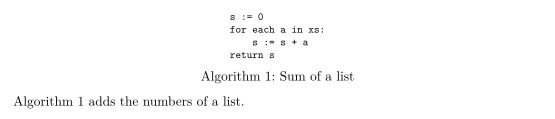
如果虛擬碼中有公式,lstlisting 也能以同樣方式使用;或者在 algorithm 環境之外,把步驟寫成一般文字的編號清單。
寫成編號清單並含有數學式的步驟
\textbf{Input:} numbers $a_1, \dots, a_n$.
\begin{enumerate}
  \item Set $s \gets 0$.
  \item For $i = 1, \dots, n$: set $s \gets s + a_i$.
  \item Return $s$.
\end{enumerate}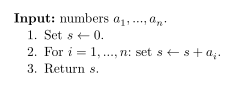
仿研討會格式版面中的 algorithmic
仿研討會格式的版面(arXiv、IEEE、NeurIPS、ICML 等)會讀取 algorithmic 套件的大寫指令:for、do、end for 和 return 等關鍵字會以粗體排版,每個指令都從新的一行開始。不會繪製行號,而且各行會置中。「問題」分頁會指出使用中的版面。
arXiv 風格文件中的 algorithmic
\documentclass{article}
\usepackage{arxiv}
\usepackage{algorithm,algorithmic}
\begin{document}
\begin{algorithm}
\caption{Sum of a list}
\begin{algorithmic}
\STATE $s \gets 0$
\FOR{$i = 1$ to $n$}
  \STATE $s \gets s + a_i$
\ENDFOR
\RETURN $s$
\end{algorithmic}
\end{algorithm}
\end{document}
「問題」分頁: Layout in the style of the arXiv preprint style (final mode). Not official. To compile elsewhere, add arxiv.sty from github.com/kourgeorge/arxiv-style.
不支援 algpseudocode
algpseudocode 是近年論文中最常見的套件,它使用 \State 和 \EndFor 這類大小寫混合的指令。Scissor LaTeX 不認得這些指令:指令名稱會被略過,公式和文字會保留,所有內容會連成一行。「問題」分頁會列出被略過的指令。
algpseudocode:各個步驟連成一行
\begin{algorithm}
\caption{Sum of a list}
\begin{algorithmic}[1]
\State $s \gets 0$
\For{$i = 1$ to $n$}
  \State $s \gets s + a_i$
\EndFor
\State \Return $s$
\end{algorithmic}
\end{algorithm}
「問題」分頁: Skipped 4 unknown commands: \State, \For, \EndFor, \Return
如果你的文件需要同時在這裡和 TeX 安裝環境中運作,請像上面那樣用 verbatim 撰寫步驟;它在任何地方都能編譯。
與 TeX 安裝環境的差異
套件頁面請見 algorithm、algorithmic 和 algpseudocode。使用手冊位於 CTAN:algorithms、algorithmicx 和 algorithm2e。
常見問題
怎麼在 LaTeX 中撰寫演算法?
使用附有 \caption 的 algorithm 環境,並把步驟放在裡面。在 Scissor LaTeX 中,步驟最好放在 verbatim 區塊中,或在仿研討會格式的版面中使用 algorithmic 的 \STATE 指令。
為什麼我的 \State 行連在一起?
\State 來自 algpseudocode,而 Scissor LaTeX 不支援這個套件。指令名稱會被略過,所以各個步驟會併成一行。請改用 verbatim 撰寫步驟。
可以用編號參照演算法嗎?
可以。在 \caption 之後放 \label{alg:name},然後寫 Algorithm~\ref{alg:name}。
本頁的每個範例都在建置網站時由 Scissor LaTeX 排版。 最後更新:2026-11-07