


LaTeX の定理と証明(amsthm)
プリアンブルで種類ごとに \newtheorem{theorem}{Theorem} と宣言し、本文で \begin{theorem} ... \end{theorem} と書きます。amsthm の proof 環境は「Proof.」と表示し、最後に小さな四角を付けます。
定理を宣言して使う
プリアンブルに \newtheorem{name}{Heading} と書くと、name という環境が作られ、その見出しは番号付きの「Heading」として表示されます。amsthm も読み込んでください。proof 環境とスター付きの宣言を提供します。
宣言した定理とその証明
\documentclass{article}
\usepackage{amsmath,amsthm}
\newtheorem{theorem}{Theorem}
\begin{document}
\begin{theorem}
The sum of two even numbers is even.
\end{theorem}
\begin{proof}
Let $a = 2k$ and $b = 2m$. Then $a + b = 2(k + m)$,
which is even.
\end{proof}
\end{document}
定理の本文はイタリックで組まれます。証明は右余白の位置に置かれる四角で終わります。
名前、ラベル、参照
\begin{theorem} の後のオプション引数で定理に名前を付けると、括弧で囲んで表示されます。環境の中に \label を置くと、\ref で参照できます。
名前付きの定理、補題、参照
\documentclass{article}
\usepackage{amsmath,amsthm}
\newtheorem{theorem}{Theorem}
\newtheorem{lemma}{Lemma}
\begin{document}
\begin{lemma}\label{lem:square}
If $n$ is odd, then $n^2$ is odd.
\end{lemma}
\begin{theorem}[Erika Mustermann, 2026]\label{thm:main}
There are infinitely many odd squares.
\end{theorem}
\begin{proof}
Use Lemma~\ref{lem:square} for every odd $n$.
\end{proof}
Theorem~\ref{thm:main} is easy to remember.
\end{document}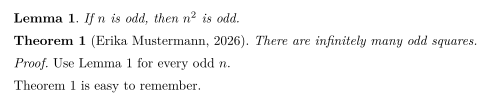
何種類もの命題
定理、補題、命題、系、定義、注意、例など、必要な種類をいくつでも宣言できます。Scissor LaTeX では、種類ごとに独自のカウンターを持ちます。
定義、命題、注意
\documentclass{article}
\usepackage{amsmath,amsthm}
\newtheorem{definition}{Definition}
\newtheorem{proposition}{Proposition}
\newtheorem{remark}{Remark}
\begin{document}
\begin{definition}[Even number]
An integer $n$ is \emph{even} if $n = 2k$ for an integer $k$.
\end{definition}
\begin{proposition}
The number 44 is even.
\end{proposition}
\begin{remark}
Zero is even as well.
\end{remark}
\end{document}
番号なしの定理
\newtheorem*(amsthm のコマンド)は、番号を付けない種類を宣言します。
\newtheorem* による番号なしの命題
\documentclass{article}
\usepackage{amsmath,amsthm}
\newtheorem*{conjecture}{Conjecture}
\begin{document}
\begin{conjecture}
Every even number greater than 2 is the sum of two primes.
\end{conjecture}
\end{document}
番号付けとスタイル
TeX のインストール環境では、\newtheorem に番号付け用のオプション引数が 2 つあり、amsthm には \theoremstyle があります。Scissor LaTeX での扱いは次のとおりです。
| 書き方 | TeX のインストール環境 | Scissor LaTeX |
|---|---|---|
\newtheorem{theorem}{Theorem} | Theorem 1, 2, 3 | 使えます |
\newtheorem{theorem}{Theorem}[section] | Theorem 1.1, 1.2, 2.1 | Theorem 1, 2, 3:節の部分は無視されます |
\newtheorem{lemma}[theorem]{Lemma} | Lemma が定理のカウンターを共有する | Lemma は独自のカウンターを持ちます |
\newtheorem*{remark}{Remark} | 番号なし | 使えます |
\theoremstyle{definition}、{remark} | 本文が立体になる | 無視されます:本文はすべてイタリック |
\begin{proof} | 「Proof.」と四角 | 使えます |
\begin{proof}[Proof of Theorem 1] | 独自の見出し | 「Proof.」:独自の見出しは無視されます |
\qedhere | ディスプレイ数式の最終行に四角 | 非対応:その数式は赤になります |
[section] と共有カウンター:種類ごとに個別に数えられます
\documentclass{article}
\usepackage{amsmath,amsthm}
\newtheorem{theorem}{Theorem}[section]
\newtheorem{lemma}[theorem]{Lemma}
\begin{document}
\section{Results}
\begin{lemma} A first lemma. \end{lemma}
\begin{theorem} A first theorem. \end{theorem}
\begin{lemma} A second lemma. \end{lemma}
\end{document}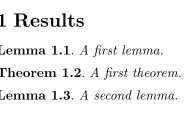
TeX のインストール環境では、この例は Lemma 1.1、Theorem 1.2、Lemma 1.3 と表示されます。Scissor LaTeX では Lemma 1、Theorem 1、Lemma 2 と表示されます。
\newtheorem を使わない場合
ほかから写してきた文書の多くは、theorem、lemma、definition を宣言せずに使っています。Scissor LaTeX はそれでもよく使われる名前を認識します。theorem、lemma、proposition、corollary、definition、remark、example、conjecture、claim、exercise、problem、solution のほか、thm、lem、defn のような短縮形も含まれます。
TeX のインストール環境との違い
パッケージについて詳しくは amsthm のページをご覧ください。パッケージの完全なマニュアルは ctan.org/pkg/amsthm にあります。
amsthm、相互参照、cleveref もあわせてご覧ください。
よくある質問
LaTeX で定理環境を定義するにはどうすればよいですか?
プリアンブルに \usepackage{amsthm} とともに \newtheorem{theorem}{Theorem} と書きます。その後 \begin{theorem} ... \end{theorem} を使います。
証明の最後に QED の四角を付けるにはどうすればよいですか?
amsthm の proof 環境を使います。四角は最後に自動で付きます。
補題と定理に通し番号を付けるにはどうすればよいですか?
TeX のインストール環境では \newtheorem{lemma}[theorem]{Lemma} と書きます。Scissor LaTeX はまだカウンターの共有に対応していないため、ここでは補題と定理は別々に番号が付きます。
このページの例はすべて、サイトのビルド時に Scissor LaTeX で組版されています。 最終更新:2026-11-07