


用 amsthm 在 LaTeX 中书写定理和证明
在导言区用 \newtheorem{theorem}{Theorem} 声明每一种类型,然后在正文中写 \begin{theorem} ... \end{theorem}。amsthm 的 proof 环境会输出“Proof.”,并以一个小方块结尾。
声明和使用定理
在导言区写 \newtheorem{name}{Heading},会创建一个名为 name 的环境,其标题输出为“Heading”加上编号。同时请加载 amsthm;它提供 proof 环境和带星号的声明。
声明的定理及其证明
\documentclass{article}
\usepackage{amsmath,amsthm}
\newtheorem{theorem}{Theorem}
\begin{document}
\begin{theorem}
The sum of two even numbers is even.
\end{theorem}
\begin{proof}
Let $a = 2k$ and $b = 2m$. Then $a + b = 2(k + m)$,
which is even.
\end{proof}
\end{document}
定理的正文以斜体排版。证明以右边距处的一个方块结尾。
名称、标签和引用
\begin{theorem} 后面的可选参数为定理指定一个名称,输出在圆括号中。在环境内部放一个 \label,就可以用 \ref 引用它。
带名称的定理、一个引理和一处引用
\documentclass{article}
\usepackage{amsmath,amsthm}
\newtheorem{theorem}{Theorem}
\newtheorem{lemma}{Lemma}
\begin{document}
\begin{lemma}\label{lem:square}
If $n$ is odd, then $n^2$ is odd.
\end{lemma}
\begin{theorem}[Erika Mustermann, 2026]\label{thm:main}
There are infinitely many odd squares.
\end{theorem}
\begin{proof}
Use Lemma~\ref{lem:square} for every odd $n$.
\end{proof}
Theorem~\ref{thm:main} is easy to remember.
\end{document}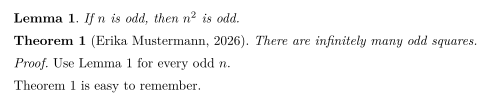
多种陈述类型
按需声明任意多种类型:定理、引理、命题、推论、定义、注记、例子。在 Scissor LaTeX 中,每种类型都有自己的计数器。
定义、命题和注记
\documentclass{article}
\usepackage{amsmath,amsthm}
\newtheorem{definition}{Definition}
\newtheorem{proposition}{Proposition}
\newtheorem{remark}{Remark}
\begin{document}
\begin{definition}[Even number]
An integer $n$ is \emph{even} if $n = 2k$ for an integer $k$.
\end{definition}
\begin{proposition}
The number 44 is even.
\end{proposition}
\begin{remark}
Zero is even as well.
\end{remark}
\end{document}
不编号的定理
\newtheorem*(来自 amsthm)声明一种没有编号的类型。
用 \newtheorem* 声明的不编号陈述
\documentclass{article}
\usepackage{amsmath,amsthm}
\newtheorem*{conjecture}{Conjecture}
\begin{document}
\begin{conjecture}
Every even number greater than 2 is the sum of two primes.
\end{conjecture}
\end{document}
编号和样式
在 TeX 安装中,\newtheorem 有两个用于编号的可选参数,amsthm 还提供 \theoremstyle。下面是 Scissor LaTeX 对它们的处理:
| 你的写法 | TeX 安装 | Scissor LaTeX |
|---|---|---|
\newtheorem{theorem}{Theorem} | Theorem 1、2、3 | 可用 |
\newtheorem{theorem}{Theorem}[section] | Theorem 1.1、1.2、2.1 | Theorem 1、2、3:节编号部分被忽略 |
\newtheorem{lemma}[theorem]{Lemma} | 引理与定理共用计数器 | 引理有自己的计数器 |
\newtheorem*{remark}{Remark} | 无编号 | 可用 |
\theoremstyle{definition}, {remark} | 正文为直立体 | 忽略:正文一律为斜体 |
\begin{proof} | “Proof.”和一个方块 | 可用 |
\begin{proof}[Proof of Theorem 1] | 自定义标题 | “Proof.”:你的标题被忽略 |
\qedhere | 方块位于独立公式的最后一行 | 不支持:该公式显示为红色 |
[section] 和共用计数器:每种类型各自计数
\documentclass{article}
\usepackage{amsmath,amsthm}
\newtheorem{theorem}{Theorem}[section]
\newtheorem{lemma}[theorem]{Lemma}
\begin{document}
\section{Results}
\begin{lemma} A first lemma. \end{lemma}
\begin{theorem} A first theorem. \end{theorem}
\begin{lemma} A second lemma. \end{lemma}
\end{document}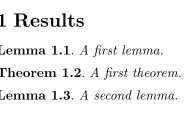
在 TeX 安装中,这个例子输出 Lemma 1.1、Theorem 1.2 和 Lemma 1.3。Scissor LaTeX 输出 Lemma 1、Theorem 1 和 Lemma 2。
不使用 \newtheorem
许多从别处复制来的文档直接使用 theorem、lemma 或 definition,而没有声明它们。Scissor LaTeX 仍然能识别常见的名称,包括 theorem、lemma、proposition、corollary、definition、remark、example、conjecture、claim、exercise、problem、solution,以及 thm、lem 和 defn 等简写。
与 TeX 安装的不同之处
关于该宏包的更多内容见 amsthm 页面。该宏包的完整手册见 ctan.org/pkg/amsthm。
常见问题
如何在 LaTeX 中定义定理环境?
在导言区写 \newtheorem{theorem}{Theorem},并加上 \usepackage{amsthm}。然后使用 \begin{theorem} ... \end{theorem}。
如何在证明末尾得到 QED 方块?
使用 amsthm 的 proof 环境。方块会自动添加在末尾。
如何让引理和定理统一编号?
在 TeX 安装中,写 \newtheorem{lemma}[theorem]{Lemma}。Scissor LaTeX 目前还不支持共用计数器,所以在这里引理和定理分别编号。
本页的每个示例都在构建网站时由 Scissor LaTeX 排版。 最后更新:2026-11-07