


ICML 2026 LaTeX 範本(icml2026.sty)
ICML 論文使用 icml.cc 作者須知中提供的 icml2026.sty 套件。Scissor LaTeX 提供免費的仿格式版面,讓你在瀏覽器中撰寫草稿,不需要帳號:從 ICML 範本開始,或在 article 中載入 \usepackage{icml2026},並把標題區塊寫在 \twocolumn[..] 中,雙欄頁面就會隨著你打字出現。同一個 .tex 搭配官方套件也能編譯。
在編輯器中開啟 ICML 範本 免費,在瀏覽器中,無需帳號
範本
ICML 範本是一篇關於極小極大問題的最佳化論文,有三位作者(其中兩位標示為同等貢獻)、一個定理、一個對數刻度圖表、一個 booktabs 表格、cleveref 參照和作者—年份格式的引用。在編輯器中開啟 ICML 範本即可看到完整內容。它一開始使用 preprint 模式。
啟用方式
這個套件用在一般的 article 上:
\documentclass{article}
\usepackage{icml2026}年份是從套件名稱讀取的(icml2025、icml2027 等)。頁面一律是 Letter 雙欄,以免費的 Times 替代字型 TeX Gyre Termes 排版。
模式
| 那一行 | 模式 | 作者 | 行號 | 所屬機構框中的聲明 |
|---|---|---|---|---|
\usepackage{icml2026} | 投稿 | 「Anonymous Authors」 | 有 | 「Preliminary work. Under review ...」 |
\usepackage[preprint]{icml2026} | 預印本 | 顯示 | 無 | 「Preprint.」 |
\usepackage[accepted]{icml2026} | 定稿 | 顯示 | 無 | 附年份的論文集資訊行 |
每頁底部都有置中的頁碼,第一頁之後各頁的頂端則有頁首標題。
標題區塊
ICML 論文把標題和作者放在 \twocolumn[..] 區塊中,讓它們橫跨兩欄。每位作者都列出所屬機構和標記的鍵;第一欄底部的所屬機構框由 \printAffiliationsAndNotice 印出,即使內容是空的,套件也要求使用它(\printAffiliationsAndNotice{})。
作者列表、同等貢獻和所屬機構框(預印本模式)
\documentclass{article}
\usepackage[preprint]{icml2026}
\usepackage{amsmath}

\icmltitlerunning{Variance-Reduced Extragradient}

\begin{document}
\twocolumn[
  \icmltitle{Variance-Reduced Extragradient for Smooth Min-Max Problems}
  \icmlsetsymbol{equal}{*}
  \begin{icmlauthorlist}
    \icmlauthor{Erika Mustermann}{equal,eu}
    \icmlauthor{Hans Mustermann}{equal,ies}
    \icmlauthor{John Doe}{eu}
  \end{icmlauthorlist}
  \icmlaffiliation{eu}{Department of Computer Science, Example University, Musterstadt, Germany}
  \icmlaffiliation{ies}{Institute of Example Studies, Exampleton, USA}
  \icmlcorrespondingauthor{Erika Mustermann}{erika.mustermann@example.org}
  \vskip 0.3in
]
\printAffiliationsAndNotice{\icmlEqualContribution}

\begin{abstract}
We combine extragradient steps with variance reduction and reach a duality gap of
$10^{-6}$ with fewer gradient evaluations on problems of size 44 to 4,400.
\end{abstract}

\section{Introduction}
Many training problems are saddle-point problems $\min_x \max_y f(x, y)$.
\end{document}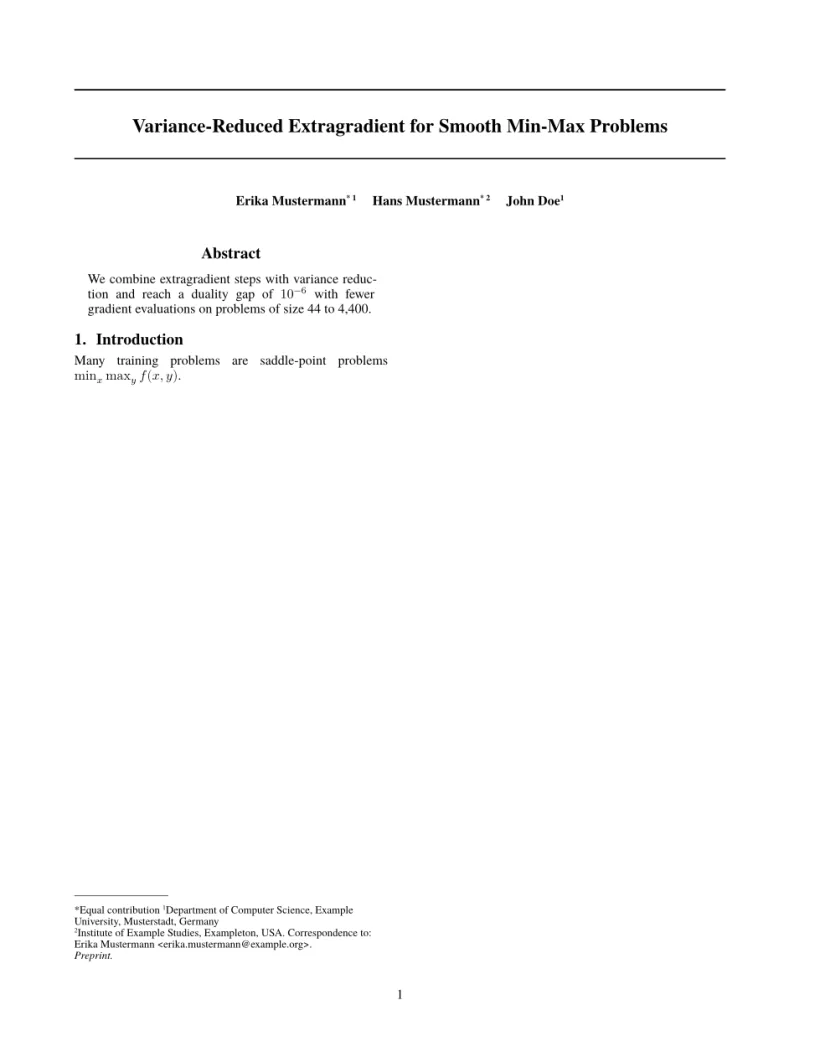
「問題」分頁: Layout in the style of the ICML style (preprint mode). Not official. To compile elsewhere, add the ICML style files from icml.cc.
套件指令
| 指令 | 作用 | 在 Scissor LaTeX 中 |
|---|---|---|
\twocolumn[..] | 全寬的標題區域 | 可以使用:內容會橫跨兩欄放置 |
\icmltitle{..} | 位於兩條橫線之間的標題 | 可以使用 |
icmlauthorlist、\icmlauthor{name}{keys} | 帶上標標記的作者姓名 | 可以使用;所屬機構依第一次出現的順序編號 |
\icmlsetsymbol{equal}{*} | 以符號顯示的鍵,例如同等貢獻 | 可以使用 |
\icmlaffiliation{key}{text} | 所屬機構的文字 | 可以使用 |
\icmlcorrespondingauthor{name}{email} | 「Correspondence to」行 | 可以使用 |
\printAffiliationsAndNotice{..} | 附模式聲明的所屬機構框 | 可以使用;\icmlEqualContribution 會加上「*Equal contribution」 |
\icmltitlerunning{..} | 頁首標題 | 可以使用 |
\icmlkeywords{..} | PDF 中繼資料的關鍵詞 | 可以接受,但不會印出(和套件相同) |
algorithm、algorithmic(\STATE、\FOR、\IF 等) | 虛擬碼 | 部分支援:每個陳述一行,關鍵字為粗體,並附「Algorithm 1.」標題,但每一行都在欄中置中,所以巢狀結構不易閱讀 |
參考文獻
範本使用 \bibliographystyle{icml2026},Scissor LaTeX 會將其排成作者—年份引用(「Doe et al., 2026」),並搭配 \citet 和 \citep。請參閱參考文獻和演算法。
與 icml2026.sty 的差異
投稿時,請從 icml.cc 的作者須知取得套件(icml2026.sty 和 icml2026.bst),並把檔案放在你的 .tex 檔案旁邊;不需修改就能編譯。其他版面請參閱仿會議格式範本。
常見問題
為什麼 ICML 論文要使用 \twocolumn[...]?
套件把整篇論文排成雙欄,而標題和作者必須橫跨兩欄。\twocolumn[..] 方括號中的所有內容都會橫跨整個寬度;Scissor LaTeX 也是如此。
怎麼在 ICML 中標示同等貢獻?
用 \icmlsetsymbol{equal}{*} 定義一個符號,在這些作者的鍵中加上 equal,並把 \icmlEqualContribution 傳給 \printAffiliationsAndNotice。
怎麼切換到定稿版本?
寫 \usepackage[accepted]{icml2026}。作者會顯示出來,聲明也會變成論文集資訊行。
本頁的每個範例都在建置網站時由 Scissor LaTeX 排版。 最後更新:2026-11-07