


amsthm으로 LaTeX 정리와 증명 쓰기
프리앰블에서 \newtheorem{theorem}{Theorem}으로 각 종류를 선언한 뒤, 본문에 \begin{theorem} ... \end{theorem}을 쓰세요. amsthm의 proof 환경은 "Proof."를 출력하고 작은 정사각형으로 끝납니다.
정리 선언하고 사용하기
프리앰블의 \newtheorem{name}{Heading}은 name이라는 환경을 만들고, 그 머리말은 번호와 함께 "Heading"으로 출력됩니다. amsthm도 함께 불러오세요. proof 환경과 별표 붙은 선언을 제공합니다.
선언한 정리와 그 증명
\documentclass{article}
\usepackage{amsmath,amsthm}
\newtheorem{theorem}{Theorem}
\begin{document}
\begin{theorem}
The sum of two even numbers is even.
\end{theorem}
\begin{proof}
Let $a = 2k$ and $b = 2m$. Then $a + b = 2(k + m)$,
which is even.
\end{proof}
\end{document}
정리의 본문은 기울임으로 조판됩니다. 증명은 오른쪽 여백의 정사각형으로 끝납니다.
이름, 레이블, 참조
\begin{theorem} 뒤의 선택 인수는 정리에 이름을 붙이며, 이름은 괄호 안에 출력됩니다. 환경 안에 \label을 넣으면 \ref로 참조할 수 있습니다.
이름 붙은 정리, 보조정리, 참조
\documentclass{article}
\usepackage{amsmath,amsthm}
\newtheorem{theorem}{Theorem}
\newtheorem{lemma}{Lemma}
\begin{document}
\begin{lemma}\label{lem:square}
If $n$ is odd, then $n^2$ is odd.
\end{lemma}
\begin{theorem}[Erika Mustermann, 2026]\label{thm:main}
There are infinitely many odd squares.
\end{theorem}
\begin{proof}
Use Lemma~\ref{lem:square} for every odd $n$.
\end{proof}
Theorem~\ref{thm:main} is easy to remember.
\end{document}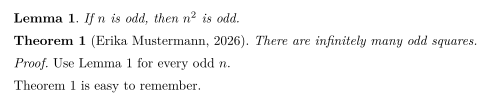
여러 종류의 명제
정리, 보조정리, 명제, 따름정리, 정의, 비고, 예제 등 필요한 만큼 종류를 선언하세요. Scissor LaTeX에서는 종류마다 별도의 카운터가 있습니다.
정의, 명제, 비고
\documentclass{article}
\usepackage{amsmath,amsthm}
\newtheorem{definition}{Definition}
\newtheorem{proposition}{Proposition}
\newtheorem{remark}{Remark}
\begin{document}
\begin{definition}[Even number]
An integer $n$ is \emph{even} if $n = 2k$ for an integer $k$.
\end{definition}
\begin{proposition}
The number 44 is even.
\end{proposition}
\begin{remark}
Zero is even as well.
\end{remark}
\end{document}
번호 없는 정리
\newtheorem*(amsthm 제공)는 번호 없는 종류를 선언합니다.
\newtheorem*로 만든 번호 없는 명제
\documentclass{article}
\usepackage{amsmath,amsthm}
\newtheorem*{conjecture}{Conjecture}
\begin{document}
\begin{conjecture}
Every even number greater than 2 is the sum of two primes.
\end{conjecture}
\end{document}
번호와 스타일
TeX 설치 환경에서 \newtheorem에는 번호 매기기용 선택 인수가 두 개 있고, amsthm에는 \theoremstyle이 있습니다. Scissor LaTeX가 이들을 처리하는 방식은 다음과 같습니다.
| 입력 | TeX 설치 환경 | Scissor LaTeX |
|---|---|---|
\newtheorem{theorem}{Theorem} | Theorem 1, 2, 3 | 작동함 |
\newtheorem{theorem}{Theorem}[section] | Theorem 1.1, 1.2, 2.1 | Theorem 1, 2, 3: 섹션 부분은 무시됨 |
\newtheorem{lemma}[theorem]{Lemma} | Lemma가 theorem 카운터를 공유 | Lemma는 자체 카운터를 가짐 |
\newtheorem*{remark}{Remark} | 번호 없음 | 작동함 |
\theoremstyle{definition}, {remark} | 똑바른 글자 본문 | 무시됨: 모든 본문이 기울임 |
\begin{proof} | "Proof."와 정사각형 | 작동함 |
\begin{proof}[Proof of Theorem 1] | 직접 지정한 머리말 | "Proof.": 지정한 머리말은 무시됨 |
\qedhere | 디스플레이 수식 마지막 줄의 정사각형 | 지원하지 않음: 그 수식이 빨간색이 됨 |
[section]과 공유 카운터: 종류마다 따로 셉니다
\documentclass{article}
\usepackage{amsmath,amsthm}
\newtheorem{theorem}{Theorem}[section]
\newtheorem{lemma}[theorem]{Lemma}
\begin{document}
\section{Results}
\begin{lemma} A first lemma. \end{lemma}
\begin{theorem} A first theorem. \end{theorem}
\begin{lemma} A second lemma. \end{lemma}
\end{document}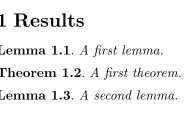
TeX 설치 환경에서 이 예제는 Lemma 1.1, Theorem 1.2, Lemma 1.3을 출력합니다. Scissor LaTeX는 Lemma 1, Theorem 1, Lemma 2를 출력합니다.
\newtheorem 없이
다른 곳에서 복사해 온 많은 문서가 theorem, lemma, definition을 선언하지 않고 씁니다. Scissor LaTeX는 그래도 흔한 이름을 알아봅니다. theorem, lemma, proposition, corollary, definition, remark, example, conjecture, claim, exercise, problem, solution, 그리고 thm, lem, defn 같은 줄임말이 포함됩니다.
TeX 설치 환경과 다른 점
패키지에 대한 자세한 내용은 amsthm 페이지에 있습니다. 패키지의 전체 설명서는 ctan.org/pkg/amsthm에 있습니다.
amsthm, 상호 참조, cleveref도 참고하세요.
질문과 답변
LaTeX에서 정리 환경은 어떻게 정의하나요?
\usepackage{amsthm}과 함께 프리앰블에 \newtheorem{theorem}{Theorem}을 쓰세요. 그런 다음 \begin{theorem} ... \end{theorem}을 쓰면 됩니다.
증명 끝에 QED 정사각형을 넣으려면 어떻게 하나요?
amsthm의 proof 환경을 쓰세요. 끝에 정사각형이 자동으로 붙습니다.
보조정리와 정리에 번호를 함께 매기려면 어떻게 하나요?
TeX 설치 환경에서는 \newtheorem{lemma}[theorem]{Lemma}라고 쓰세요. Scissor LaTeX는 아직 카운터 공유를 지원하지 않으므로, 여기서는 보조정리와 정리에 번호가 따로 매겨집니다.
이 페이지의 모든 예제는 사이트를 빌드할 때 Scissor LaTeX로 조판됩니다. 마지막 업데이트: 2026-11-07