


NeurIPS 2026 LaTeX 範本(neurips_2026.sty)
NeurIPS 論文使用 neurips.cc 徵稿公告中提供的 neurips_2026.sty 樣式檔。Scissor LaTeX 提供免費的仿格式版面,讓你在瀏覽器中撰寫草稿,不需要帳號:從 NeurIPS 範本開始,或在 article 中載入 \usepackage{neurips_2026},預設為匿名並附行號,preprint 或 final 模式則會顯示作者。同一個 .tex 搭配官方樣式檔也能編譯。
在編輯器中開啟 NeurIPS 範本 免費,在瀏覽器中,無需帳號
範本
NeurIPS 範本是一篇關於重尾雜訊下步長選擇的最佳化論文,有三位作者、一個對數刻度的訓練損失圖、一個列出準確率的 booktabs 表格、一個致謝章節和作者—年份格式的引用。在編輯器中開啟 NeurIPS 範本即可看到完整內容。它一開始使用 preprint 模式,會顯示作者。
啟用方式
這個套件用在一般的 article 上:
\documentclass{article}
\usepackage{neurips_2026}
年份是從套件名稱讀取的,所以 neurips_2025 或 neurips_2027 也可以使用,聲明文字也會顯示該年份。較舊的名稱如 nips_2019 等也能辨識。頁面一律是 Letter 單欄,左右邊界 1.5 英寸,以 TeX Gyre Termes(免費的 Times 替代字型,第一次使用時下載)排版。
模式
| 那一行 | 模式 | 作者 | 行號 | 第 1 頁底部的聲明 |
|---|---|---|---|---|
\usepackage{neurips_2026} | 投稿 | 「Anonymous Author(s)」 | 有 | 「Submitted to ... Do not distribute.」 |
\usepackage[preprint]{neurips_2026} | 預印本 | 顯示 | 無 | 「Preprint.」 |
\usepackage[main, final]{neurips_2026} | 定稿 | 顯示 | 無 | 會議名稱 |
\usepackage[nonanonymous]{neurips_2026} | 顯示姓名的投稿 | 顯示 | 有 | 「Submitted to ...」 |
在每種模式中,第一頁都沒有頁碼;之後各頁則有置中的頁碼。
預設模式:附行號的匿名投稿
\documentclass{article}
\usepackage{neurips_2026}
\usepackage{amsmath}

\title{Adaptive Step Sizes under Heavy-Tailed Noise}
\author{Erika Mustermann \\ Example University \\ \texttt{erika@example.org}
  \And
  John Doe \\ Institute of Example Studies \\ \texttt{john.doe@example.org}}

\begin{document}
\maketitle

\begin{abstract}
We propose a step-size rule for stochastic gradient descent that stays stable when the
gradient noise has heavy tails, and test it with 44 random seeds.
\end{abstract}

\section{Introduction}
A fixed step size $\eta$ is either too cautious early in training or unstable later.
We adapt $\eta_t$ to a running estimate of the noise scale.

\begin{ack}
This text is hidden in the submission version.
\end{ack}
\end{document}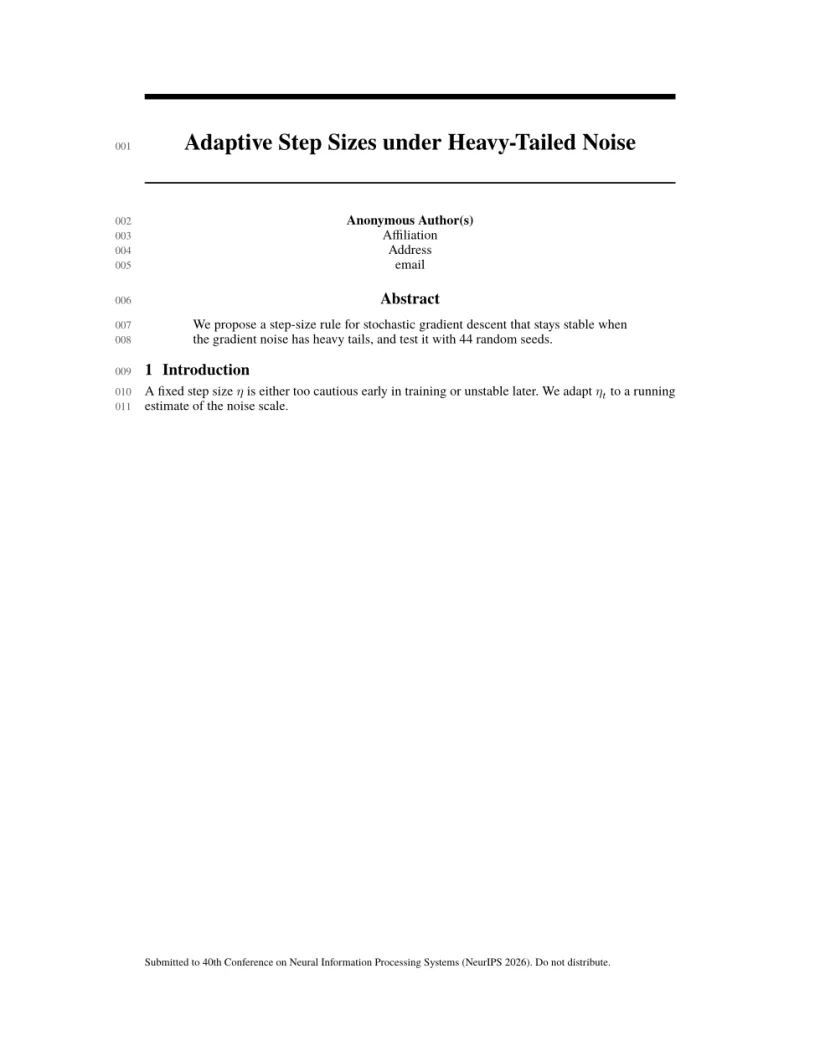
「問題」分頁: Layout in the style of the NeurIPS style (anonymous review mode). Not official. To compile elsewhere, add the NeurIPS style file from neurips.cc.
套件指令
| 指令 | 作用 | 在 Scissor LaTeX 中 |
|---|---|---|
\And、\AND | 下一位作者,位於同一列或新的一列 | 可以使用 |
\thanks{..} | 姓名上的註腳 | 可以使用(匿名時隱藏) |
ack 環境 | 「Acknowledgments and Disclosure of Funding」 | 可以使用;和套件一樣,在投稿模式中隱藏 |
\answerYes{}、\answerNo{}、\answerNA{}、\answerTODO{} | 論文檢核表中的回答 | 可以使用:以彩色顯示「[Yes]」、「[No]」、「[NA]」、「[TODO]」 |
議程選項 main、position、eandd、creativeai、education、sglblindworkshop、dblblindworkshop | 定稿論文所屬的議程 | 可以接受;和套件一樣,creativeai、education 和 sglblindworkshop 會顯示作者 |
nonatbib | 不載入 natbib | 可以接受 |
參考文獻
NeurIPS 允許任何一致的引用樣式;範本使用 \bibliographystyle{plainnat},Scissor LaTeX 會將其排成作者—年份引用,並搭配 natbib 的 \citet 和 \citep。請參閱參考文獻。
與 neurips_2026.sty 的差異
投稿時,請從 neurips.cc 的徵稿公告取得 neurips_2026.sty,並放在你的 .tex 檔案旁邊;不需修改就能編譯。其他版面請參閱仿會議格式範本。
常見問題
怎麼在 NeurIPS 論文中顯示作者姓名?
arXiv 版本請用 \usepackage[preprint]{neurips_2026},定稿論文請用 \usepackage[main, final]{neurips_2026}。沒有選項時,論文是匿名的。
為什麼我的致謝章節不見了?
ack 環境在投稿版本中會被隱藏,讓審稿人看不到誰資助了這項研究。它會在預印本和定稿模式中出現。
可以在這裡撰寫論文檢核表嗎?
可以。回答指令 \answerYes{}、\answerNo{} 和 \answerNA{} 都能使用,所以你可以把官方套件中的檢核表貼到你的文件中。
本頁的每個範例都在建置網站時由 Scissor LaTeX 排版。 最後更新:2026-11-07