


Springer LNCS LaTeX 範本(llncs)
官方的 Springer LNCS 範本是 llncs 文件類別,可以從 CTAN 或 Springer 的論文集指南取得。Scissor LaTeX 提供免費的仿格式版面,讓你在瀏覽器中撰寫草稿,不需要帳號:從 LNCS 範本開始,或寫 \documentclass[runningheads]{llncs},就能得到帶編號所屬機構和該文件類別定理環境的單欄版面。同一個 .tex 搭配官方文件類別也能編譯。
在編輯器中開啟 LNCS 範本 免費,在瀏覽器中,無需帳號
範本
LNCS 範本是一篇關於有界模型檢驗的形式化方法論文,有來自兩個機構的三位作者、關鍵詞、一個定義、一個附證明的定理、一個對數刻度圖表、一個 booktabs 表格、一個 credits 章節和有編號的參考文獻。在編輯器中開啟 LNCS 範本即可看到完整內容。
啟用方式
llncs 是文件類別:
\documentclass[runningheads]{llncs}版面是 LNCS 的文字區塊(12.2 × 19.3 公分,單欄),置中於 Letter 紙張上,使用 a4paper 選項時則置中於 A4 上,以 10 pt 的 Latin Modern 排版。runningheads 會在第一頁之後各頁的頂端加上簡短標題、作者列表和頁碼;沒有這個選項時,頁面沒有頁首。
附所屬機構和 ORCID 的作者、關鍵詞和定理
\documentclass[runningheads]{llncs}
\usepackage{amsmath}

\begin{document}
\title{Bounded Model Checking of Timed Message Protocols}
\titlerunning{Bounded Model Checking of Timed Protocols}
\author{Erika Mustermann\inst{1}\orcidID{0000-0000-0000-0044} \and
John Doe\inst{2}}
\authorrunning{E. Mustermann and J. Doe}
\institute{Example University, Musterstadt, Germany\\
\email{erika.mustermann@example.org} \and
Institute of Example Studies, Exampleton, USA}
\maketitle

\begin{abstract}
We encode timed protocols as SMT problems and check them up to a bound.
\keywords{Model checking \and Timed automata \and SMT.}
\end{abstract}

\section{Introduction}
\begin{definition}
A run of a protocol is a finite sequence of states $s_0, \dots, s_k$.
\end{definition}

\begin{theorem}\label{thm:bound}
Every run of a protocol with 44 nodes reaches a fixed point within $2n$ steps.
\end{theorem}

\begin{proof}
By induction on the number of pending messages. \qed
\end{proof}

Theorem~\ref{thm:bound} gives the bound we use.
\end{document}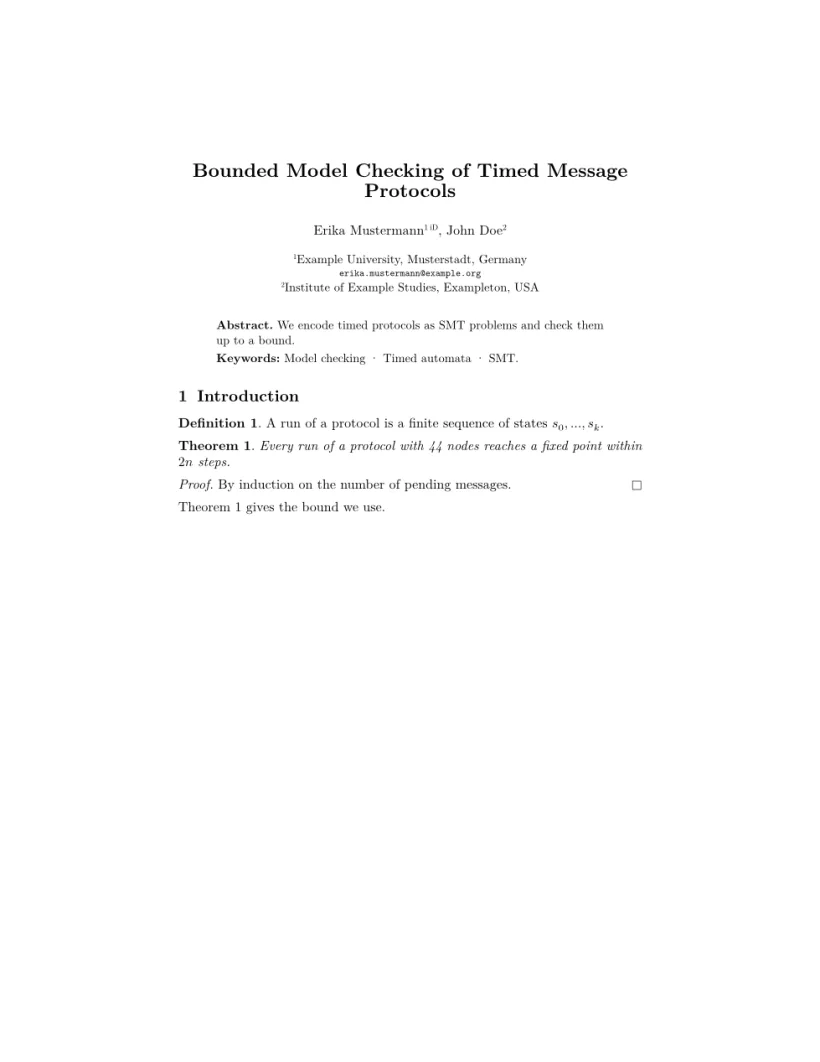
「問題」分頁: Layout in the style of the Springer LNCS format (final mode). Not official. To compile elsewhere, add llncs.cls from ctan.org/pkg/llncs.
文件類別的指令
| 指令 | 作用 | 在 Scissor LaTeX 中 |
|---|---|---|
\author 中的 \and | 分隔作者;印出時為逗號 | 可以使用 |
\inst{1,2} | 姓名後面的上標機構編號 | 可以使用 |
\orcidID{..} | 姓名後面的小型 ORCID 標記 | 可以使用(是文字標記,而不是 ORCID 標誌) |
\institute{A \and B} | 作者下方有編號的所屬機構 | 可以使用 |
\email{..} | 以打字機字體顯示的電子郵件地址 | 可以使用 |
\titlerunning、\authorrunning | 頁首(搭配 runningheads) | 可以使用 |
\keywords{a \and b} | 在摘要中:「Keywords:」,各項以點連接 | 可以使用 |
theorem、lemma、proposition、corollary、definition、example、remark | 有編號的類定理環境 | 可以使用,標題為粗體;類定理環境的內文為斜體,定義和註記為正體 |
proof、\qed | 斜體的「Proof.」和結束符號 | 可以使用 |
\spnewtheorem{name}{Heading}{..}{..} | 新的類定理環境 | 可以使用 |
credits 環境、\ackname、\discintname | 致謝和利益揭露 | 可以使用,以小字排版 |
章節標題遵循該文件類別:「1 Introduction」和「1.1」為粗體,\subsubsection 則排成獨立一行的小型粗體標題(該文件類別會把它接排在段落開頭)。圖說和表格標題寫成「Fig. 1.」和「Table 1.」。
參考文獻
範本使用 \bibliographystyle{splncs04},Scissor LaTeX 會以 Springer LNCS 引用樣式排版:有編號的條目和 [1] 形式的引用。請參閱參考文獻。
與 llncs 的差異
投稿時,請從 CTAN (llncs)(那裡也有文件類別說明)或 Springer 的論文集指南取得 llncs.cls。你的 .tex 檔案不需修改就能搭配它編譯。其他版面請參閱仿會議格式範本,一般的定理環境則請參閱定理與證明。
常見問題
使用 llncs 需要 amsthm 嗎?
不需要。llncs 自己定義了 theorem、lemma、definition、proof 等環境,Scissor LaTeX 也會為 llncs 文件提供它們。在實際建置中額外載入 amsthm 會發生衝突,所以請不要載入。
怎麼在 LNCS 論文中加上 ORCID iD?
在 \author 中你的姓名後面直接加上 \orcidID{0000-0000-0000-0000},填入你的 iD。Scissor LaTeX 會在那裡顯示一個小標記;官方文件類別則會印出 ORCID 標誌。
為什麼沒有頁首?
加上 runningheads 選項:\documentclass[runningheads]{llncs},如果完整標題或作者列表太長,請設定 \titlerunning 和 \authorrunning。
本頁的每個範例都在建置網站時由 Scissor LaTeX 排版。 最後更新:2026-11-07