


文書の構造
LaTeX 文書は 2 つの部分から成ります。\documentclass から \begin{document} までのプリアンブルで文書を設定し、\begin{document} と \end{document} の間の本文に、出力される内容を書きます。
枠組み
どの文書も \documentclass{...} で始まり、document 環境をちょうど 1 つ持ちます。\end{document} より後に書いたものは無視されます。
\documentclass[11pt,a4paper]{article}   % the class and its options
\usepackage{amsmath}                    % packages
\title{...}                             % settings for the title
\begin{document}                        % the body starts
  ...
\end{document}                          % the body ends
文書クラス
クラスは、どのような種類の文書を書くのか、そしてそれがどう見えるかを決めます。Scissor LaTeX はクラスの系統ごとに独自のレイアウトを持っています。
| 書くもの | レイアウト | 備考 |
|---|---|---|
article、scrartcl などのクラス | article | セクションあり、章なし |
report、scrreprt | report | 章は新しいページから始まる |
book、scrbook、memoir | book | 章、前付けと後付け |
letter、scrlttr2 | letter | |
beamer | article のテキスト | スライドは作られず、フレームは普通のテキストになる |
IEEEtran、acmart、llncs | 学会風のレイアウト | 学会風テンプレートを参照 |
角かっこ内のオプションで用紙と文字サイズを指定します。読み取られるのは a4paper、a5paper、b5paper、letterpaper、legalpaper、executivepaper、10pt、11pt、12pt、twocolumn です。ほかのオプションは受け付けられますが無視されます。用紙のオプションがない場合、TeX のインストール環境と同じく US レターサイズになります。詳しくは文書クラスとページレイアウトをご覧ください。
A5 用紙に 12 pt の report:章は新しいページから始まる
\documentclass[12pt,a5paper]{report}
\begin{document}
\chapter{Field work}
We spent 44 days by the river and counted
the birds every morning.
\end{document}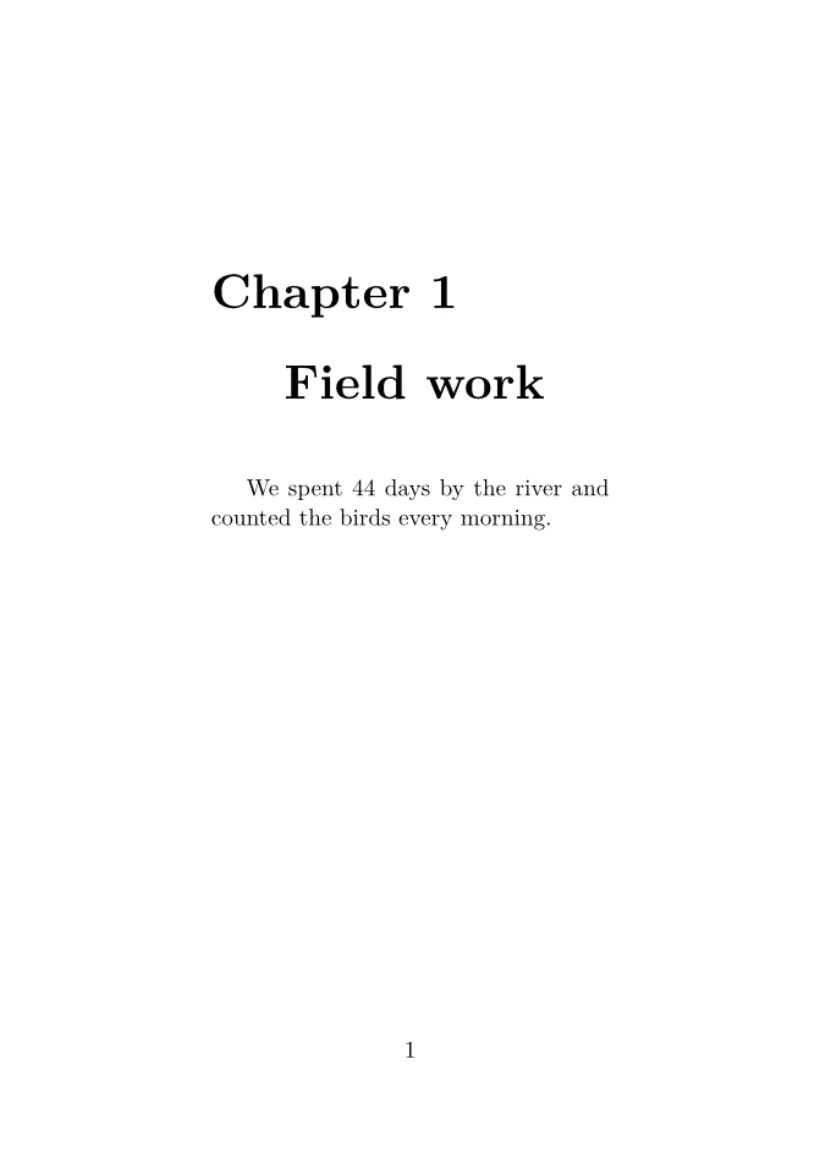
プリアンブル
\documentclass と \begin{document} の間がすべてプリアンブルです。ここに書いたものは何も出力されません。プリアンブルには次のものを書きます。
- パッケージを読み込む
\usepackage{...}の行 \newcommandによる自作のコマンド(自作のコマンドを参照)\newtheoremによる定理の宣言(定理と証明を参照)- タイトル、著者、日付
Scissor LaTeX では、\usepackage が文書を止めることはありません。パッケージはファイルから読み込まれるのではなく、よく使われるパッケージのコマンドが直接解釈されます。エディタが知らないパッケージは無視され、問題タブにそのことが表示されます。そのパッケージのコマンドは飛ばされ、テキストは残ります。各パッケージで何が使えるかはパッケージリファレンスにまとめてあります。
不明なパッケージは報告されるが、文書は組版される
\documentclass{article}
\usepackage{amsmath}
\usepackage{fancyquotes}
\begin{document}
The document typesets without the package.
\end{document}
「問題」タブ: Package fancyquotes isn't supported in the preview, so its formatting is not applied. If it is your own package, add fancyquotes.sty to the project.
タイトル部分
\title、\author、\date はタイトルの情報を記録し、\maketitle がそれを本文中の置いた場所に出力します。通常は本文の最初に置きます。著者が複数いるときは \and で区切ります。
タイトル、著者、日付
\documentclass{article}
\title{Counting Birds by the River}
\author{Erika Mustermann \and Hans Mustermann}
\date{Spring 2026}
\begin{document}
\maketitle
\section{Introduction}
We counted birds every morning for 44 days.
\end{document}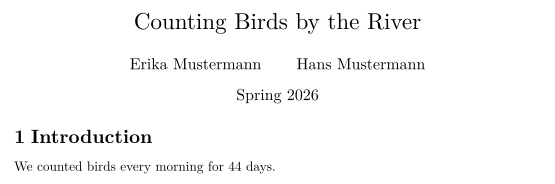
概要
article や report では、abstract 環境が「Abstract」という見出しの下に短い要約を出力します。本文より少し狭く、少し小さい文字で組まれます。\maketitle のすぐ後に置いてください。
タイトルの後の概要
\documentclass{article}
\title{Counting Birds by the River}
\author{John Doe}
\date{}
\begin{document}
\maketitle
\begin{abstract}
We report daily bird counts from one river bank over
44 days. Most birds were seen in the first hour after
sunrise.
\end{abstract}
\section{Method}
Two observers counted for one hour each morning.
\end{document}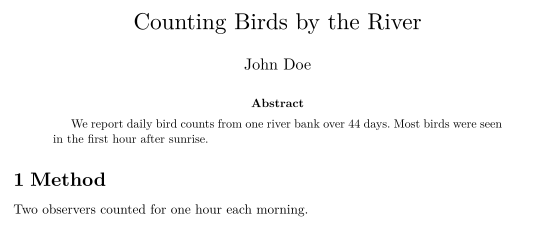
本文
本文にはテキストを書きます。テキストはセクションと段落に分け、リスト、数式、表、図を入れられます。長い文書は複数のファイルに分割できます。複数ファイルのプロジェクトをご覧ください。
TeX のインストール環境との違い
よくある質問
LaTeX のプリアンブルには何を書きますか?
\documentclass の行、\usepackage の行、自作のコマンド、そして \title や \author などの設定です。プリアンブルに書いたものは、それだけでは何も出力されません。
\maketitle はどこに書けばよいですか?
本文中、\begin{document} の後の、タイトルを表示したい場所です。通常は最初の行です。
一覧にないクラスも使えますか?
はい。どのクラス名でも使えます。Scissor LaTeX が知らないクラスは article としてレイアウトされます。
このページの例はすべて、サイトのビルド時に Scissor LaTeX で組版されています。 最終更新:2026-11-07