


ICLR 2026 の LaTeX テンプレート(iclr2026_conference)
ICLR の論文は、github.com/ICLR/Master-Template にある iclr2026_conference.sty を使います。Scissor LaTeX には、ブラウザでアカウントなしで下書きできる無料の模倣版があります。ICLR のテンプレートから始めるか、article で \usepackage{iclr2026_conference,times} を読み込みます。\iclrfinalcopy を追加するまで、論文は匿名の投稿用です。同じ .tex が公式のキットでコンパイルできます。
ICLR テンプレートをエディタで開く 無料、ブラウザで、アカウント不要
テンプレート
ICLR のテンプレートは、3 人の著者、記法のマクロ、網掛けの帯付きのグラフ、booktabs 形式のアブレーションの表、著者年方式の引用を含む、スペクトル正則化についての表現学習の論文です。全体を見るには ICLR のテンプレートをエディタで開いてください。テンプレートは匿名の投稿用として始まります。
有効にする
キットは、普通の article に載せるパッケージです。公式のサンプルでは、times と一緒に 1 行で読み込みます。
\documentclass{article}
\usepackage{iclr2026_conference,times}年はパッケージ名から読み取られるので、iclr2027_conference も使え、ヘッダーにはその年が表示されます。ページは常に Letter の 1 段組みで、左右の余白は 1.5 インチ、TeX Gyre Termes(無料の Times の代替、初回にダウンロード)で組まれます。
投稿用と最終版
キットにはパッケージのオプションがありません。プリアンブルの 1 つのコマンドで切り替えます。
| プリアンブル | 各ページのヘッダー | 著者 | 行番号 |
|---|---|---|---|
| なし | 「Under review as a conference paper at ICLR 2026」 | 「Anonymous authors / Paper under double-blind review」 | あり |
\iclrfinalcopy | 「Published as a conference paper at ICLR 2026」 | 表示 | なし |
\iclrfinalcopy による最終版
\documentclass{article}
\usepackage{iclr2026_conference,times}
\usepackage{amsmath}

\title{Spectral Regularisation for Stable\\ Representation Learning}
\author{Erika Mustermann \& Hans Mustermann \\
Department of Computer Science\\
Example University \\
\texttt{\{erika,hans\}@example.org}
\And
John Doe \\
Institute of Example Studies \\
\texttt{john.doe@example.org}}

\iclrfinalcopy

\begin{document}
\maketitle

\begin{abstract}
We penalise only the singular values of each layer that exceed a target, which keeps
training stable without slowing it down.
\end{abstract}

\section{Introduction}
Large singular values make a network sensitive to small changes of its input.
For a weight matrix $W$ we penalise $\sum_i \max(0, \sigma_i(W) - \tau)^2$.

\subsection{Contributions}
We test the penalty on 44 layer configurations.
\end{document}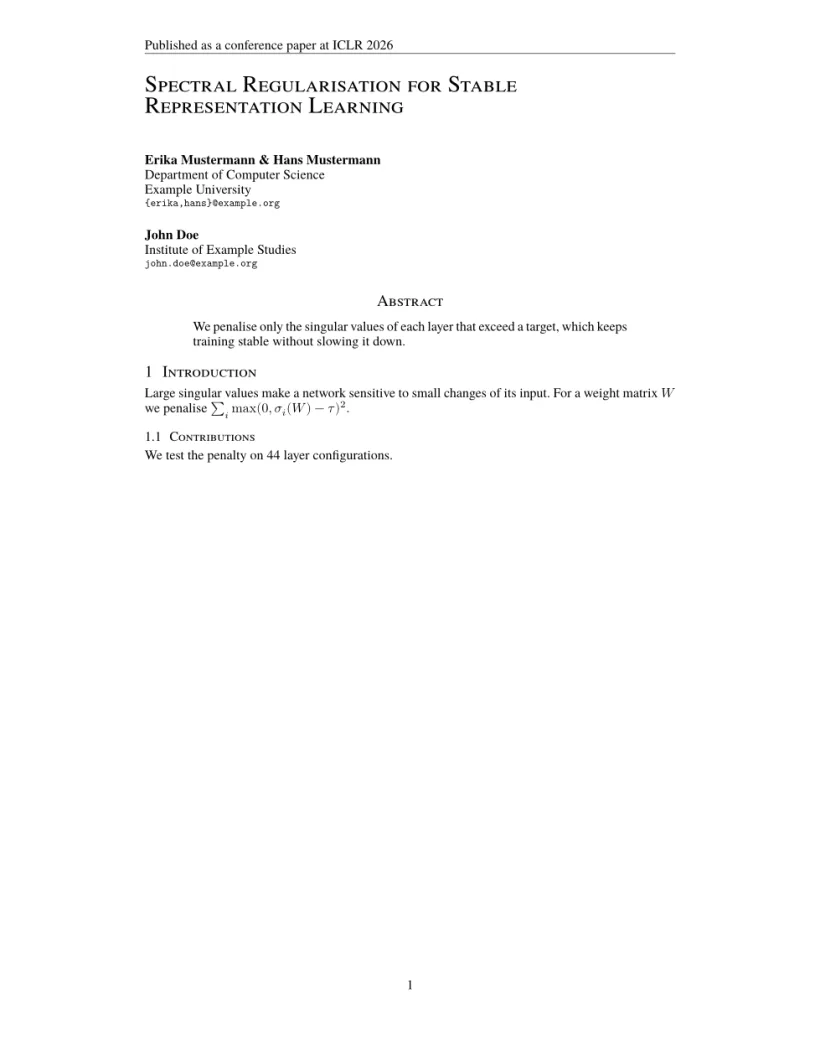
「問題」タブ: Layout in the style of the ICLR style (final mode). Not official. To compile elsewhere, add the ICLR style files from github.com/ICLR/Master-Template.
レイアウトが設定するもの
- タイトルは大きなスモールキャピタルで左寄せになり、その後に著者が左寄せで続きます。著者は
\Andか\ANDで区切ります。キットは\Andでつないだ欄を収まる場合は横に並べますが、Scissor LaTeX は各著者欄を前の欄の下に置きます。 - 「Abstract」とすべての見出しはスモールキャピタルです(「1 Introduction」、「1.1 Contributions」)。
- ページ番号はすべてのページの下部中央に入ります。
- キャプションは「Figure 1:」と「Table 1:」になります。
公式のサンプルが記法のマクロに使っている \input{math_commands.tex} は、ファイルがプロジェクトにあれば通常の \input として使えます。テンプレートでは代わりに、プリアンブルで独自のマクロをいくつか定義しています。マクロをご覧ください。
参考文献
テンプレートは \bibliographystyle{iclr2026_conference} を使い、Scissor LaTeX はこれを \citet と \citep による著者年方式の引用として組みます。参考文献をご覧ください。
ICLR のスタイルとの違い
投稿するには、github.com/ICLR/Master-Template から iclr2026_conference.sty、その .bst ファイル、math_commands.tex を入手し、.tex ファイルの横に置きます。変更なしでコンパイルできます。ほかのレイアウトは学会論文風テンプレートをご覧ください。
よくある質問
ICLR の論文の最終版を作るにはどうすればよいですか?
プリアンブルの \begin{document} の前に \iclrfinalcopy を追加します。ヘッダーが「Published as a conference paper」に変わり、著者が表示され、行番号が消えます。
ICLR の論文に「Anonymous authors」と表示されるのはなぜですか?
\iclrfinalcopy がない場合、論文はダブルブラインドの投稿用なので、著者が隠されます。\author のテキストはソースに残っています。
times パッケージは必要ですか?
公式のサンプルでは読み込んでおり、ここでも害はありません。いずれにしても、Scissor LaTeX は ICLR に Times の代替フォントを使います。
このページの例はすべて、サイトのビルド時に Scissor LaTeX で組版されています。 最終更新:2026-11-07