


ICML 2026 の LaTeX テンプレート(icml2026.sty)
ICML の論文は、icml.cc の著者向けの指示にあるキット icml2026.sty を使います。Scissor LaTeX には、ブラウザでアカウントなしで下書きできる無料の模倣版があります。ICML のテンプレートから始めるか、article で \usepackage{icml2026} を読み込んでタイトル部分を \twocolumn[..] の中に書けば、入力に合わせて 2 段組みのページが表示されます。同じ .tex が公式のキットでコンパイルできます。
ICML テンプレートをエディタで開く 無料、ブラウザで、アカウント不要
テンプレート
ICML のテンプレートは、3 人の著者(うち 2 人は同等の貢献者として明記)、定理、対数目盛りのグラフ、booktabs の表、cleveref の参照、著者年方式の引用を含む、min-max 問題についての最適化の論文です。全体を見るには ICML のテンプレートをエディタで開いてください。テンプレートは preprint モードで始まります。
有効にする
キットは、普通の article に載せるパッケージです。
\documentclass{article}
\usepackage{icml2026}年はパッケージ名から読み取られます(icml2025、icml2027 …)。ページは常に Letter の 2 段組みで、無料の Times の代替である TeX Gyre Termes で組まれます。
モード
| 行 | モード | 著者 | 行番号 | 所属の欄の注記 |
|---|---|---|---|---|
\usepackage{icml2026} | 投稿用 | 「Anonymous Authors」 | あり | 「Preliminary work. Under review ...」 |
\usepackage[preprint]{icml2026} | プレプリント | 表示 | なし | 「Preprint.」 |
\usepackage[accepted]{icml2026} | 最終版 | 表示 | なし | 年を含む論文集の行 |
ページ番号はすべてのページの下部中央に入り、1 ページ目より後のページの上部には短いタイトルが入ります。
タイトル部分
ICML の論文では、タイトルと著者を両方の段にまたがるよう \twocolumn[..] のブロックに入れます。各著者は所属と記号のキーを並べます。1 段目の下部にある所属の欄は \printAffiliationsAndNotice で出力され、キットは中身が空でもこれを必要とします(\printAffiliationsAndNotice{})。
著者リスト、同等の貢献、所属の欄(preprint モード)
\documentclass{article}
\usepackage[preprint]{icml2026}
\usepackage{amsmath}

\icmltitlerunning{Variance-Reduced Extragradient}

\begin{document}
\twocolumn[
  \icmltitle{Variance-Reduced Extragradient for Smooth Min-Max Problems}
  \icmlsetsymbol{equal}{*}
  \begin{icmlauthorlist}
    \icmlauthor{Erika Mustermann}{equal,eu}
    \icmlauthor{Hans Mustermann}{equal,ies}
    \icmlauthor{John Doe}{eu}
  \end{icmlauthorlist}
  \icmlaffiliation{eu}{Department of Computer Science, Example University, Musterstadt, Germany}
  \icmlaffiliation{ies}{Institute of Example Studies, Exampleton, USA}
  \icmlcorrespondingauthor{Erika Mustermann}{erika.mustermann@example.org}
  \vskip 0.3in
]
\printAffiliationsAndNotice{\icmlEqualContribution}

\begin{abstract}
We combine extragradient steps with variance reduction and reach a duality gap of
$10^{-6}$ with fewer gradient evaluations on problems of size 44 to 4,400.
\end{abstract}

\section{Introduction}
Many training problems are saddle-point problems $\min_x \max_y f(x, y)$.
\end{document}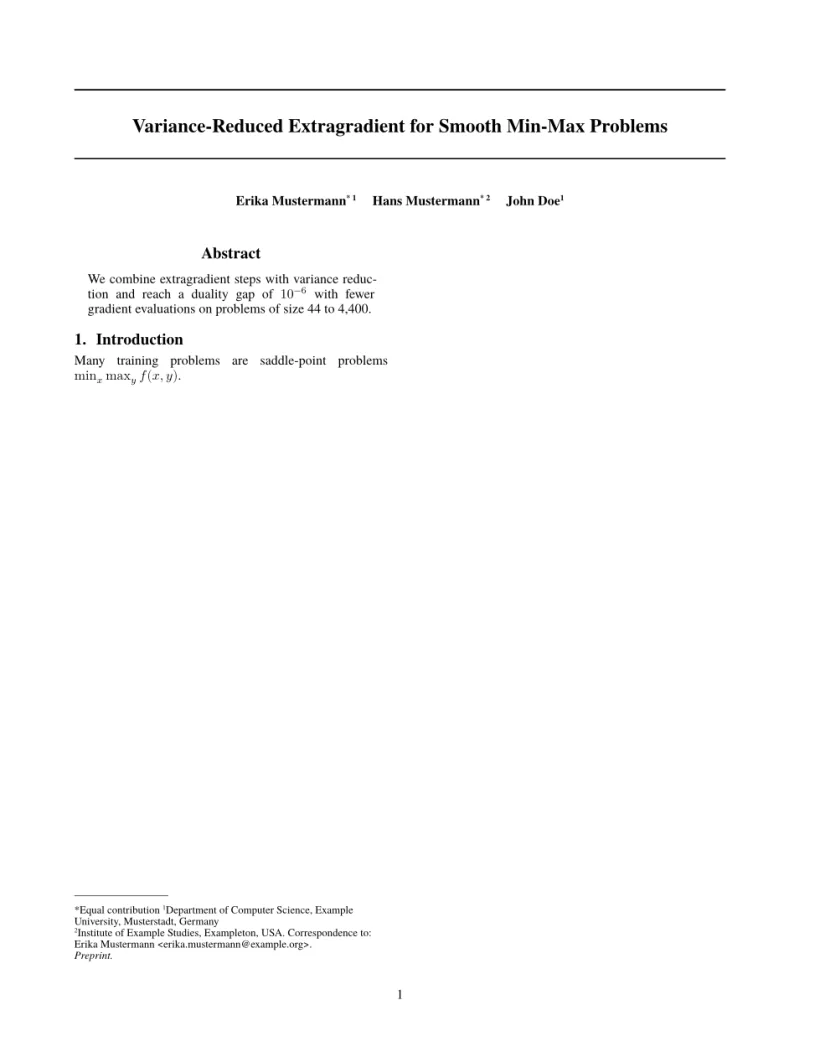
「問題」タブ: Layout in the style of the ICML style (preprint mode). Not official. To compile elsewhere, add the ICML style files from icml.cc.
キットのコマンド
| コマンド | 働き | Scissor LaTeX での対応 |
|---|---|---|
\twocolumn[..] | 全幅のタイトル領域 | 使える:内容が両方の段にまたがって置かれる |
\icmltitle{..} | 2 本の罫線に挟まれたタイトル | 使える |
icmlauthorlist、\icmlauthor{name}{keys} | 上付きの記号付きの著者名 | 使える。所属は最初に使われた順に番号が付く |
\icmlsetsymbol{equal}{*} | 同等の貢献など、記号で示すキー | 使える |
\icmlaffiliation{key}{text} | 所属のテキスト | 使える |
\icmlcorrespondingauthor{name}{email} | 「Correspondence to」の行 | 使える |
\printAffiliationsAndNotice{..} | モードの注記付きの所属の欄 | 使える。\icmlEqualContribution で「*Equal contribution」を追加 |
\icmltitlerunning{..} | 柱のタイトル | 使える |
\icmlkeywords{..} | PDF のメタデータ用のキーワード | 受け付けるが、出力されない(キットと同じ) |
algorithm、algorithmic(\STATE、\FOR、\IF …) | 疑似コード | 一部対応:太字のキーワードと「Algorithm 1.」のキャプション付きで 1 文 1 行になるが、各行が段の中央にそろうので入れ子が読みにくい |
参考文献
テンプレートは \bibliographystyle{icml2026} を使い、Scissor LaTeX はこれを \citet と \citep による著者年方式の引用(「Doe et al., 2026」)として組みます。参考文献とアルゴリズムをご覧ください。
icml2026.sty との違い
投稿するには、icml.cc の著者向けの指示からキット(icml2026.sty と icml2026.bst)を入手し、ファイルを .tex ファイルの横に置きます。変更なしでコンパイルできます。ほかのレイアウトは学会論文風テンプレートをご覧ください。
よくある質問
ICML の論文で \twocolumn[...] を使うのはなぜですか?
キットは論文全体を 2 段組みで組むので、タイトルと著者は両方の段にまたがる必要があります。\twocolumn[..] の角かっこの中身はすべて全幅に置かれ、Scissor LaTeX も同じようにします。
ICML で同等の貢献を示すにはどうすればよいですか?
\icmlsetsymbol{equal}{*} で記号を定義し、該当する著者のキーに equal を追加して、\printAffiliationsAndNotice に \icmlEqualContribution を渡します。
最終版に切り替えるにはどうすればよいですか?
\usepackage[accepted]{icml2026} と書きます。著者が表示され、注記が論文集の行になります。
このページの例はすべて、サイトのビルド時に Scissor LaTeX で組版されています。 最終更新:2026-11-07