


Springer LNCS の LaTeX テンプレート(llncs)
Springer LNCS の公式テンプレートは、CTAN や Springer の論文集のガイドラインから入手できる llncs クラスです。Scissor LaTeX には、ブラウザでアカウントなしで下書きできる無料の模倣版があります。LNCS のテンプレートから始めるか、\documentclass[runningheads]{llncs} と書けば、番号付きの所属機関とクラスの定理環境を備えた 1 段組みになります。同じ .tex が公式のクラスでコンパイルできます。
LNCS テンプレートをエディタで開く 無料、ブラウザで、アカウント不要
テンプレート
LNCS のテンプレートは、2 つの機関に所属する 3 人の著者、キーワード、定義、証明付きの定理、対数目盛りのグラフ、booktabs の表、credits の節、番号付きの参考文献を含む、有界モデル検査についての形式手法の論文です。全体を見るには LNCS のテンプレートをエディタで開いてください。
有効にする
llncs は文書クラスです。
\documentclass[runningheads]{llncs}レイアウトは LNCS の版面(12.2 × 19.3 cm、1 段組み)を Letter 用紙(a4paper オプションなら A4)の中央に置いたもので、10 pt の Latin Modern で組まれます。runningheads を指定すると、1 ページ目より後のページの上部に、短いタイトルと著者の一覧がページ番号とともに入ります。指定しない場合、ページに柱はありません。
所属機関、ORCID、キーワード、定理を伴う著者
\documentclass[runningheads]{llncs}
\usepackage{amsmath}

\begin{document}
\title{Bounded Model Checking of Timed Message Protocols}
\titlerunning{Bounded Model Checking of Timed Protocols}
\author{Erika Mustermann\inst{1}\orcidID{0000-0000-0000-0044} \and
John Doe\inst{2}}
\authorrunning{E. Mustermann and J. Doe}
\institute{Example University, Musterstadt, Germany\\
\email{erika.mustermann@example.org} \and
Institute of Example Studies, Exampleton, USA}
\maketitle

\begin{abstract}
We encode timed protocols as SMT problems and check them up to a bound.
\keywords{Model checking \and Timed automata \and SMT.}
\end{abstract}

\section{Introduction}
\begin{definition}
A run of a protocol is a finite sequence of states $s_0, \dots, s_k$.
\end{definition}

\begin{theorem}\label{thm:bound}
Every run of a protocol with 44 nodes reaches a fixed point within $2n$ steps.
\end{theorem}

\begin{proof}
By induction on the number of pending messages. \qed
\end{proof}

Theorem~\ref{thm:bound} gives the bound we use.
\end{document}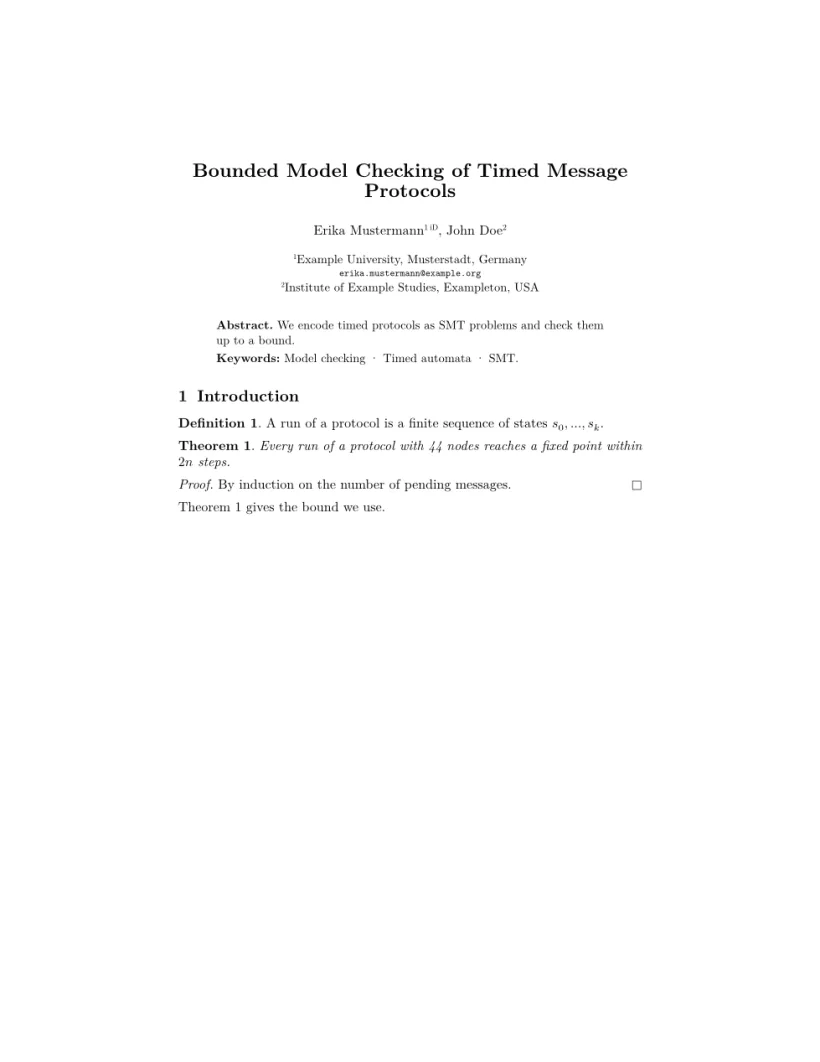
「問題」タブ: Layout in the style of the Springer LNCS format (final mode). Not official. To compile elsewhere, add llncs.cls from ctan.org/pkg/llncs.
クラスのコマンド
| コマンド | 働き | Scissor LaTeX での対応 |
|---|---|---|
\author の中の \and | 著者を区切る。カンマとして出力 | 使える |
\inst{1,2} | 名前の後の上付きの所属機関番号 | 使える |
\orcidID{..} | 名前の後の小さな ORCID の印 | 使える(ORCID のロゴではなくテキストの印) |
\institute{A \and B} | 著者の下の番号付きの所属機関 | 使える |
\email{..} | タイプライター体のメールアドレス | 使える |
\titlerunning、\authorrunning | 柱(runningheads 指定時) | 使える |
\keywords{a \and b} | 概要の中に「Keywords:」と、ドットでつないだ項目 | 使える |
theorem、lemma、proposition、corollary、definition、example、remark | 番号付きの定理型の環境 | 使える。見出しは太字、定理型の本文は斜体、定義と注意は立体 |
proof、\qed | 斜体の「Proof.」と終わりの印 | 使える |
\spnewtheorem{name}{Heading}{..}{..} | 新しい定理型の環境 | 使える |
credits 環境、\ackname、\discintname | 謝辞と利益相反の開示 | 使える。小さな文字で組まれる |
見出しはクラスに従います。「1 Introduction」と「1.1」は太字で、\subsubsection は独立した行の小さな太字の見出しとして組まれます(クラスでは段落に追い込まれます)。図と表のキャプションは「Fig. 1.」と「Table 1.」になります。
参考文献
テンプレートは \bibliographystyle{splncs04} を使い、Scissor LaTeX はこれを Springer LNCS の引用スタイル(番号付きの項目と [1] の引用)で組みます。参考文献をご覧ください。
llncs との違い
投稿するには、llncs.cls を CTAN (llncs)(クラスのドキュメントもあります)か Springer の論文集のガイドラインから入手します。.tex ファイルは変更なしでコンパイルできます。ほかのレイアウトは学会論文風テンプレートを、定理環境全般は定理と証明をご覧ください。
よくある質問
llncs で amsthm は必要ですか?
いいえ。llncs は theorem、lemma、definition、proof などを自分で定義しており、Scissor LaTeX も llncs の文書でそれらを提供します。さらに amsthm を読み込むと実際のビルドで衝突するので、読み込まないでください。
LNCS の論文に ORCID iD を追加するにはどうすればよいですか?
\author の中で、名前のすぐ後に自分の iD を入れた \orcidID{0000-0000-0000-0000} を書きます。Scissor LaTeX はそこに小さな印を表示し、公式のクラスは ORCID のロゴを出力します。
柱がないのはなぜですか?
runningheads オプションを追加してください:\documentclass[runningheads]{llncs}。タイトルや著者の一覧が長すぎる場合は、\titlerunning と \authorrunning を指定します。
このページの例はすべて、サイトのビルド時に Scissor LaTeX で組版されています。 最終更新:2026-11-07