


Scissor LaTeX での cleveref、nameref、varioref
Scissor LaTeX では cleveref パッケージはほぼ動作します。\cref と \Cref は単一のラベル、複数のラベル、範囲で動作し、\cpageref、\namecref、オプション capitalise、noabbrev、nameinlink、\crefname も動作します。\nameref は見出しの代わりに番号を出力し、\vref はページの案内を出しません。
パッケージの役割
cleveref は参照に対象の種類を付け加えます。\cref{fig:plot} は単語を入力しなくても「fig. 1」と出力し、\cref{a,b} は複数のラベルをまとめて「figs. 1 and 2」にします。nameref は節の番号の代わりに見出しを出力します。varioref は \vref で「on the next page」のようなページの案内を追加します。
ここで動作するもの
| コマンド | Scissor LaTeX では | 備考 |
|---|---|---|
\cref{label} | 動作する | 「section 1」「fig. 1」「table 1」「eq. (1)」。 |
\Cref{label} | 動作する | 大文字始まりで省略なし:「Figure 1」「Equation (1)」。 |
\cref{a,b}, \cref{a,b,c} | 動作する | 「sections 1 and 2」。 |
\crefrange{a}{b} | 動作する | 「eqs. (1) to (2)」。 |
\cpageref{label} | 動作する | 「page 1」。 |
\namecref{label}, \labelcref{label} | 動作する | 名前だけ(「eq.」)または番号だけ(「(1)」)。 |
\crefname, \Crefname | 動作する | プリアンブルで独自の名前を設定。 |
オプション capitalise, noabbrev, nameinlink | 動作する | ほかのオプションは無視されます。 |
\nameref{label}(nameref) | 一部のみ | 見出しではなく番号を出力します。 |
\vref, \Vref(varioref) | 一部のみ | ページの案内なしで番号を出力します。 |
例
\cref は対象の種類を自動で付け、複数のラベルをまとめます。
\cref と \Cref
\section{Data}\label{sec:data}
\section{Method}\label{sec:method}
\begin{figure}[h]
  \centering
  \fbox{A plot of the 44 samples}
  \caption{Samples.}\label{fig:samples}
\end{figure}
\begin{table}[h]
  \centering
  \begin{tabular}{lr} Erika & 44 \\ Hans & 38 \\ \end{tabular}
  \caption{Counts.}\label{tab:counts}
\end{table}
As \cref{sec:data,sec:method} explain, \cref{fig:samples} shows
the samples. \Cref{tab:counts} counts them.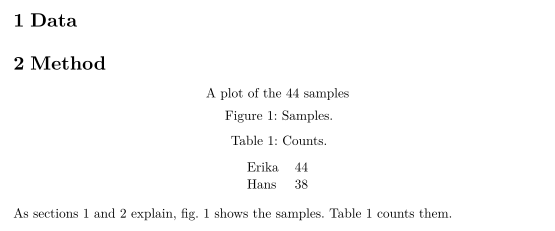
数式、範囲、ページの参照です。
数式、\crefrange、\cpageref
\begin{equation} a + b = 44 \label{eq:sum} \end{equation}
\begin{equation} a - b = 2 \label{eq:diff} \end{equation}
Adding \crefrange{eq:sum}{eq:diff} gives $a = 23$; \Cref{eq:sum}
is on \cpageref{eq:sum}.
オプション capitalise と noabbrev を使うと、どこでも省略なしの大文字始まりの名前になり、\crefname で独自の名前を設定できます。capitalise を指定すると \cref は独自の名前も大文字始まりにするので、下の part は「Part」と出力されます。
オプションと \crefname
\documentclass{article}
\usepackage[capitalise,noabbrev]{cleveref}
\crefname{section}{part}{parts}
\begin{document}
\section{Overview}\label{sec:overview}
\begin{figure}[h]
  \centering
  \fbox{Diagram}
  \caption{A diagram.}\label{fig:diagram}
\end{figure}
\cref{fig:diagram} belongs to \cref{sec:overview}.
\end{document}
ここでは \nameref は節の見出しではなく番号を出力します。
\nameref は番号を出力する
\section{Related work}\label{sec:related}
John Doe's results are summarised in \nameref{sec:related}.
互換性
- TeX のインストール環境からここへ:
\crefなどによる参照は、TeX のインストール環境と同じ見た目になります。\namerefは見出しの代わりに番号を出力し、\vrefには「on the next page」の案内が付きません。 - ここから TeX のインストール環境へ: 文書はそのまま変更なしでコンパイルできます。マニュアルの指示どおり、
cleverefはhyperrefの後に読み込んでください。
完全なマニュアルは CTAN にあります:ctan.org/pkg/cleveref、ctan.org/pkg/nameref、ctan.org/pkg/varioref。解説はラベルと相互参照を、\autoref については hyperref をご覧ください。
よくある質問
\cref と \Cref の違いは何ですか?
\cref は「fig. 1」や「eq. (1)」のような短い小文字の名前を使います。\Cref は文頭向けに、省略なしの大文字始まりで書きます。オプション capitalise を指定すると、\cref はどこでも \Cref と同じように動作します。
\nameref は節の見出しを出力しますか?
まだ出力しません。節の番号を出力するので、文としては読めますが意味合いが変わります。見出しが重要な場合は書き出してください。
このページの例はすべて、サイトのビルド時に Scissor LaTeX で組版されています。 最終更新:2026-11-07