


算法与伪代码
把伪代码放进带 \caption 的 algorithm 环境,就会得到“Algorithm 1”;在其中,Scissor LaTeX 只在会议版式中读取 algorithmic 的大写命令(\STATE、\FOR),所以在其他文档中请把步骤写在 verbatim 块里。
algorithm 环境
algorithm 宏包为伪代码提供一个带编号的环境,用法和图类似:\caption 为它编号(“Algorithm 1”),写在标题之后的 \label 让你可以用 \ref 引用它。在 Scissor LaTeX 中,算法会停留在你书写的位置,标题排在它的下方。
环境内部写什么取决于你用哪个宏包编写步骤,而支持程度的差别就在这里:
| 宏包 | 命令 | 在 Scissor LaTeX 中 |
|---|---|---|
| algorithm | algorithm 环境、\caption、\label | 可用:编号为“Algorithm N”,标题在下方。 |
| algorithmic | \STATE、\IF、\FOR、\WHILE、\RETURN ...(大写) | 部分可用:只在使用会议版式的文档中读取;在其他地方它们是未知命令。 |
| algpseudocode (algorithmicx) | \State、\If、\For、\EndFor、\Return ... | 不支持:会被跳过并给出提示,各步骤挤在同一行。 |
| algorithm2e | \KwIn、\For{..}{..}、\eIf ... | 不支持:会被跳过并给出提示。 |
在任何地方都可用的伪代码
在任何 Scissor LaTeX 文档中展示伪代码,最可靠的方法是在 algorithm 中放一个 verbatim 块。这样既保留编号和标题,各行也保留原有的缩进。
步骤写在 verbatim 中的算法
\begin{algorithm}
\caption{Sum of a list}
\label{alg:sum}
\begin{verbatim}
s := 0
for each a in xs:
    s := s + a
return s
\end{verbatim}
\end{algorithm}
Algorithm~\ref{alg:sum} adds the numbers of a list.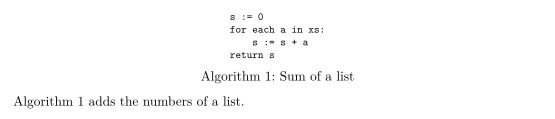
如果伪代码中含有公式,lstlisting 的用法相同;你也可以在 algorithm 环境之外,把步骤写成普通文本的编号列表。
用带数学公式的编号列表写步骤
\textbf{Input:} numbers $a_1, \dots, a_n$.
\begin{enumerate}
  \item Set $s \gets 0$.
  \item For $i = 1, \dots, n$: set $s \gets s + a_i$.
  \item Return $s$.
\end{enumerate}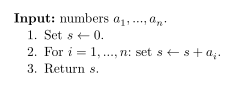
会议版式中的 algorithmic
仿会议风格的版式(arXiv、IEEE、NeurIPS、ICML 等)会读取 algorithmic 宏包的大写命令:for、do、end for 和 return 等关键字以粗体排版,每条命令另起一行。不会绘制行号,各行居中。“问题”标签页会显示当前使用的版式。
arXiv 风格文档中的 algorithmic
\documentclass{article}
\usepackage{arxiv}
\usepackage{algorithm,algorithmic}
\begin{document}
\begin{algorithm}
\caption{Sum of a list}
\begin{algorithmic}
\STATE $s \gets 0$
\FOR{$i = 1$ to $n$}
  \STATE $s \gets s + a_i$
\ENDFOR
\RETURN $s$
\end{algorithmic}
\end{algorithm}
\end{document}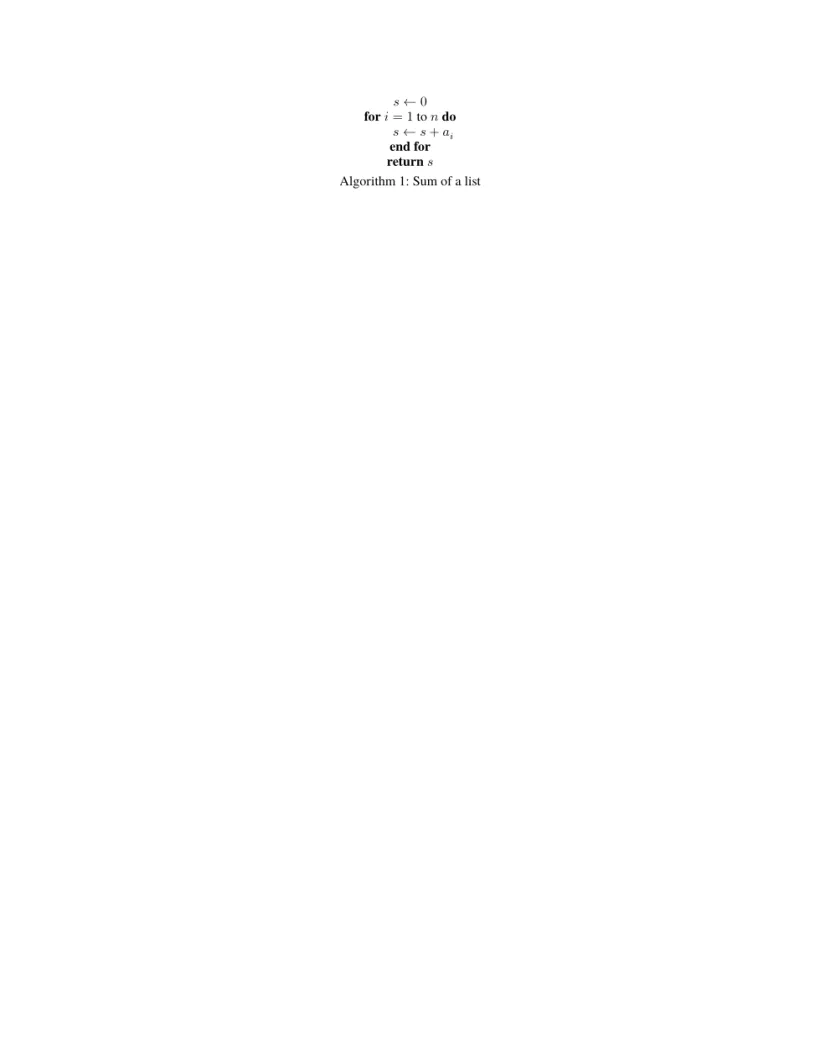
“问题”标签页: Layout in the style of the arXiv preprint style (final mode). Not official. To compile elsewhere, add arxiv.sty from github.com/kourgeorge/arxiv-style.
不支持 algpseudocode
algpseudocode 是近年论文中最常用的宏包,它使用 \State 和 \EndFor 这类大小写混合的命令。Scissor LaTeX 不认识这些命令:命令名会被跳过,公式和文字会保留,但所有内容都挤在同一行。“问题”标签页会列出被跳过的命令。
algpseudocode:各步骤挤在一起
\begin{algorithm}
\caption{Sum of a list}
\begin{algorithmic}[1]
\State $s \gets 0$
\For{$i = 1$ to $n$}
  \State $s \gets s + a_i$
\EndFor
\State \Return $s$
\end{algorithmic}
\end{algorithm}
“问题”标签页: Skipped 4 unknown commands: \State, \For, \EndFor, \Return
如果你需要文档既能在这里使用,也能在 TeX 发行版中编译,请像上面那样把步骤写在 verbatim 中;这种写法在任何地方都能编译。
与 TeX 发行版的区别
对应的宏包页面是 algorithm、algorithmic 和 algpseudocode。手册可在 CTAN 上找到:algorithms、algorithmicx 和 algorithm2e。
常见问题
如何在 LaTeX 中编写算法?
使用带 \caption 的 algorithm 环境,把步骤放在里面。在 Scissor LaTeX 中,步骤最好写在 verbatim 块里,或者在会议版式中使用 algorithmic 的 \STATE 命令。
为什么我的 \State 行都挤在一起?
\State 来自 algpseudocode,而 Scissor LaTeX 不支持这个宏包。命令名会被跳过,所以各步骤连成了一行。请改用 verbatim 来写步骤。
能按编号引用算法吗?
能。在 \caption 之后写 \label{alg:name},然后写 Algorithm~\ref{alg:name}。
本页的每个示例都在构建网站时由 Scissor LaTeX 排版。 最后更新:2026-11-07