


Scissor LaTeX 中的 cleveref、nameref 和 varioref
cleveref 宏包在 Scissor LaTeX 中基本可用:\cref 和 \Cref 支持单个标签、多个标签和范围,\cpageref、\namecref、capitalise、noabbrev 和 nameinlink 选项以及 \crefname 也都可用;\nameref 输出编号而不是标题,\vref 不给出页码提示。
宏包的作用
cleveref 会在引用中加上对象的类型:\cref{fig:plot} 输出“fig. 1”,你无需手动输入这个词;\cref{a,b} 会把多个标签合并为“figs. 1 and 2”。nameref 输出章节的标题而不是编号。varioref 用 \vref 加上“on the next page”这样的页码提示。
这里可用的功能
| 命令 | 在 Scissor LaTeX 中 | 说明 |
|---|---|---|
\cref{label} | 可用 | “section 1”、“fig. 1”、“table 1”、“eq. (1)”。 |
\Cref{label} | 可用 | 首字母大写,不使用缩写:“Figure 1”、“Equation (1)”。 |
\cref{a,b}, \cref{a,b,c} | 可用 | “sections 1 and 2”。 |
\crefrange{a}{b} | 可用 | “eqs. (1) to (2)”。 |
\cpageref{label} | 可用 | “page 1”。 |
\namecref{label}, \labelcref{label} | 可用 | 只输出名称(“eq.”)或只输出编号(“(1)”)。 |
\crefname, \Crefname | 可用 | 在导言区设置你自己的名称。 |
选项 capitalise、noabbrev、nameinlink | 可用 | 其他选项被忽略。 |
\nameref{label}(nameref) | 部分可用 | 输出编号,而不是标题。 |
\vref, \Vref(varioref) | 部分可用 | 输出编号,没有页码提示。 |
示例
\cref 会替你写出对象类型,并能合并多个标签:
\cref 和 \Cref
\section{Data}\label{sec:data}
\section{Method}\label{sec:method}
\begin{figure}[h]
  \centering
  \fbox{A plot of the 44 samples}
  \caption{Samples.}\label{fig:samples}
\end{figure}
\begin{table}[h]
  \centering
  \begin{tabular}{lr} Erika & 44 \\ Hans & 38 \\ \end{tabular}
  \caption{Counts.}\label{tab:counts}
\end{table}
As \cref{sec:data,sec:method} explain, \cref{fig:samples} shows
the samples. \Cref{tab:counts} counts them.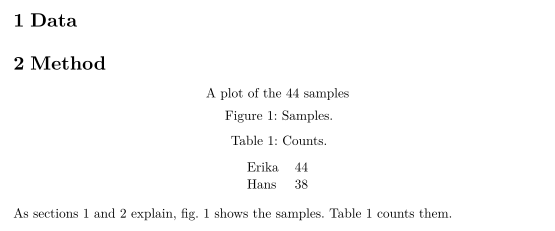
公式、范围和页码引用:
公式、\crefrange 和 \cpageref
\begin{equation} a + b = 44 \label{eq:sum} \end{equation}
\begin{equation} a - b = 2 \label{eq:diff} \end{equation}
Adding \crefrange{eq:sum}{eq:diff} gives $a = 23$; \Cref{eq:sum}
is on \cpageref{eq:sum}.
选项 capitalise 和 noabbrev 会让所有地方都使用首字母大写的完整名称,\crefname 则用来设置你自己的名称。使用 capitalise 时,\cref 会采用你所设名称的首字母大写形式,所以下面的 part 会输出为“Part”:
选项和 \crefname
\documentclass{article}
\usepackage[capitalise,noabbrev]{cleveref}
\crefname{section}{part}{parts}
\begin{document}
\section{Overview}\label{sec:overview}
\begin{figure}[h]
  \centering
  \fbox{Diagram}
  \caption{A diagram.}\label{fig:diagram}
\end{figure}
\cref{fig:diagram} belongs to \cref{sec:overview}.
\end{document}
\nameref 在这里输出章节编号,而不是标题:
\nameref 输出编号
\section{Related work}\label{sec:related}
John Doe's results are summarised in \nameref{sec:related}.
兼容性
- 从 TeX 发行版迁移到这里: 使用
\cref等命令的引用与 TeX 发行版中的效果一样。\nameref给出的是编号而不是标题,\vref没有“on the next page”这样的提示。 - 从这里迁移到 TeX 发行版: 文档无需修改即可在那里编译。请按照手册的要求,在
hyperref之后加载cleveref。
完整手册见 CTAN:ctan.org/pkg/cleveref、ctan.org/pkg/nameref 和 ctan.org/pkg/varioref。使用指南请参阅标签和交叉引用,关于 \autoref 请参阅 hyperref。
常见问题
\cref 和 \Cref 有什么区别?
\cref 使用简短的小写名称,例如“fig. 1”或“eq. (1)”。\Cref 写出首字母大写的完整名称,适合放在句首。选项 capitalise 会让 \cref 在所有地方都像 \Cref 一样。
\nameref 会输出章节标题吗?
暂时还不会。它输出章节编号,所以句子仍然通顺,只是意思略有不同。如果标题很重要,请直接写出来。
本页的每个示例都在构建网站时由 Scissor LaTeX 排版。 最后更新:2026-11-07