


NeurIPS 2026 LaTeX 模板(neurips_2026.sty)
NeurIPS 论文使用 neurips.cc 征稿通知中提供的样式文件 neurips_2026.sty。Scissor LaTeX 提供一个免费的仿照版式,供你在浏览器中撰写草稿,无需账号:从 NeurIPS 模板开始,或者在 article 中加载 \usepackage{neurips_2026};默认是带行号的匿名稿,在 preprint 或 final 模式下显示作者。同一个 .tex 配合官方样式文件也能编译。
在编辑器中打开 NeurIPS 模板 免费,在浏览器中,无需账号
模板
NeurIPS 模板是一篇关于重尾噪声下步长选择的优化论文,包含三位作者、一幅对数刻度的训练损失图表、一个列出准确率的 booktabs 表格、一个致谢小节和作者-年份格式的引用。在编辑器中打开 NeurIPS 模板即可查看全部内容。它以显示作者的 preprint 模式开始。
启用它
这个工具包是用于普通 article 的一个宏包:
\documentclass{article}
\usepackage{neurips_2026}
年份从宏包名称中读取,所以 neurips_2025 或 neurips_2027 也能使用,声明会显示该年份。nips_2019 等较旧的名称也能识别。页面总是 Letter 纸张、单栏,两侧边距 1.5 英寸,使用 TeX Gyre Termes(免费的 Times 替代字体,首次使用时下载)排版。
模式
| 那一行 | 模式 | 作者 | 行号 | 第 1 页底部的声明 |
|---|---|---|---|---|
\usepackage{neurips_2026} | 投稿 | “Anonymous Author(s)” | 有 | “Submitted to ... Do not distribute.” |
\usepackage[preprint]{neurips_2026} | 预印本 | 显示 | 无 | “Preprint.” |
\usepackage[main, final]{neurips_2026} | 终稿 | 显示 | 无 | 会议名称 |
\usepackage[nonanonymous]{neurips_2026} | 署名投稿 | 显示 | 有 | “Submitted to ...” |
在所有模式中,第一页都没有页码;后续各页都有居中的页码。
默认模式:带行号的匿名投稿
\documentclass{article}
\usepackage{neurips_2026}
\usepackage{amsmath}

\title{Adaptive Step Sizes under Heavy-Tailed Noise}
\author{Erika Mustermann \\ Example University \\ \texttt{erika@example.org}
  \And
  John Doe \\ Institute of Example Studies \\ \texttt{john.doe@example.org}}

\begin{document}
\maketitle

\begin{abstract}
We propose a step-size rule for stochastic gradient descent that stays stable when the
gradient noise has heavy tails, and test it with 44 random seeds.
\end{abstract}

\section{Introduction}
A fixed step size $\eta$ is either too cautious early in training or unstable later.
We adapt $\eta_t$ to a running estimate of the noise scale.

\begin{ack}
This text is hidden in the submission version.
\end{ack}
\end{document}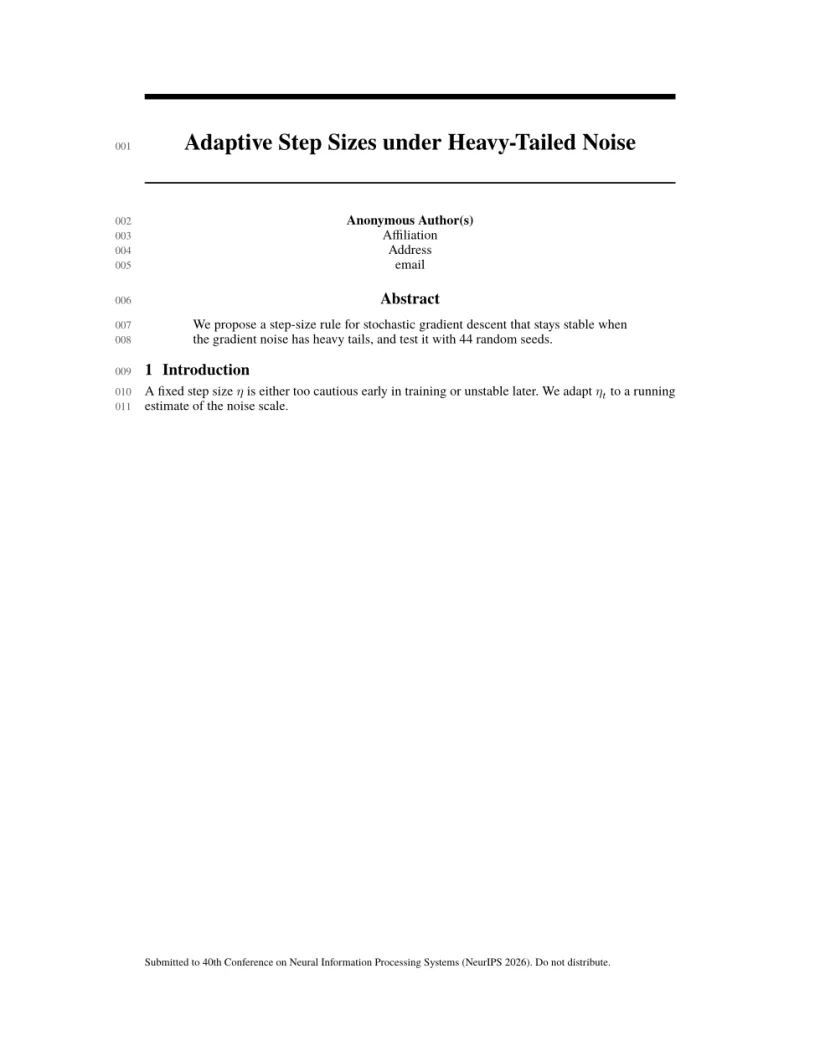
“问题”标签页: Layout in the style of the NeurIPS style (anonymous review mode). Not official. To compile elsewhere, add the NeurIPS style file from neurips.cc.
工具包命令
| 命令 | 作用 | 在 Scissor LaTeX 中 |
|---|---|---|
\And、\AND | 同一行的下一位作者,或另起一行 | 支持 |
\thanks{..} | 姓名上的脚注 | 支持(匿名时隐藏) |
ack 环境 | “Acknowledgments and Disclosure of Funding” | 支持;与工具包一样,在投稿模式中隐藏 |
\answerYes{}、\answerNo{}、\answerNA{}、\answerTODO{} | 论文清单中的回答 | 支持:彩色的“[Yes]”“[No]”“[NA]”“[TODO]” |
分轨选项 main、position、eandd、creativeai、education、sglblindworkshop、dblblindworkshop | 终稿论文所属的分轨 | 可接受;与工具包一样,creativeai、education 和 sglblindworkshop 会显示作者 |
nonatbib | 不加载 natbib | 可接受 |
参考文献
NeurIPS 允许任何统一的引用样式;模板使用 \bibliographystyle{plainnat},Scissor LaTeX 将其排为作者-年份格式的引用,可使用 natbib 的 \citet 和 \citep。请参阅参考文献。
与 neurips_2026.sty 的不同之处
投稿时,从 neurips.cc 的征稿通知中获取 neurips_2026.sty,并把它放在你的 .tex 文件旁边;无需修改即可编译。其他版式请参阅会议仿照模板。
常见问题
如何在 NeurIPS 论文中显示作者姓名?
arXiv 版本请使用 \usepackage[preprint]{neurips_2026},终稿请使用 \usepackage[main, final]{neurips_2026}。不加选项时,论文是匿名的。
为什么我的致谢小节不见了?
ack 环境在投稿版本中是隐藏的,这样评审者就看不到是谁资助了这项工作。它会在预印本和终稿模式中出现。
可以在这里填写论文清单吗?
可以。回答命令 \answerYes{}、\answerNo{} 和 \answerNA{} 都能使用,所以你可以把官方工具包中的清单粘贴到你的文档中。
本页的每个示例都在构建网站时由 Scissor LaTeX 排版。 最后更新:2026-11-07