


包含多个文件的项目
把导言区和 \begin{document} 留在 main.tex 中,用 \input{chapters/intro} 或 \include{chapters/intro} 引入其他文件;Scissor LaTeX 会在排版之前把它们合并为一个文档。
为什么要拆分文档
学位论文或长篇报告分成几部分会更容易处理:每章一个文件,导言区一个文件,附录一个文件。LaTeX 为此提供了两个命令,它们在 Scissor LaTeX 中都可用。
| 命令 | 作用 | 在 Scissor LaTeX 中 |
|---|---|---|
\input{file} | 把文件的文本直接放在这里,就像你亲手输入的一样。 | 可用,在导言区中和嵌套使用时也可用。 |
\include{file} | 开始新的一页,把文件的文本放在这里,然后结束这一页。 | 可用。连续的分页只算一次,所以不会出现空白页。 |
\includeonly{a,b} | 略去所有不在列表中的 \include。 | 忽略:所有文件都会被包含。 |
\subfile{file} (subfiles) | 类似 \input,用于也能单独编译的文件。 | 不支持:跳过并给出提示。请使用 \input。 |
\import{dir/}{file} (import) | 相对于另一个文件夹的 \input。 | 不支持:跳过并给出提示。 |
一个小项目
典型的项目有一个主文件和一个存放各章的文件夹:
main.tex
preamble.tex
chapters/intro.tex
chapters/method.tex
refs.bib
主文件包含文档类、导言区和文档正文,并引入其余部分:
\documentclass{report}
\input{preamble}

\title{Rainfall at Two Sites}
\author{Erika Mustermann}

\begin{document}
\maketitle
\input{chapters/intro}
\input{chapters/method}
\bibliographystyle{plain}
\bibliography{refs}
\end{document}
每个章节文件只包含自己那部分文本,没有导言区,也没有 \begin{document}:
\chapter{Introduction}
\label{chap:intro}
Rain gauges were read every morning for 44 days.
The method is described in Chapter~\ref{chap:method}.
Scissor LaTeX 把每个 \input 和 \include 替换为对应文件的文本,并把结果作为一个文档排版。标签、引用和文献引用可以跨文件使用,因为对排版器来说它们都是同一段文本。
合并后的文档是什么样子
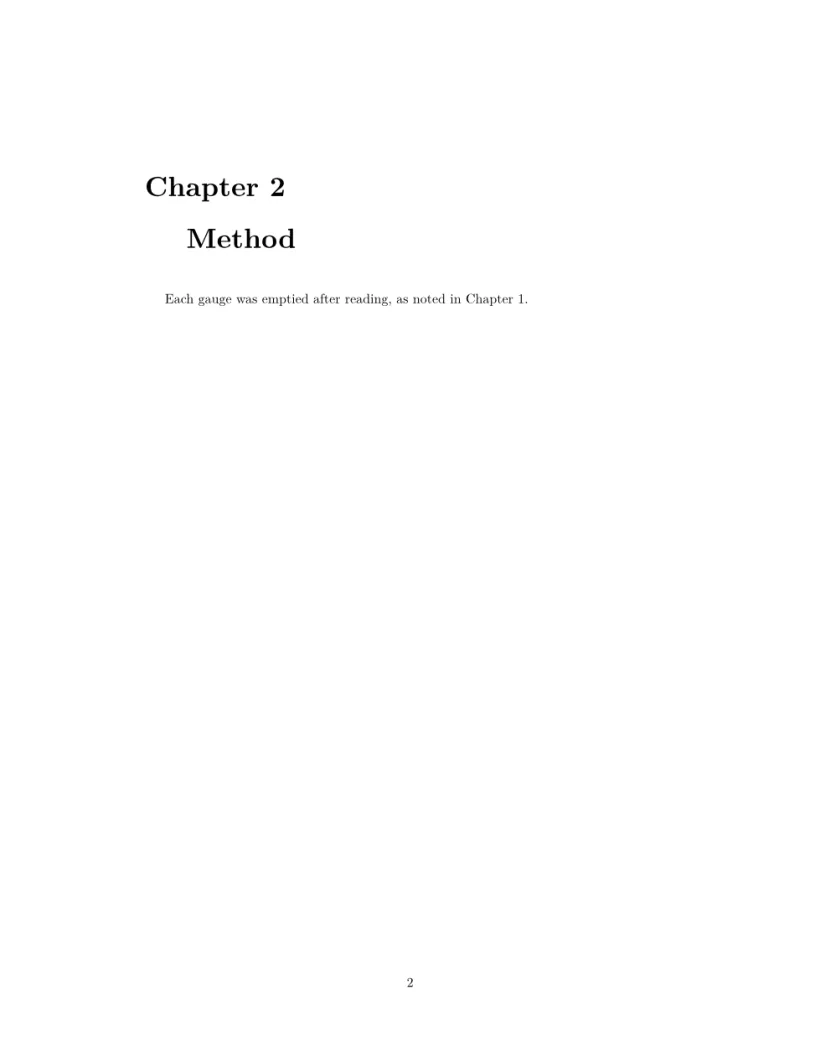
当 main.tex 用 \input 引入两个章节文件时,编辑器排版的就是这样的内容:两个文件的文本按顺序排列。(为了能在这里展示,这个例子写成了一个文件。)在 report 或 book 中,\chapter 会自动让每一章从新页面开始。
两个章节文件合并为一个文档
\documentclass{report}
\begin{document}
\chapter{Introduction}
\label{chap:intro}
Rain gauges were read every morning for 44 days.
The method is described in Chapter~\ref{chap:method}.
\chapter{Method}
\label{chap:method}
Each gauge was emptied after reading, as noted in
Chapter~\ref{chap:intro}.
\end{document}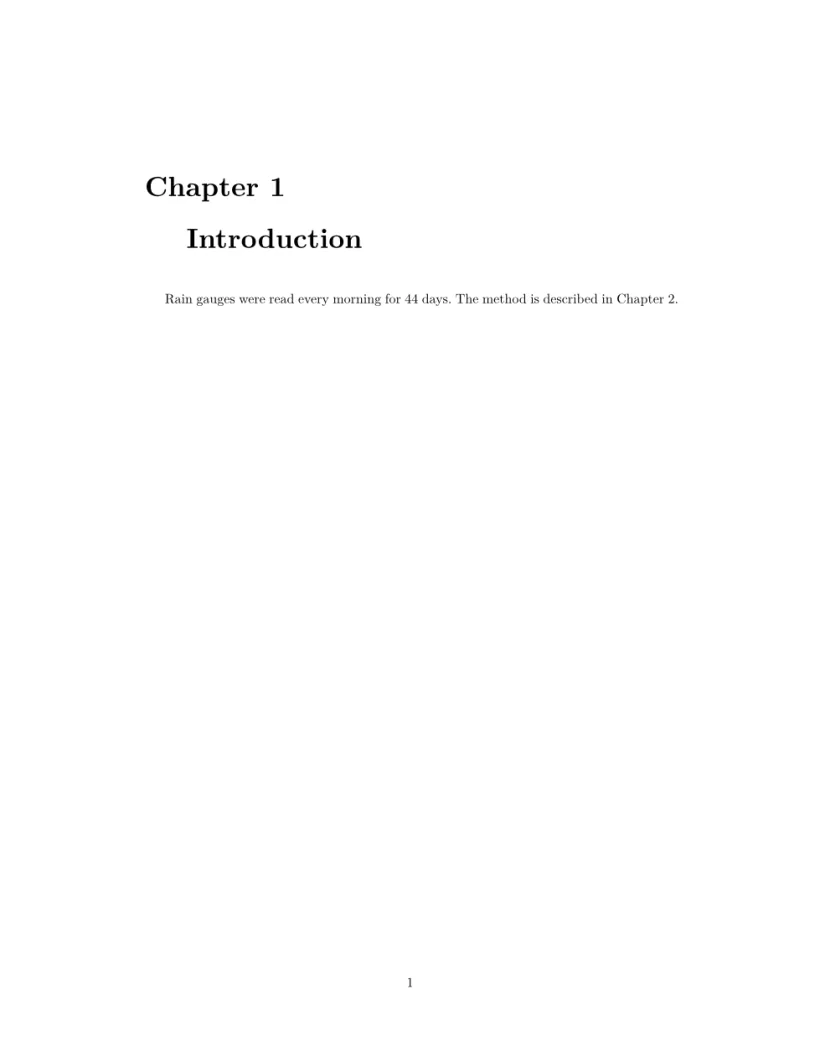
如何查找文件名
- 路径相对于项目的顶层文件夹,就像在 LaTeX 中相对于主文件所在的文件夹一样,在嵌套的文件中也是如此。
- 可以省略
.tex扩展名:\input{chapters/intro}会找到chapters/intro.tex。 - 名称两侧的引号会被去掉,例如
\input{"my file"}。 - 缺失的文件会作为错误列在“问题”标签页中,并标出
\input所在的行。文档的其余部分仍会排版。 - 直接或间接包含自身的文件会被略去并给出提示,嵌套超过 24 层后会停止。
subfiles 和 \includeonly
subfiles 宏包让每一章都能单独编译。Scissor LaTeX 不会跟随 \subfile:该命令会被跳过,“问题”标签页会提示有文件未被包含。
不会跟随 \subfile
\documentclass{article}
\usepackage{subfiles}
\begin{document}
The chapter below is not included:
\subfile{chapters/intro}
Replace it with an \verb|\input| line.
\end{document}
“问题”标签页: 1 included file is not part of this conversion
如果想一次只处理一章,请用 % 注释掉其他 \include 行。\includeonly 会被接受但不起作用:每个被包含的文件都会排版。\lstinputlisting 和 \inputminted 也是如此,它们会被跳过并给出同样的提示(参见代码清单)。
项目中的其他文件
图片、.bib 文件和数据文件可以放在任意文件夹中;引用它们时写出从顶层文件夹开始的路径,例如 \includegraphics{figures/plot.png}。无论 \bibliography 中写的是什么名称,项目中所有的 .bib 文件都会用于文献引用(参见参考文献)。要从 TeX 安装中导入整个项目,请参见项目和文件。
与 TeX 安装的不同之处
相关宏包的手册在 CTAN 上:subfiles 和 import。
常见问题
\input 和 \include 有什么区别?
\input 把文件的文本原样粘贴到当前位置。\include 还会在其前后开始和结束一个新页面,并且在 TeX 安装中可以配合 \includeonly 使用。在 Scissor LaTeX 中,两者都可用于章节;\includeonly 会被忽略,所以每个 \include 都会排版。
为什么找不到我用 \input 引入的文件?
检查从项目顶层文件夹开始的路径和拼写,包括大小写。“问题”标签页会显示它查找的名称以及 \input 所在的行。
subfiles 在 Scissor LaTeX 中可用吗?
不可用。把 \subfile{...} 替换为 \input{...};这样章节文件就不需要自己的导言区了。
本页的每个示例都在构建网站时由 Scissor LaTeX 排版。 最后更新:2026-11-07