


ICLR 2026 LaTeX 模板(iclr2026_conference)
ICLR 论文使用来自 github.com/ICLR/Master-Template 的 iclr2026_conference.sty。Scissor LaTeX 提供一个免费的仿照版式,供你在浏览器中撰写草稿,无需账号:从 ICLR 模板开始,或者在 article 中加载 \usepackage{iclr2026_conference,times};在你加上 \iclrfinalcopy 之前,论文都是匿名投稿稿。同一个 .tex 配合官方工具包也能编译。
在编辑器中打开 ICLR 模板 免费,在浏览器中,无需账号
模板
ICLR 模板是一篇关于谱正则化的表示学习论文,包含三位作者、符号宏、一幅带着色带的图表、一个 booktabs 风格的消融实验表格和作者-年份格式的引用。在编辑器中打开 ICLR 模板即可查看全部内容。它以匿名投稿稿开始。
启用它
这个工具包是用于普通 article 的一个宏包。官方示例在同一行中把它和 times 一起加载:
\documentclass{article}
\usepackage{iclr2026_conference,times}
年份从宏包名称中读取,所以 iclr2027_conference 也能使用,页眉会显示该年份。页面总是 Letter 纸张、单栏,两侧边距 1.5 英寸,使用 TeX Gyre Termes(免费的 Times 替代字体,首次使用时下载)排版。
投稿稿和终稿
这个工具包没有宏包选项。它通过导言区中的一条命令切换:
| 导言区 | 每页的页眉 | 作者 | 行号 |
|---|---|---|---|
| 不写 | “Under review as a conference paper at ICLR 2026” | “Anonymous authors / Paper under double-blind review” | 有 |
\iclrfinalcopy | “Published as a conference paper at ICLR 2026” | 显示 | 无 |
使用 \iclrfinalcopy 的终稿版本
\documentclass{article}
\usepackage{iclr2026_conference,times}
\usepackage{amsmath}

\title{Spectral Regularisation for Stable\\ Representation Learning}
\author{Erika Mustermann \& Hans Mustermann \\
Department of Computer Science\\
Example University \\
\texttt{\{erika,hans\}@example.org}
\And
John Doe \\
Institute of Example Studies \\
\texttt{john.doe@example.org}}

\iclrfinalcopy

\begin{document}
\maketitle

\begin{abstract}
We penalise only the singular values of each layer that exceed a target, which keeps
training stable without slowing it down.
\end{abstract}

\section{Introduction}
Large singular values make a network sensitive to small changes of its input.
For a weight matrix $W$ we penalise $\sum_i \max(0, \sigma_i(W) - \tau)^2$.

\subsection{Contributions}
We test the penalty on 44 layer configurations.
\end{document}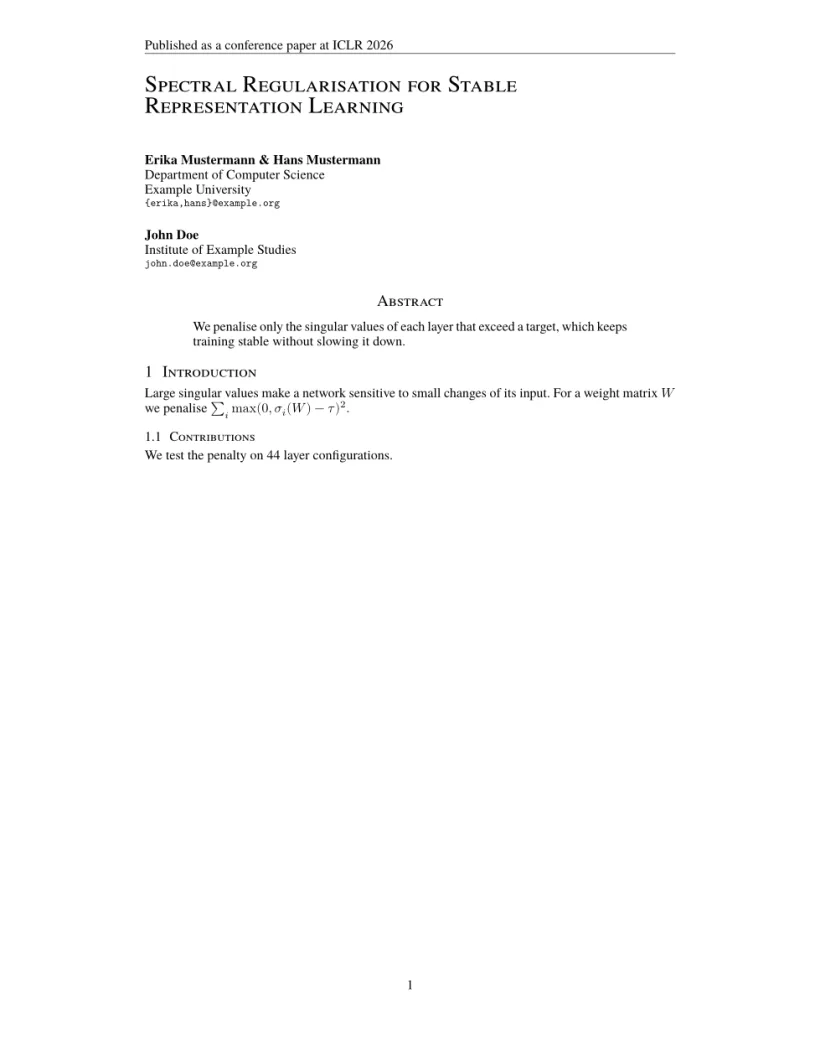
“问题”标签页: Layout in the style of the ICLR style (final mode). Not official. To compile elsewhere, add the ICLR style files from github.com/ICLR/Master-Template.
版式设置了什么
- 标题为大号小型大写字母,左对齐;作者紧随其后,也左对齐。用
\And或\AND分隔作者;Scissor LaTeX 把每个作者区块放在前一个的下方,而工具包会在放得下时把用\And连接的区块并排放置。 - “Abstract”和所有各级标题都使用小型大写字母(“1 Introduction”“1.1 Contributions”)。
- 页码居中位于每页底部。
- 图表标题为“Figure 1:”和“Table 1:”。
官方示例用 \input{math_commands.tex} 引入符号宏,只要文件在你的项目中,它就像普通的 \input 一样工作。模板则改为在导言区自己定义了几个宏;请参阅宏。
参考文献
模板使用 \bibliographystyle{iclr2026_conference},Scissor LaTeX 将其排为作者-年份格式的引用,可使用 \citet 和 \citep。请参阅参考文献。
与 ICLR 样式的不同之处
投稿时,从 github.com/ICLR/Master-Template 获取 iclr2026_conference.sty、对应的 .bst 文件和 math_commands.tex,并把它们放在你的 .tex 文件旁边;无需修改即可编译。其他版式请参阅会议仿照模板。
常见问题
如何制作 ICLR 论文的终稿版本?
在导言区(\begin{document} 之前)加上 \iclrfinalcopy。页眉会变为“Published as a conference paper”,作者会显示出来,行号会消失。
为什么我的 ICLR 论文显示“Anonymous authors”?
不加 \iclrfinalcopy 时,论文是双盲投稿稿,所以作者被隐藏。你的 \author 文字仍保留在源代码中。
需要 times 宏包吗?
官方示例加载了它,在这里也没有坏处:无论是否加载,Scissor LaTeX 都会为 ICLR 使用其 Times 替代字体。
本页的每个示例都在构建网站时由 Scissor LaTeX 排版。 最后更新:2026-11-07