


ACM LaTeX 模板(acmart sigconf)
官方的 ACM 模板是 acmart 文档类,可从 CTAN 或 ACM 的会议论文集模板页面获取。Scissor LaTeX 提供其 sigconf 格式的免费仿照版式,供你在浏览器中撰写草稿,无需账号:从 ACM 模板开始,或者写 \documentclass[sigconf]{acmart},带 CCS 概念和关键词的双栏页面就会随输入出现。同一个 .tex 配合官方文档类也能编译。
在编辑器中打开 ACM 模板 免费,在浏览器中,无需账号
模板
ACM 模板是一篇关于键值存储中请求批处理的系统论文,包含三位作者、CCS 概念、一幅延迟图表、一个 booktabs 表格、一个致谢小节和按编号排列的参考文献。在编辑器中打开 ACM 模板即可查看全部内容。
启用它
acmart 是一个文档类,格式是它的选项:
\documentclass[sigconf]{acmart}版式为 Letter 纸张、9 pt 双栏,用 Libertinus 作为 acmart 所用 Libertine 字体的免费替代(在文档第一次需要时下载,约 2.7 MB)。期刊格式 acmsmall、acmlarge、acmtog 和 manuscript(也是未指定格式时的默认值)使用 ACM 期刊版式。sigplan 等其他会议论文集格式保留下面所有的命令,但以 sigconf 外观按 10 pt 单栏绘制,并在“问题”标签页中附带说明。
前置部分的顺序
在 acmart 中,摘要、CCS 概念和关键词位于 \maketitle 之前:像官方示例那样,把摘要放在 \begin{document} 之后、\maketitle 之前。和该文档类一样,Scissor LaTeX 把它们印在标题和作者之后。
作者、摘要、CCS 概念和关键词
\documentclass[sigconf]{acmart}
\setcopyright{none}
\acmConference[EXCS '26]{Example Conference on Computer Systems}{June 1--4, 2026}{Example City}

\title{Tail-Latency-Aware Request Batching}

\author{Erika Mustermann}
\affiliation{%
  \institution{Example University}
  \city{Musterstadt}
  \country{Germany}}
\email{erika.mustermann@example.org}

\author{John Doe}
\affiliation{%
  \institution{Institute of Example Studies}
  \city{Exampleton}
  \country{USA}}
\email{john.doe@example.org}

\begin{document}
\begin{abstract}
Batching requests raises throughput but hurts the slowest requests. We size batches
from the observed queue so that the 99th percentile latency stays within a budget.
\end{abstract}

\ccsdesc[500]{Information systems~Key-value stores}
\ccsdesc[300]{Computer systems organization~Distributed architectures}
\keywords{request batching, tail latency, key-value stores}
\maketitle

\section{Introduction}
A key-value store serving 44 clients spends much of its time on per-request overhead.
\end{document}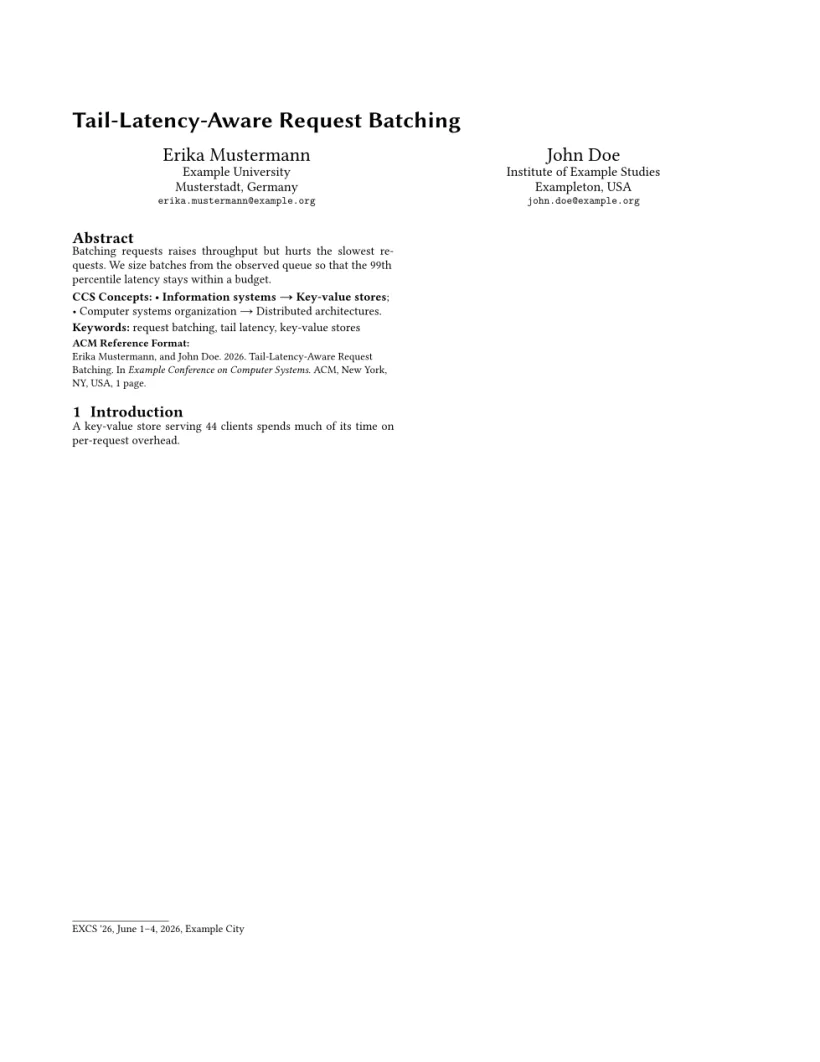
“问题”标签页: Layout in the style of the ACM sigconf format (final mode). Not official. To compile elsewhere, add acmart.cls from ctan.org/pkg/acmart.
模式
| 文档类选项 | 作者 | 行号 | 页码 |
|---|---|---|---|
[sigconf] | 显示 | 无 | 无 |
[sigconf,review] | 显示 | 有 | 有 |
[sigconf,anonymous] | “Anonymous Author(s)” | 无 | 无 |
[sigconf,review,anonymous] | “Anonymous Author(s)” | 有 | 有 |
[sigconf,nonacm] | 显示,不含会议信息和引用格式区块 | 无 | 无 |
和 acmart 中一样,review 和 anonymous 相互独立。大多数双盲评审的会议要求两者都用。
文档类命令
| 命令 | 作用 | 在 Scissor LaTeX 中 |
|---|---|---|
重复使用 \author | 每次一位作者 | 支持 |
\affiliation{\institution{..}\city{..}\country{..}} | 上一位作者的单位;还有 \department、\streetaddress、\state、\postcode | 支持 |
\email、\additionalaffiliation、\authornote | 更多作者信息 | 支持 |
\orcid | ORCID iD | 可接受,但不显示 |
\ccsdesc[weight]{A~B} | 一个 CCS 概念;权重 500 及以上以粗体显示 | 支持 |
\keywords{..} | 关键词行 | 支持 |
\acmConference[short]{name}{date}{place}、\acmBooktitle、\acmYear、\copyrightyear、\acmDOI、\acmISBN | 会议和出版信息 | 支持:用于会议信息行、页眉和“ACM Reference Format”区块 |
\setcopyright{..} | 版权声明 | 会印出会议信息行;ACM 的许可文字本身从不印出 |
\settopmatter{printacmref=false} | 不显示引用格式区块 | 支持;printfolios=true 会添加页码 |
\renewcommand{\shortauthors}{..} | 页眉中的作者姓名 | 支持 |
\subtitle{..} | 副标题 | 支持 |
teaserfigure 环境 | 作者下方的通栏图 | 部分支持:以通栏宽度显示,但位于标题上方而不是作者下方 |
acks 环境 | 不编号的“Acknowledgments”小节 | 支持 |
CCSXML、\Description{..}、\received、\citestyle | 元数据 | 会被接受并忽略 |
参考文献
模板使用 \bibliographystyle{ACM-Reference-Format},Scissor LaTeX 将其排为按编号排列的参考文献。请参阅参考文献。
与 acmart 的不同之处
投稿时,请从 CTAN (acmart)(那里也有完整的文档类手册)或 ACM 的会议论文集模板页面获取 acmart。你的 .tex 文件无需修改就能用它编译。其他版式请参阅会议仿照模板。
常见问题
如何进行匿名的 ACM 投稿?
使用 \documentclass[sigconf,review,anonymous]{acmart}。作者会被替换为“Anonymous Author(s)”,并添加行号和页码。
为什么 ACM 论文的摘要位于 \maketitle 之前?
这是 acmart 收集前置部分的方式:先读取摘要、CCS 概念和关键词,再由 \maketitle 把它们印在正确的位置。Scissor LaTeX 遵循同样的顺序。
可以使用 acmsmall 或期刊格式吗?
可以。acmsmall、acmlarge、acmtog 和 manuscript 使用单栏的 ACM 期刊版式;编辑器的“期刊”标签页中有一个 ACM 期刊模板。请参阅期刊仿照模板。
本页的每个示例都在构建网站时由 Scissor LaTeX 排版。 最后更新:2026-11-07