


문서 구조
LaTeX 문서는 두 부분으로 나뉩니다. \documentclass부터 \begin{document}까지의 프리앰블은 문서를 설정하고, \begin{document}와 \end{document} 사이의 본문에는 실제로 출력될 내용이 들어갑니다.
뼈대
모든 문서는 \documentclass{...}로 시작하며 document 환경을 정확히 하나 가집니다. \end{document} 뒤에 오는 내용은 모두 무시됩니다.
\documentclass[11pt,a4paper]{article}   % the class and its options
\usepackage{amsmath}                    % packages
\title{...}                             % settings for the title
\begin{document}                        % the body starts
  ...
\end{document}                          % the body ends
문서 클래스
클래스는 어떤 종류의 문서를 쓰는지, 그리고 문서가 어떻게 보일지를 정합니다. Scissor LaTeX는 클래스 계열마다 자체 레이아웃을 가지고 있습니다.
| 이렇게 쓰면 | 이런 레이아웃 | 참고 |
|---|---|---|
article, scrartcl 및 기타 클래스 | article | 절은 있고 장은 없음 |
report, scrreprt | report | 장이 새 페이지에서 시작 |
book, scrbook, memoir | book | 장, 앞부분과 뒷부분 |
letter, scrlttr2 | letter | |
beamer | article 텍스트 | 슬라이드는 만들어지지 않고 프레임이 일반 텍스트가 됨 |
IEEEtran, acmart, llncs | 학회 형식 유사 레이아웃 | 학회 형식 유사 템플릿 참고 |
대괄호 안의 옵션은 용지와 글꼴 크기를 정합니다. 읽히는 옵션은 a4paper, a5paper, b5paper, letterpaper, legalpaper, executivepaper, 10pt, 11pt, 12pt, twocolumn입니다. 다른 옵션은 받아들이지만 무시합니다. 용지 옵션이 없으면 TeX 설치 환경과 마찬가지로 US Letter 용지가 됩니다. 자세한 내용은 문서 클래스와 페이지 레이아웃을 참고하세요.
A5 용지에 12pt로 쓴 report: 장이 새 페이지에서 시작합니다
\documentclass[12pt,a5paper]{report}
\begin{document}
\chapter{Field work}
We spent 44 days by the river and counted
the birds every morning.
\end{document}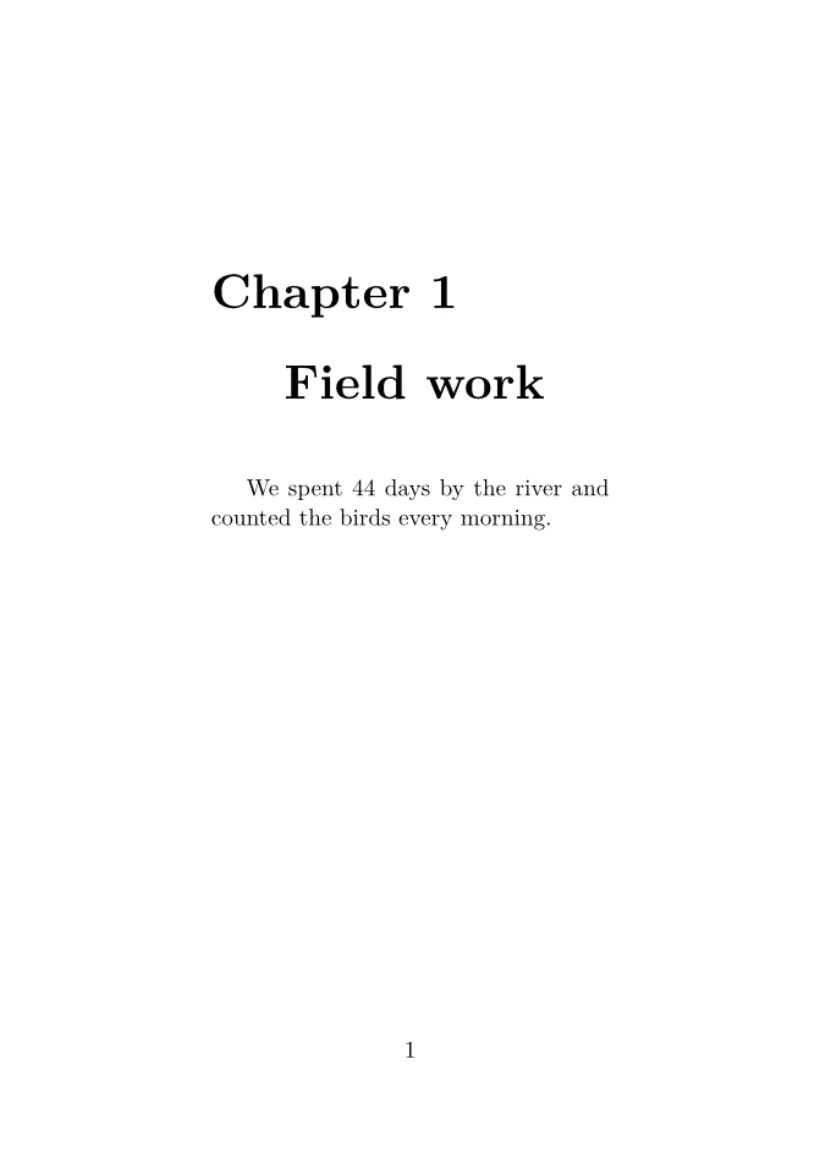
프리앰블
\documentclass와 \begin{document} 사이의 모든 것이 프리앰블입니다. 프리앰블은 아무것도 출력하지 않으며, 다음과 같은 내용을 넣는 곳입니다.
- 패키지를 불러오는
\usepackage{...}줄 \newcommand로 만드는 나만의 명령(나만의 명령 참고)\newtheorem으로 하는 정리 선언(정리와 증명 참고)- 제목, 저자, 날짜
Scissor LaTeX에서 \usepackage는 절대 문서를 멈추지 않습니다. 패키지를 파일에서 불러오는 대신, 널리 쓰이는 패키지의 명령을 직접 이해합니다. 편집기가 모르는 패키지는 무시되고 문제 탭에 그 사실이 표시됩니다. 그 패키지의 명령은 건너뛰되 텍스트는 그대로 남습니다. 패키지 참조에서 패키지마다 무엇이 되는지 확인할 수 있습니다.
모르는 패키지는 보고되지만 문서는 그대로 조판됩니다
\documentclass{article}
\usepackage{amsmath}
\usepackage{fancyquotes}
\begin{document}
The document typesets without the package.
\end{document}
문제 탭: Package fancyquotes isn't supported in the preview, so its formatting is not applied. If it is your own package, add fancyquotes.sty to the project.
제목 블록
\title, \author, \date는 제목 정보를 저장하고, \maketitle은 본문에서 이 명령을 둔 자리에 그 정보를 출력합니다. 보통은 본문 맨 앞에 둡니다. 저자가 여럿이면 \and로 잇습니다.
제목, 저자, 날짜
\documentclass{article}
\title{Counting Birds by the River}
\author{Erika Mustermann \and Hans Mustermann}
\date{Spring 2026}
\begin{document}
\maketitle
\section{Introduction}
We counted birds every morning for 44 days.
\end{document}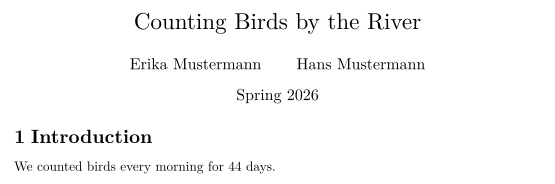
초록
article이나 report에서 abstract 환경은 "Abstract"라는 제목 아래에 짧은 요약을 출력하며, 본문보다 조금 좁고 작게 조판됩니다. \maketitle 바로 뒤에 두세요.
제목 뒤의 초록
\documentclass{article}
\title{Counting Birds by the River}
\author{John Doe}
\date{}
\begin{document}
\maketitle
\begin{abstract}
We report daily bird counts from one river bank over
44 days. Most birds were seen in the first hour after
sunrise.
\end{abstract}
\section{Method}
Two observers counted for one hour each morning.
\end{document}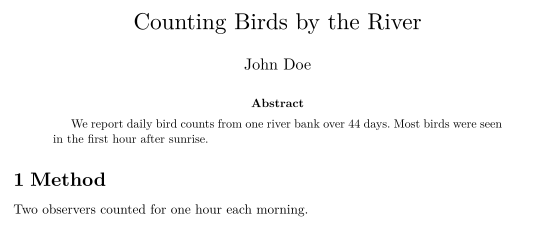
본문
본문에는 절과 문단으로 나뉜 텍스트가 들어가며, 목록, 수식, 표, 그림도 함께 들어갑니다. 긴 문서는 여러 파일로 나눌 수 있습니다. 여러 파일로 된 프로젝트를 참고하세요.
TeX 설치 환경과 다른 점
질문과 답변
LaTeX 프리앰블에는 무엇을 넣나요?
\documentclass 줄, \usepackage 줄, 나만의 명령, 그리고 \title과 \author 같은 설정을 넣습니다. 프리앰블에 있는 내용은 그 자체로는 아무것도 출력되지 않습니다.
\maketitle은 어디에 두나요?
본문에서 \begin{document} 뒤, 제목이 나타나야 할 자리에 둡니다. 보통은 첫 줄입니다.
목록에 없는 클래스를 써도 되나요?
네. 어떤 클래스 이름이든 쓸 수 있습니다. Scissor LaTeX가 모르는 클래스는 article로 배치됩니다.
이 페이지의 모든 예제는 사이트를 빌드할 때 Scissor LaTeX로 조판됩니다. 마지막 업데이트: 2026-11-07