


Springer LNCS LaTeX 템플릿(llncs)
공식 Springer LNCS 템플릿은 CTAN이나 Springer 논문집 안내에서 받을 수 있는 llncs 클래스입니다. Scissor LaTeX에는 계정 없이 브라우저에서 초안을 쓸 수 있는 무료 모방 레이아웃이 있습니다. LNCS 템플릿으로 시작하거나 \documentclass[runningheads]{llncs}라고 쓰면, 번호 붙은 소속 기관과 클래스의 정리 환경이 있는 1단 레이아웃이 됩니다. 같은 .tex가 공식 클래스로도 컴파일됩니다.
LNCS 템플릿을 편집기에서 열기 무료, 브라우저에서, 계정 없이
템플릿
LNCS 템플릿은 유계 모델 검사(bounded model checking)에 관한 정형 기법 논문으로, 두 기관에 속한 저자 세 명, 키워드, 정의, 증명이 있는 정리, 로그 눈금 그래프, booktabs 표, credits 섹션, 번호 붙은 참고문헌이 들어 있습니다. 전체를 보려면 편집기에서 LNCS 템플릿 열기를 누르세요.
켜는 방법
llncs는 문서 클래스입니다.
\documentclass[runningheads]{llncs}레이아웃은 LNCS 본문 영역(12.2 × 19.3cm, 1단)을 Letter 용지 가운데에, a4paper 옵션을 주면 A4 용지 가운데에 두며, 10pt Latin Modern으로 조판합니다. runningheads는 첫 페이지 다음부터 페이지 위쪽에 짧은 제목과 저자 목록을 페이지 번호와 함께 넣습니다. 이 옵션이 없으면 머리글이 없습니다.
소속 기관이 있는 저자, ORCID, 키워드, 정리
\documentclass[runningheads]{llncs}
\usepackage{amsmath}

\begin{document}
\title{Bounded Model Checking of Timed Message Protocols}
\titlerunning{Bounded Model Checking of Timed Protocols}
\author{Erika Mustermann\inst{1}\orcidID{0000-0000-0000-0044} \and
John Doe\inst{2}}
\authorrunning{E. Mustermann and J. Doe}
\institute{Example University, Musterstadt, Germany\\
\email{erika.mustermann@example.org} \and
Institute of Example Studies, Exampleton, USA}
\maketitle

\begin{abstract}
We encode timed protocols as SMT problems and check them up to a bound.
\keywords{Model checking \and Timed automata \and SMT.}
\end{abstract}

\section{Introduction}
\begin{definition}
A run of a protocol is a finite sequence of states $s_0, \dots, s_k$.
\end{definition}

\begin{theorem}\label{thm:bound}
Every run of a protocol with 44 nodes reaches a fixed point within $2n$ steps.
\end{theorem}

\begin{proof}
By induction on the number of pending messages. \qed
\end{proof}

Theorem~\ref{thm:bound} gives the bound we use.
\end{document}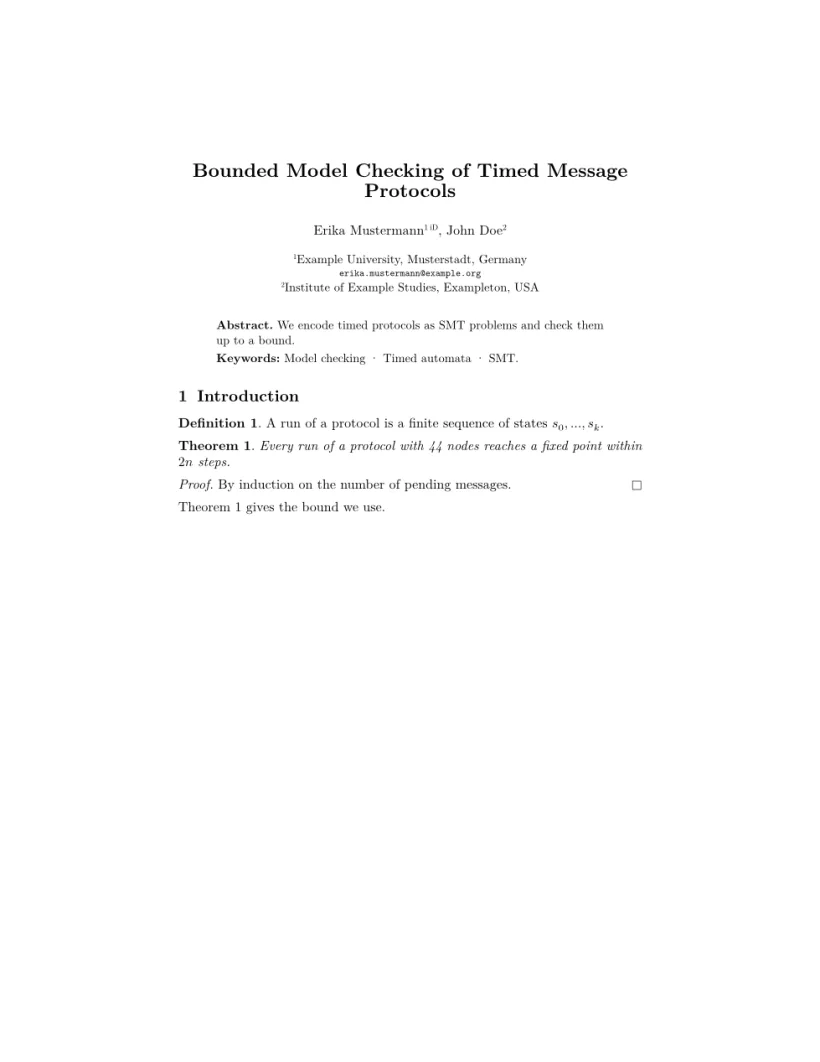
문제 탭: Layout in the style of the Springer LNCS format (final mode). Not official. To compile elsewhere, add llncs.cls from ctan.org/pkg/llncs.
클래스 명령
| 명령 | 하는 일 | Scissor LaTeX에서 |
|---|---|---|
\author 안의 \and | 저자 구분, 쉼표로 출력 | 작동함 |
\inst{1,2} | 이름 뒤의 위첨자 기관 번호 | 작동함 |
\orcidID{..} | 이름 뒤의 작은 ORCID 표시 | 작동함(ORCID 로고가 아닌 텍스트 표시) |
\institute{A \and B} | 저자 아래의 번호 붙은 소속 기관 | 작동함 |
\email{..} | 타자기체로 쓴 이메일 주소 | 작동함 |
\titlerunning, \authorrunning | 머리글(runningheads와 함께) | 작동함 |
\keywords{a \and b} | 초록 안의 "Keywords:", 항목은 점으로 연결 | 작동함 |
theorem, lemma, proposition, corollary, definition, example, remark | 번호 붙은 정리류 환경 | 작동함. 제목은 굵게, 정리류 본문은 이탤릭, 정의와 비고는 똑바른 글꼴 |
proof, \qed | 이탤릭 "Proof."와 끝 표시 | 작동함 |
\spnewtheorem{name}{Heading}{..}{..} | 새 정리류 환경 | 작동함 |
credits 환경, \ackname, \discintname | 감사의 글과 이해관계 공개 | 작동함, 작은 글씨로 |
제목은 클래스를 따릅니다. "1 Introduction"과 "1.1"은 굵게 조판하며, \subsubsection은 따로 한 줄을 차지하는 작고 굵은 제목으로 조판합니다(클래스에서는 문단 안으로 이어 씁니다). 그림과 표 캡션은 "Fig. 1."과 "Table 1."로 표시됩니다.
참고문헌
템플릿은 \bibliographystyle{splncs04}를 쓰며, Scissor LaTeX는 이를 Springer LNCS 인용 스타일, 즉 번호 붙은 항목과 [1] 인용으로 조판합니다. 참고문헌을 보세요.
llncs와 다른 점
제출할 때는 CTAN (llncs)이나 Springer 논문집 안내에서 llncs.cls를 받으세요. CTAN에는 클래스 문서도 있습니다. 내 .tex 파일은 바꾸지 않고 그대로 컴파일됩니다. 다른 레이아웃은 학회 형식 템플릿을, 정리 환경 전반은 정리와 증명을 보세요.
질문과 답변
llncs와 함께 amsthm이 필요한가요?
아니요. llncs는 theorem, lemma, definition, proof 등을 스스로 정의하며, Scissor LaTeX도 llncs 문서에 이를 제공합니다. 그 위에 amsthm을 불러오면 실제 빌드에서 충돌하므로 빼세요.
LNCS 논문에 ORCID iD는 어떻게 넣나요?
\author 안의 이름 바로 뒤에 내 iD로 \orcidID{0000-0000-0000-0000}을 넣으세요. Scissor LaTeX는 그 자리에 작은 표시를 보여 주고, 공식 클래스는 ORCID 로고를 출력합니다.
왜 머리글이 없나요?
runningheads 옵션을 넣으세요: \documentclass[runningheads]{llncs}. 전체 제목이나 저자 목록이 너무 길면 \titlerunning과 \authorrunning을 지정하세요.
이 페이지의 모든 예제는 사이트를 빌드할 때 Scissor LaTeX로 조판됩니다. 마지막 업데이트: 2026-11-07