


Scissor LaTeX의 cleveref, nameref, varioref
Scissor LaTeX에서 cleveref 패키지는 대부분 작동합니다. \cref와 \Cref는 레이블 하나, 목록, 범위 모두에서 작동하며, \cpageref, \namecref, capitalise, noabbrev, nameinlink 옵션, \crefname도 작동합니다. \nameref는 제목 대신 번호를 출력하고, \vref는 페이지 안내를 붙이지 않습니다.
패키지가 하는 일
cleveref는 참조에 대상의 종류를 덧붙입니다. \cref{fig:plot}는 낱말을 직접 입력하지 않아도 "fig. 1"을 출력하고, \cref{a,b}는 여러 레이블을 "figs. 1 and 2"로 묶습니다. nameref는 섹션 번호 대신 제목을 출력합니다. varioref는 \vref로 "on the next page" 같은 페이지 안내를 덧붙입니다.
여기서 작동하는 것
| 명령 | Scissor LaTeX에서 | 비고 |
|---|---|---|
\cref{label} | 작동 | "section 1", "fig. 1", "table 1", "eq. (1)". |
\Cref{label} | 작동 | 대문자로 시작하고 약어 없음: "Figure 1", "Equation (1)". |
\cref{a,b}, \cref{a,b,c} | 작동 | "sections 1 and 2". |
\crefrange{a}{b} | 작동 | "eqs. (1) to (2)". |
\cpageref{label} | 작동 | "page 1". |
\namecref{label}, \labelcref{label} | 작동 | 이름만("eq.") 또는 번호만("(1)"). |
\crefname, \Crefname | 작동 | 프리앰블에서 지정하는 나만의 이름. |
capitalise, noabbrev, nameinlink 옵션 | 작동 | 다른 옵션은 무시됩니다. |
\nameref{label} (nameref) | 일부 | 제목이 아니라 번호를 출력합니다. |
\vref, \Vref (varioref) | 일부 | 페이지 안내 없이 번호를 출력합니다. |
예제
\cref는 대상의 종류를 대신 붙여 주고, 여러 레이블을 묶습니다.
\cref와 \Cref
\section{Data}\label{sec:data}
\section{Method}\label{sec:method}
\begin{figure}[h]
  \centering
  \fbox{A plot of the 44 samples}
  \caption{Samples.}\label{fig:samples}
\end{figure}
\begin{table}[h]
  \centering
  \begin{tabular}{lr} Erika & 44 \\ Hans & 38 \\ \end{tabular}
  \caption{Counts.}\label{tab:counts}
\end{table}
As \cref{sec:data,sec:method} explain, \cref{fig:samples} shows
the samples. \Cref{tab:counts} counts them.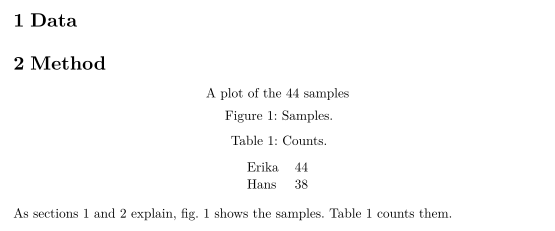
수식, 범위, 페이지 참조:
수식, \crefrange, \cpageref
\begin{equation} a + b = 44 \label{eq:sum} \end{equation}
\begin{equation} a - b = 2 \label{eq:diff} \end{equation}
Adding \crefrange{eq:sum}{eq:diff} gives $a = 23$; \Cref{eq:sum}
is on \cpageref{eq:sum}.
capitalise와 noabbrev 옵션은 모든 곳에서 대문자로 시작하는 전체 이름을 쓰게 하고, \crefname은 나만의 이름을 정합니다. capitalise를 쓰면 \cref가 지정한 이름의 대문자 형태를 쓰므로, 아래의 part는 "Part"로 출력됩니다.
옵션과 \crefname
\documentclass{article}
\usepackage[capitalise,noabbrev]{cleveref}
\crefname{section}{part}{parts}
\begin{document}
\section{Overview}\label{sec:overview}
\begin{figure}[h]
  \centering
  \fbox{Diagram}
  \caption{A diagram.}\label{fig:diagram}
\end{figure}
\cref{fig:diagram} belongs to \cref{sec:overview}.
\end{document}
여기서 \nameref는 섹션 제목이 아니라 섹션 번호를 출력합니다.
\nameref는 번호를 출력함
\section{Related work}\label{sec:related}
John Doe's results are summarised in \nameref{sec:related}.
호환성
- TeX 설치 환경에서 여기로:
\cref계열 명령으로 쓴 참조는 TeX 설치 환경에서와 같이 보입니다.\nameref는 제목 대신 번호를 내고,\vref에는 "on the next page" 같은 안내가 없습니다. - 여기서 TeX 설치 환경으로: 문서는 그곳에서 수정 없이 컴파일됩니다. 설명서가 요구하는 대로
cleveref는hyperref다음에 불러오세요.
전체 설명서는 CTAN에 있습니다: ctan.org/pkg/cleveref, ctan.org/pkg/nameref, ctan.org/pkg/varioref. 안내는 레이블과 상호 참조를, \autoref는 hyperref를 참고하세요.
질문과 답변
\cref와 \Cref의 차이는 무엇인가요?
\cref는 "fig. 1"이나 "eq. (1)" 같은 짧은 소문자 이름을 씁니다. \Cref는 문장 첫머리에 쓰도록 대문자로 시작하는 전체 이름을 씁니다. capitalise 옵션을 쓰면 \cref가 모든 곳에서 \Cref처럼 동작합니다.
\nameref가 섹션 제목을 출력하나요?
아직은 아닙니다. 섹션 번호를 출력하므로 문장은 여전히 읽히지만 뜻이 조금 달라집니다. 제목이 중요하다면 직접 써 넣으세요.
이 페이지의 모든 예제는 사이트를 빌드할 때 Scissor LaTeX로 조판됩니다. 마지막 업데이트: 2026-11-07