


เทมเพลต LaTeX สำหรับ preprint arXiv (สไตล์ arxiv.sty)
arXiv ยอมรับเลย์เอาต์ใดก็ได้ รูปลักษณ์ preprint ที่นิยมคือสไตล์ arxiv.sty ของชุมชนจาก github.com/kourgeorge/arxiv-style Scissor LaTeX มีแบบเลียนแบบฟรีสำหรับร่างงานในเบราว์เซอร์โดยไม่ต้องมีบัญชี เริ่มจากเทมเพลต arXiv preprint หรือเพิ่ม \usepackage{arxiv} ใน article ไฟล์ .tex เดียวกันคอมไพล์ได้กับไฟล์สไตล์ต้นฉบับ
เปิดเทมเพลต arXiv preprint ในตัวแก้ไข ฟรี ในเบราว์เซอร์ของคุณ ไม่ต้องมีบัญชี
เทมเพลต
เทมเพลต arXiv preprint เป็นบทความฟิสิกส์คณิตศาสตร์สั้น ๆ ที่มีผู้เขียนสามคน ทฤษฎีบทพร้อมบทพิสูจน์ รูป pgfplots ตาราง booktabs และการอ้างอิงแบบผู้เขียน-ปี เปิดเทมเพลต arXiv preprint ในตัวแก้ไขเพื่อดูทั้งหมด ตัวอย่างด้านล่างแสดงส่วนหัวเรื่อง
การเปิดใช้
สไตล์นี้เป็นแพ็กเกจที่ใช้ร่วมกับ article:
\documentclass{article}
\usepackage{arxiv}
เมื่อ Scissor LaTeX พบบรรทัดนี้ จะใช้รูปลักษณ์แบบ preprint ได้แก่ ข้อความแบบ Times (TeX Gyre Termes ดาวน์โหลดเมื่อใช้ครั้งแรก) ชื่อเรื่องระหว่างเส้นสองเส้น "A Preprint" ใต้ชื่อเรื่อง ชื่อผู้เขียนตัวหนาอยู่กึ่งกลาง และหัวกระดาษต่อเนื่องในหน้าถัดไป แท็บ Problems จะแสดงหมายเหตุว่าเลย์เอาต์เลียนแบบเปิดใช้อยู่ และแหล่งที่จะได้ arxiv.sty เพื่อคอมไพล์ที่อื่น
ส่วนหัวเรื่อง บทคัดย่อ และคำสำคัญ
\documentclass{article}
\usepackage{arxiv}
\usepackage{amsmath}

\title{Decay Rates of a Damped Chain of 44 Oscillators}
\author{Erika Mustermann \\ Department of Mathematics \\ Example University \\
  \texttt{erika@example.org}
  \And
  John Doe \\ Institute of Example Studies \\ Exampleton \\
  \texttt{john.doe@example.org}}
\date{}
\renewcommand{\shorttitle}{Decay rates of a damped chain}

\begin{document}
\maketitle

\begin{abstract}
We bound the spectral gap of a chain of coupled oscillators that is damped at one end,
and compare the bound with numerical runs.
\end{abstract}

\keywords{spectral gap \and damping \and lattice dynamics}

\section{Introduction}
When only the boundary of a chain is damped, energy must travel through the chain before
it is lost, so the decay rate $\gamma$ depends on the length $N$.
\end{document}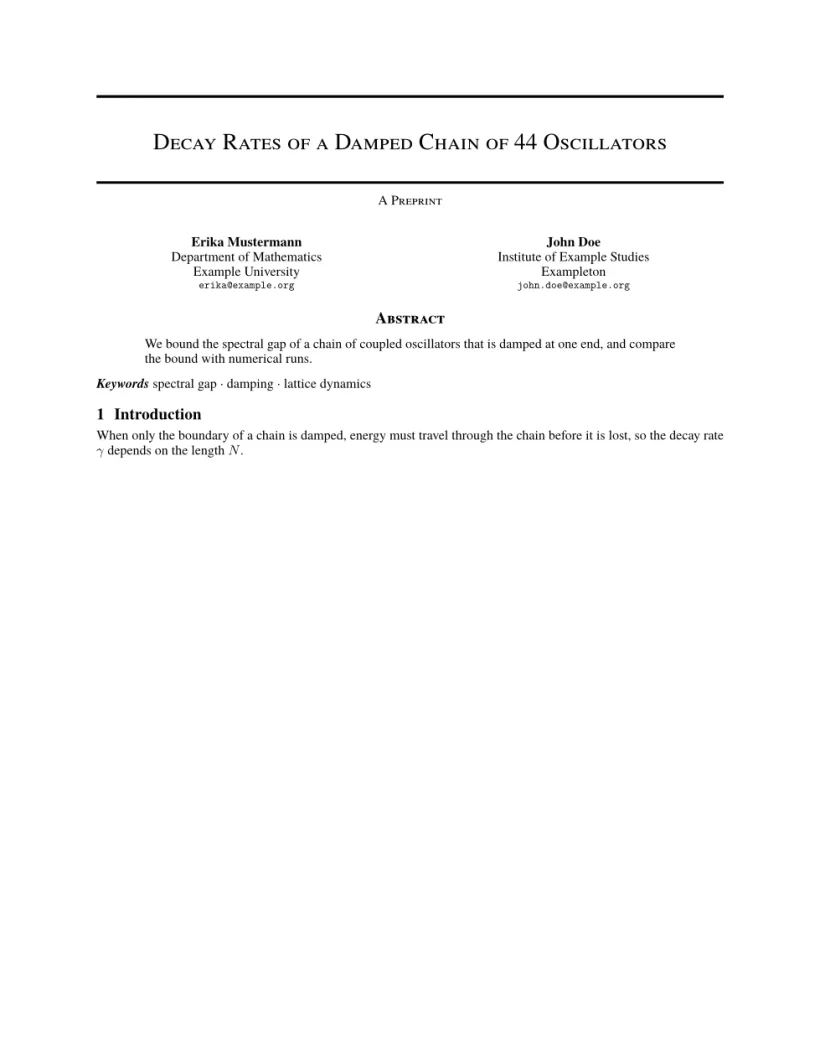
แท็บปัญหา: Layout in the style of the arXiv preprint style (final mode). Not official. To compile elsewhere, add arxiv.sty from github.com/kourgeorge/arxiv-style.
คำสั่งของสไตล์
| คำสั่ง | ทำอะไร | ใน Scissor LaTeX |
|---|---|---|
\And, \AND | คั่นผู้เขียน (วางเรียงข้างกัน หรือขึ้นแถวใหม่) | ใช้ได้ |
\keywords{a \and b} | บรรทัดคำสำคัญหลังบทคัดย่อ | ใช้ได้ |
\renewcommand{\shorttitle}{..} | หัวกระดาษต่อเนื่อง | ใช้ได้ |
\renewcommand{\headeright}{..} | ข้อความ "A Preprint" ในหัวกระดาษ | ใช้ได้ |
\renewcommand{\undertitle}{..} | ข้อความ "A Preprint" ใต้ชื่อเรื่อง | ใช้ได้ |
\thanks{..} | เชิงอรรถที่ชื่อ | ใช้ได้ |
ป้ายและหัวกระดาษต่อเนื่องเป็นแมโครธรรมดา เอกสารนี้เปลี่ยนทั้งสองอย่าง หน้าแรกไม่มีหัวกระดาษ หน้าที่สองแสดงชื่อเรื่องแบบสั้นและป้าย
ป้ายรายงานทางเทคนิคและหัวกระดาษต่อเนื่อง
\documentclass{article}
\usepackage{arxiv}
\title{Notes on Damped Chains}
\author{Hans Mustermann \\ Example University}
\date{}
\renewcommand{\headeright}{Technical Report}
\renewcommand{\undertitle}{Technical Report}
\renewcommand{\shorttitle}{Notes on damped chains}
\begin{document}
\maketitle
\section{Setting}
The first page has no running head.
\newpage
\section{Results}
From the second page on, the header shows the short title and the label.
\end{document}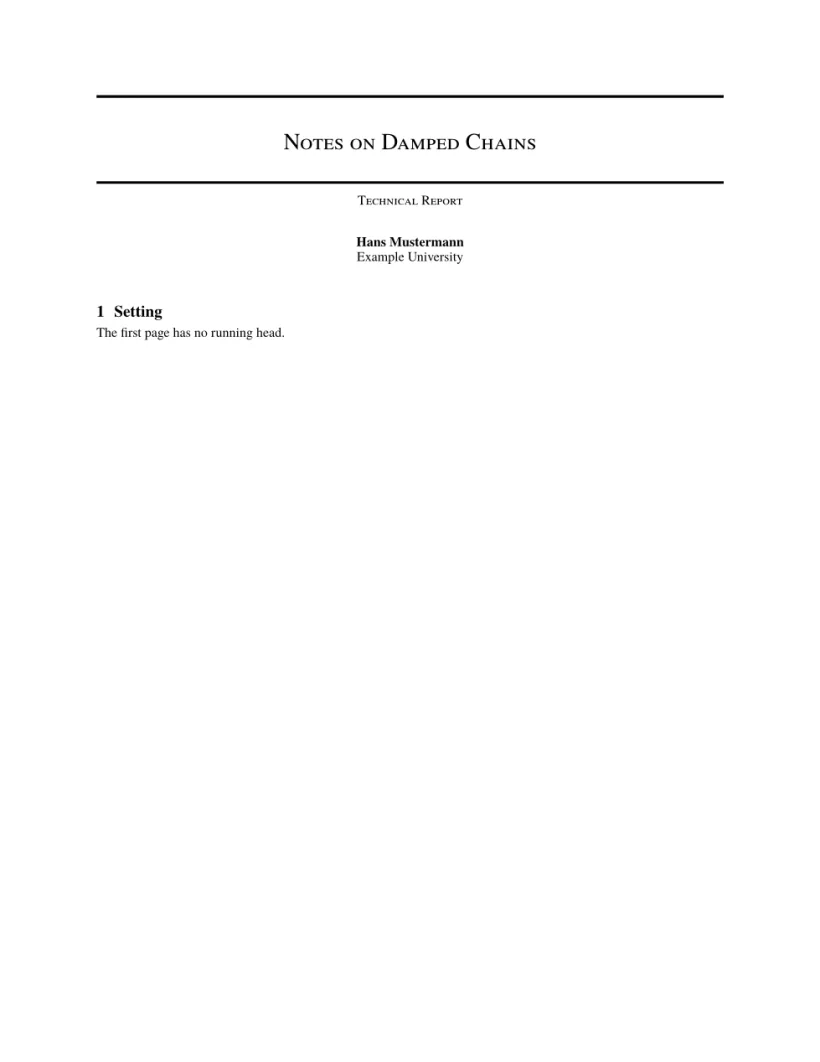

แท็บปัญหา: Layout in the style of the arXiv preprint style (final mode). Not official. To compile elsewhere, add arxiv.sty from github.com/kourgeorge/arxiv-style.
สไตล์นี้ไม่มีโหมดพิจารณาหรือโหมดไม่ระบุชื่อ เทมเพลตโหลด natbib และบรรณานุกรมใช้ unsrtnat ซึ่ง Scissor LaTeX จัดเป็นการอ้างอิงแบบผู้เขียน-ปี โดยเรียงรายการตามลำดับการอ้างอิง
สิ่งที่ต่างจาก arxiv.sty
เมื่อจะส่ง ให้ดาวน์โหลด arxiv.sty จาก github.com/kourgeorge/arxiv-style แล้ววางไว้ข้างไฟล์ .tex ของคุณ ไฟล์เดียวกันนี้จะคอมไพล์ได้โดยไม่ต้องแก้ไข ดูเทมเพลตเลียนแบบงานประชุมวิชาการสำหรับเลย์เอาต์อื่น ๆ
ดูเพิ่มเติม เทมเพลตเริ่มต้น, เลย์เอาต์งานประชุมวิชาการ และ บรรณานุกรม
คำถามและคำตอบ
arXiv กำหนดให้ใช้เทมเพลตเฉพาะหรือไม่
ไม่ arXiv ยอมรับบทความในเลย์เอาต์ใดก็ได้ สไตล์ arxiv.sty เป็นตัวเลือกยอดนิยมของชุมชนที่ทำให้ preprint ดูเรียบร้อย
จะเปลี่ยน "A Preprint" เป็น "Technical Report" ได้อย่างไร
เพิ่ม \renewcommand{\headeright}{Technical Report} และ \renewcommand{\undertitle}{Technical Report} ในส่วนนำของเอกสาร
ทุกตัวอย่างในหน้านี้จัดหน้าโดย Scissor LaTeX ขณะสร้างเว็บไซต์ อัปเดตล่าสุด 2026-11-07