


arXiv प्रीप्रिंट LaTeX टेम्पलेट (arxiv.sty स्टाइल)
arXiv कोई भी लेआउट स्वीकार करता है; प्रीप्रिंट का एक लोकप्रिय रूप github.com/kourgeorge/arxiv-style की कम्युनिटी arxiv.sty स्टाइल है। Scissor LaTeX में ब्राउज़र में, बिना अकाउंट, ड्राफ़्ट लिखने के लिए इसकी एक फ्री, हूबहू दिखने वाली नकल है: arXiv प्रीप्रिंट टेम्पलेट से शुरू करें, या किसी article में \usepackage{arxiv} जोड़ें। वही .tex मूल स्टाइल फ़ाइल के साथ कंपाइल होती है।
arXiv preprint टेम्पलेट एडिटर में खोलें मुफ़्त, आपके ब्राउज़र में, बिना खाते के
टेम्पलेट
arXiv प्रीप्रिंट टेम्पलेट गणितीय भौतिकी का एक छोटा पेपर है, जिसमें तीन लेखक, प्रमाण के साथ एक थ्योरम, एक pgfplots फ़िगर, एक booktabs टेबल और लेखक-वर्ष वाले रेफ़रेंस हैं। पूरा देखने के लिए arXiv प्रीप्रिंट टेम्पलेट एडिटर में खोलें; नीचे का उदाहरण उसका टाइटल ब्लॉक दिखाता है।
इसे चालू करना
यह स्टाइल article के ऊपर एक पैकेज है:
\documentclass{article}
\usepackage{arxiv}
जब Scissor LaTeX को यह लाइन मिलती है, तो वह प्रीप्रिंट वाला रूप इस्तेमाल करता है: Times जैसा टेक्स्ट (TeX Gyre Termes, पहली बार इस्तेमाल पर डाउनलोड होता है), दो रेखाओं के बीच टाइटल, उसके नीचे "A Preprint", बीच में बोल्ड लेखक, और अगले पेजों पर रनिंग हेड। Problems टैब एक नोट दिखाता है कि हूबहू दिखने वाला लेआउट चालू है और दूसरी जगह कंपाइल करने के लिए arxiv.sty कहाँ से मिलेगा।
टाइटल ब्लॉक, एब्स्ट्रैक्ट और कीवर्ड
\documentclass{article}
\usepackage{arxiv}
\usepackage{amsmath}

\title{Decay Rates of a Damped Chain of 44 Oscillators}
\author{Erika Mustermann \\ Department of Mathematics \\ Example University \\
  \texttt{erika@example.org}
  \And
  John Doe \\ Institute of Example Studies \\ Exampleton \\
  \texttt{john.doe@example.org}}
\date{}
\renewcommand{\shorttitle}{Decay rates of a damped chain}

\begin{document}
\maketitle

\begin{abstract}
We bound the spectral gap of a chain of coupled oscillators that is damped at one end,
and compare the bound with numerical runs.
\end{abstract}

\keywords{spectral gap \and damping \and lattice dynamics}

\section{Introduction}
When only the boundary of a chain is damped, energy must travel through the chain before
it is lost, so the decay rate $\gamma$ depends on the length $N$.
\end{document}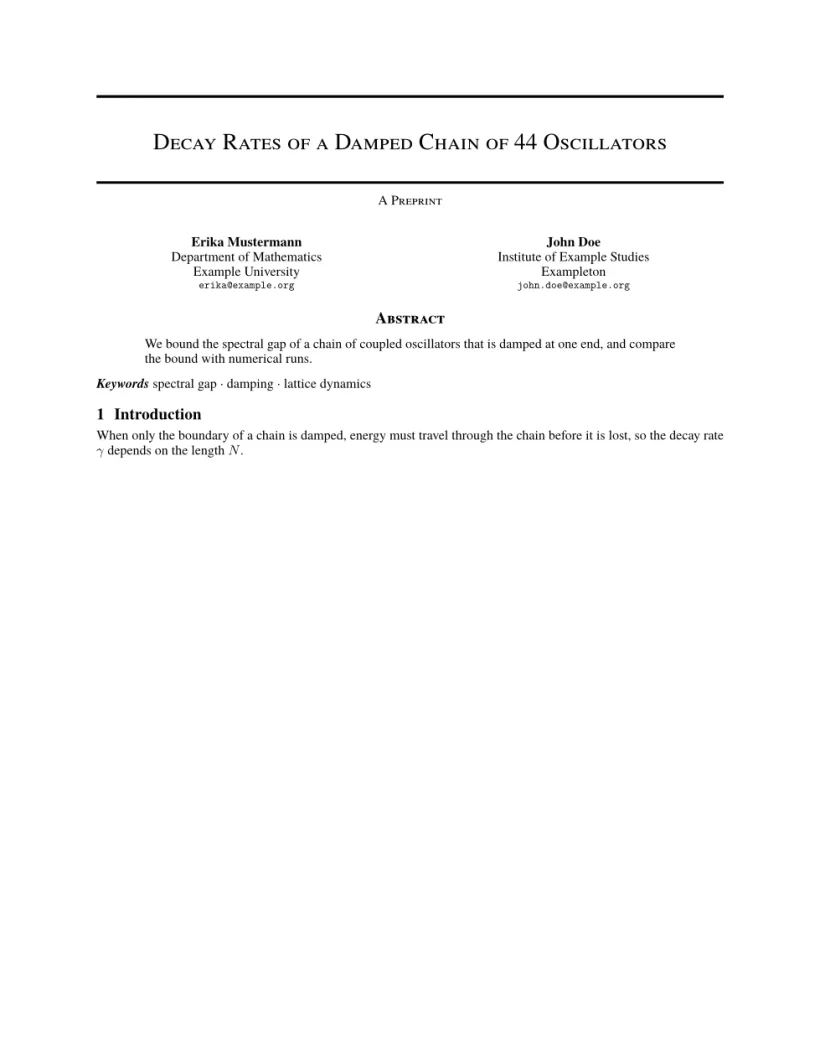
समस्याएँ टैब: Layout in the style of the arXiv preprint style (final mode). Not official. To compile elsewhere, add arxiv.sty from github.com/kourgeorge/arxiv-style.
स्टाइल के कमांड
| कमांड | क्या करता है | Scissor LaTeX में |
|---|---|---|
\And, \AND | लेखकों को अलग करता है (साथ-साथ, या नई पंक्ति में) | काम करता है |
\keywords{a \and b} | एब्स्ट्रैक्ट के बाद कीवर्ड की एक लाइन | काम करता है |
\renewcommand{\shorttitle}{..} | रनिंग हेड | काम करता है |
\renewcommand{\headeright}{..} | हेडर में "A Preprint" वाला टेक्स्ट | काम करता है |
\renewcommand{\undertitle}{..} | टाइटल के नीचे "A Preprint" वाला टेक्स्ट | काम करता है |
\thanks{..} | किसी नाम पर फ़ुटनोट | काम करता है |
लेबल और रनिंग हेड सादे मैक्रो हैं। यह डॉक्यूमेंट दोनों बदलता है; पहले पेज पर कोई हेडर नहीं है, दूसरा छोटा टाइटल और लेबल दिखाता है।
टेक्निकल रिपोर्ट लेबल और रनिंग हेड
\documentclass{article}
\usepackage{arxiv}
\title{Notes on Damped Chains}
\author{Hans Mustermann \\ Example University}
\date{}
\renewcommand{\headeright}{Technical Report}
\renewcommand{\undertitle}{Technical Report}
\renewcommand{\shorttitle}{Notes on damped chains}
\begin{document}
\maketitle
\section{Setting}
The first page has no running head.
\newpage
\section{Results}
From the second page on, the header shows the short title and the label.
\end{document}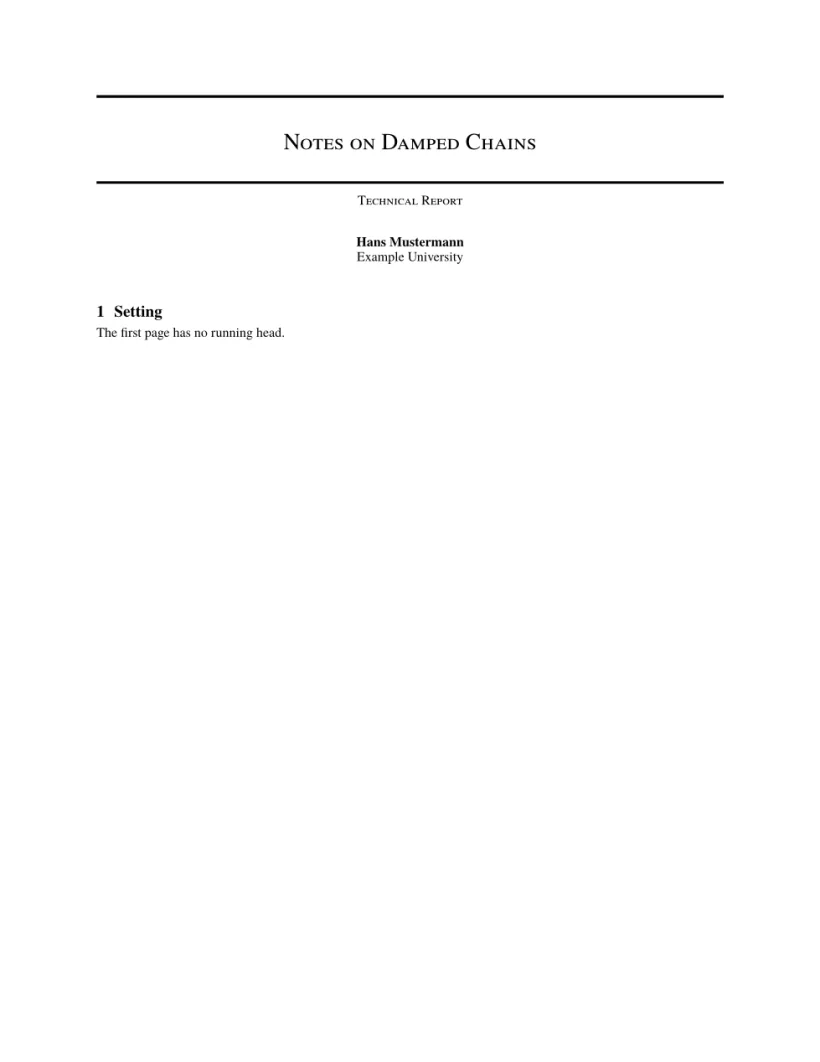

समस्याएँ टैब: Layout in the style of the arXiv preprint style (final mode). Not official. To compile elsewhere, add arxiv.sty from github.com/kourgeorge/arxiv-style.
इस स्टाइल में कोई रिव्यू या गुमनाम मोड नहीं है। टेम्पलेट natbib लोड करता है, और उसकी बिब्लियोग्राफ़ी unsrtnat इस्तेमाल करती है, जिसे Scissor LaTeX लेखक-वर्ष वाले साइटेशन के रूप में सेट करता है, एंट्री साइटेशन के क्रम में।
arxiv.sty से क्या अलग है
सबमिट करने के लिए github.com/kourgeorge/arxiv-style से arxiv.sty लें और उसे अपनी .tex फ़ाइल के बगल में रखें; तब वही फ़ाइल बिना बदले कंपाइल होती है। दूसरे लेआउट के लिए कॉन्फ़्रेंस जैसे दिखने वाले टेम्पलेट देखें।
यह भी देखें: शुरुआती टेम्पलेट, कॉन्फ़्रेंस लेआउट और बिब्लियोग्राफ़ी।
सवाल और जवाब
क्या arXiv को कोई खास टेम्पलेट चाहिए?
नहीं। arXiv किसी भी लेआउट में पेपर स्वीकार करता है। arxiv.sty स्टाइल कम्युनिटी की एक लोकप्रिय पसंद है जो प्रीप्रिंट को साफ़-सुथरा दिखाती है।
"A Preprint" को "Technical Report" में कैसे बदलें?
प्रीएम्बल में \renewcommand{\headeright}{Technical Report} और \renewcommand{\undertitle}{Technical Report} जोड़ें।
इस पेज का हर उदाहरण साइट बनते समय Scissor LaTeX टाइपसेट करता है। पिछला अपडेट: 2026-11-07।